
About Quark Publishing Platform
Quark Publishing Platform is a highly configurable solution for automating the content life cycle according to your business process so that approved content can be delivered to multiple channels and formats. Quark Publishing Platform is purpose-built to support end-to-end managed authoring and publishing, ranging from manual authoring and publishing systems to highly automated workflows.
The Platform consists of a set of core modules that can be combined in various ways and integrated with third-party systems to accommodate a wide range of modern enterprise content management requirements. Platform capabilities can be described in terms of content creation, management, publishing, and delivery.
Create
Quark Publishing Platform lets you:
-
Design professional templates for different publications
-
Author structured content in the familiar Microsoft Word environment
-
Integrate content from databases with other forms of content
-
Use and reuse multimedia content such as video, audio, and slideshows
Manage
Quark Publishing Platform provides:
-
Workflow and collaboration tools
-
Task and update notifications
-
Component management
-
Automated checks
-
Version control
Publish
With Quark Publishing Platform, you can:
-
Automatically assemble components of various types from various sources into sophisticated layouts
-
Automatically publish those layouts in a variety of formats to a variety of devices or systems
Deliver
The automation features built into Quark Publishing Platform make it easy for you to deliver content to your content consumers in both public and secure environments.
Platform concepts
In order to use Quark Publishing Platform effectively, you should understand some key concepts that it uses.
Assets
An asset is a unit of independent content. Quark Publishing Platform stores, tracks, and manages assets along with their metadata. The Platform also provides version control of assets, with both major and minor versions. Versioning policy can be configured for each content type within a collection. The Platform also supports multiple renditions of assets (such as previews, thumbnails, XML representations, and so forth), storing renditions along with each version of their original assets. Assets are stored in a configurable repository; the default repository on a file server, but pluggable third-party repositories are also supported.
Content Types
Every asset has a content type. The content type concept is a unified mechanism for associating metadata, workflows, relationships, privileges, and rendering and publishing actions with different types of content. The Platform can automatically detect a variety of different content types, including pictures, QuarkXPress projects, DITA topics, and DITA for Business Documents. Assigning content types to assets allows the Platform to apply different lifecycles, workflows, and publishing requirements to different types of content. Content types are hierarchical, with child content types inheriting from their parents, for easy and logical configuration. Child content types can be fine-tuned by associating specific metadata and publishing activities with them. In addition to the standard set of content types, the Platform allows you to define your own and provides an auto-detection mechanism for so that they can be automatically recognized.
Attributes
Assets can have attributes, which are containers for metadata that model the intrinsic properties of those assets. The selection of attributes for an asset is determined by its content type. You can use attributes to drive custom workflows and publishing processes, and to reflect system-managed state. Attributes are created globally and can be applied to one or more content types.
Relationships
A relationship links two assets with one another, with one asset being the parent and the other being the child, and has some associated metadata. There are different types of relationships, with different sets of associated metadata. Relationships can be specific to a particular version of a child asset, or can apply to all versions. Relationships enable component-content management use cases. There are predefined relationships between QuarkXPress projects and article components, and between QuarkCopyDesk article components and pictures, and there is a predefined relationship for XML component references. You can also create your own relationships.
Component Management and Referencing
Component management and referencing features are available both for XML content and for QuarkXPress/QuarkCopyDesk components. In this context, an asset can be a single topic, a concept, an image, or a media file. Aggregated documents (including DITA maps and QuarkXPress layouts) are also modeled as assets. The content type of asset determines its role.
The Platform uses asset relationships to model content-component references. For cases of content reuse, the Platform creates multiple relationships, which define such things as a component’s location, its update status, and so forth. You can selectively burst content when you check it into the Platform, for easy reuse. You can pin content to a particular version, or be automatically updated when the master version of the content changes.
Collections
A collection is a generic hierarchy that you can use to organize assets. You can model departmental hierarchies, folders, or jobs. You can then map one or more workflows to each collection, and the assets in each collection will follow that collection's workflow. Collections also have users associated with them, and different users can have different roles in different collections. You can apply collection-specific routing rules and revision control settings, and assign collection-specific attributes, and search on a collection-specific basis. A collection's Job Jackets file defines the resources available for the projects and articles in that collection.
Workflows
A workflow helps you to manage the lifecycle of assets by providing a named, ordered set of statuses for those assets to move through. A status-based auto-routing feature helps keep everything on track. You can create different workflows for different content types, use different forms to present attributes in different workflows, and color-code the statuses in a workflow for easy identification. Each workflow can have its own QuarkXPress/QuarkCopyDesk redlining settings and Job Jacket rule evaluations, and you can apply status-based constraints for each attribute.
Publishing Services
The Publishing Service Framework is a server-side framework that automates publishing and delivery tasks. You can create configurable and extensible publishing processes that use a variety of renderers, including third-party renderers.
-
A Publishing Process is a pipeline consisting of re-usable Activities that encapsulate common tasks such as resolving XML component references and QuarkXPress attachments, applying transformations, submitting content to the appropriate rendering engine, packaging and collecting the output, and delivering the rendered output to a CMS or via FTP or HTTP.
-
A Publishing Channel is a specific configuration of a publishing process that can be mapped to specific content types. The Platform ships with a library of commonly required Activities and several pre-configured Publishing Channels.
-
An SDK for developing custom Activities is also available.
Platform components
Quark Publishing Platform consists of a set of core modules that can be combined in various ways with each other and with other systems. Depending on the needs of your organization, you may choose to use some or all of these modules.
-
Quark Publishing Platform Server: The heart of Quark Publishing Platform. The Server manages content, controls and coordinates workflows, provides a hierarchical scheme for organizing assets and tracks the relationships between those assets, implements automated versioning, and lets you keep track of users and their permissions. A Web-based administrative interface lets you control and configure the Server.
-
Quark Publishing Platform Clients: A Platform client is any application that can talk to Quark Publishing Platform Server. Available clients include QuarkXPress for Quark Publishing Platform, Quark XML Author for Quark Publishing Platform, Quark Author Web Edition, Quark Publishing Platform Web Client, QuarkCopyDesk for Quark Publishing Platform, and desktop client for Mac and Windows. You can also implement and integrate your own clients with the Quark Publishing Platform SDK. A sample client for iOS "Gateway Starter App" is also included with the SDK.
-
Quark XML Author for Platform: For XML content authoring and reuse in Microsoft Word.
-
Quark Author Web Edition: Provides the ability to work with Platform using a rich text editor to produce smart documents and content using a web browser.
-
Quark Publishing Platform Adapter for Microsoft Office Word: Provides the ability to work with Platform from Microsoft Word natively.
-
Quark Publishing Platform Adapter for Microsoft Office Excel: Provides the ability to work with Platform from Microsoft Excel natively.
-
Quark Publishing Platform Adapter for Microsoft Office PowerPoint: Provides the ability to work with Platform from Microsoft PowerPoint natively.
-
QuarkXPress: For template development, custom layout, content authoring, and layout and content review.
-
QuarkCopyDesk: For content authoring and review.
-
Quark Publishing Platform Web Client: For content authoring and review in a Web browser.
-
Quark Publishing Platform Client: A generic desktop client, available for Windows and Mac OS.
-
-
Work-in-Progress Repository: A repository that provides versioning and component management capabilities for XML assets, QuarkXPress assets, and QuarkCopyDesk assets. Once a publication is finalized, the published files can be archived in a system of record.
-
Quark Publishing Platform Renderer: QuarkXPress Server, an engine that produces published files from component assets. QuarkXPress Server can produce output in a variety of formats, including PDF, ePub, and App Studio Article/App Studio Package (for deployment to the iPad and other devices).
-
DITA Open Toolkit: An engine that produces published files from XML content that uses the DITA schema. Working with an XSL-FO processor such as Antenna House, the DITA Open Toolkit can produce output in PDF, HTML, RTF, and HTML Help formats.
-
Quark Publishing Platform Script Manager: A scripting engine that allows you to build sophisticated custom functionality into Quark Publishing Platform Server without having to know a programming language.
-
Quark Publishing Platform SDK and REST interface: Robust interfaces that allow you to easily develop your own custom Quark Publishing Platform clients.
In addition to the clients listed above, Quark Publishing Platform can support custom mobile client applications. The Platform includes the source code for a sample mobile application called the Gateway iOS Starter App, which demonstrates how to create a custom Platform client for iPhone or iPad. We also have the same for Windows 8.1, a Gateway Starter App sample for Windows 8.1. Quark Publishing Platform also provides plugins for Microsoft Office and for Adobe InDesign and InCopy.
Platform architecture
Quark Publishing Platform is built using open industry standards such as SOA and the Spring framework, to allow easy integration with existing business systems. The architecture of Quark Publishing Platform is shown in the following diagram.
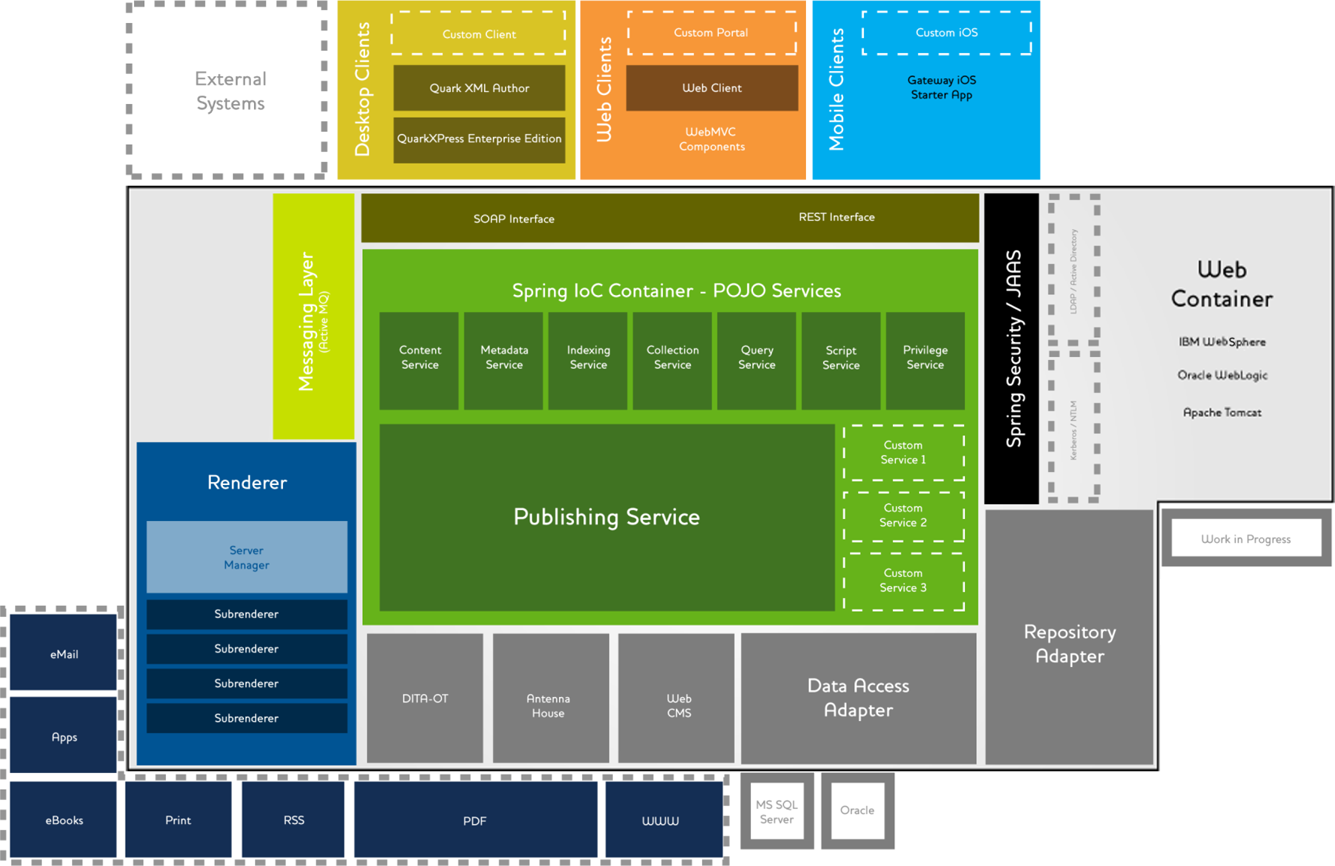
At the center is Quark Publishing Platform Server, which is a Spring-based Java application running in a Web container. This application has a number of services, hosted using the Spring framework, which it uses to perform various operations such as querying, honoring privileges, and maintaining metadata. You can also write your own custom services for business system integration.
The Publishing Service provides a component-aware publishing framework that can integrate with multiple renderers and delivery systems to publish content in multiple formats, including PDF, eBooks, iPad content, RSS feeds, syndications, and so forth.
At the top of the diagram are the Quark Publishing Platform client applications. These include desktop applications (such as QuarkXPress, QuarkCopyDesk, and Quark XML Author), Web applications (including the Web client, Web administrator and Quark Author Web Edition), and mobile clients such as the Gateway iOS Starter App. Such client applications can communicate with Quark Publishing Platform Server via SOAP or the REST interface, whichever is a better fit.
Also, within the Web container are any adapters that are necessary for Quark Publishing Platform Sever to talk to the Work-in-Progress repository or databases. Other adapters connect Quark Publishing Platform Server with output technologies such as the DITA Open Toolkit and the Antenna House XSL-FO formatter.
The Web container also hosts Quark Publishing Platform Renderer, which provides output in a variety of formats (shown in the boxes around the lower left corner). The Renderer includes a load balancer called Server Manager and some number of subrenderers running separately to handle requests as efficiently as possible.
Messaging within the system is handled with Java Message Service (JMS) messages, managed by ActiveMQ.
The Platform can securely communicate with external resources such as LDAP servers using either Kerberos or NTLM encryption. This enables the Platform to support single sign-on and domain users.
Platform features
In addition to the features already discussed, Quark Publishing Platform offers the following.
-
Powerful content reuse features: You can easily use and reuse assets and XML content in an interface that allows you to preview your changes as they will look at outlook without leaving Microsoft Word. For more information, see the documentation for Quark XML Author for Quark Publishing Platform.
-
Versatile automation features: Using the Quark Publishing Platform publishing framework, you can create publishing channels (for automatically building output) and delivery channels (for delivering published content to its destination).
-
Workflow management: Quark Publishing Platform lets you construct workflows that can automatically route files to the appropriate parties based on their statuses, notify those parties of their assigned tasks, add comments to drafts of document, track and review changes, and divide the work on a single document so that different users can work on it simultaneously.
-
Collections hierarchy: The Work-in-Progress repository can be organized into whatever kind of hierarchy works for your organization.
-
Sophisticated query engine: Quark Publishing Platform clients can take advantage of a powerful query engine, including metadata search and full-text search, using an intuitive user interface. Queries can be named, saved, and shared among users.
-
Server-side scripting: Quark Publishing Platform Server comes pre-configured with the Rhino scripting engine for JavaScript. Scripting is implemented using the Apache Bean Scripting Framework (BSF). All services, data transfer objects (DTOs), and JMS messages are available to the script engines. Scripts are executed on the server in a separate thread of the server process for maximum safety and efficiency. Scripts can be triggered manually, by a schedule, or by a server-side event. For more information, see Script Manager.
-
Directory server integration: You can import users from LDAP servers to enable single sign-on. For more information, see Managing user lists with LDAP.