HTTP Security Headers
When it comes to ensuring the security of a SaaS platform like Quark Publishing Platform, implementing proper security headers is crucial. Security headers are HTTP response headers that allow a web server to communicate additional security measures to a web browser. They help protect against various types of attacks, such as cross-site scripting (XSS), clickjacking, and content injection.
Importance of HTTP security headers
The importance of HTTP security headers in web applications, including SaaS platforms, cannot be overstated. These headers play a fundamental role in strengthening the overall security posture of the application. Here are some key points regarding the importance of HTTP security headers:
-
Mitigating common web attacks: Security headers help mitigate common web application security risks such as cross-site scripting (XSS), clickjacking, MIME-sniffing, and other injection attacks. By implementing security headers, the SaaS platform can significantly reduce the risk of these attacks and enhance its resistance to exploitation.
-
Browser compliance: Security headers ensure that web browsers comply with specific security policies defined by the SaaS platform. This can include enforcing the use of secure connections (HTTPS), preventing resources from being loaded in unauthorized frames, and controlling the sources from which content can be loaded.
-
Enhancing user privacy: Certain security headers, such as Referrer-Policy, help protect user privacy by controlling the information that the browser includes with requests, including the URL of the referring page. This can prevent sensitive information from being leaked to unauthorized parties.
-
Regulatory compliance: Many industries and regions have regulatory requirements related to data security and privacy. Implementing security headers can assist SaaS platforms in meeting these compliance standards by demonstrating a commitment to security best practices.
-
Preserving trust and reputation: In today's digital landscape, users and customers expect strong security measures to be in place when interacting with web applications. By incorporating security headers, SaaS platforms can demonstrate their dedication to user security, which in turn helps preserve trust and reputation.
-
Proactive risk management: Security headers serve as a proactive risk management tool by providing an additional layer of defense against potential security threats. They help in the prevention of unauthorized access, data breaches, and other security incidents that could undermine the integrity of the SaaS platform.
-
Content security policy (CSP): CSP helps prevent cross-site scripting and data injection attacks by allowing site owners to define the sources of content that the browser should consider valid. This can include whitelisting trusted domains for scripts, stylesheets, or other resources.
List of HTTP security headers
Below is the list of essential HTTP security headers supported in Quark Publishing Platform –
-
X-Content-Type-Options: By setting the value of this header to "nosniff", you can prevent browsers from MIME-sniffing a response away from the declared content type, which can reduce the risk of certain types of attacks.
-
X-XSS-Protection: This header is designed to enable the browser's built-in Cross-Site Scripting (XSS) filter (X-XSS-Protection: 1; mode=block), which helps detect and block reflected XSS attacks.
-
X-Frame-Options: This header helps prevent clickjacking attacks by controlling whether a web page can be loaded within a frame or iframe. It can be set to DENY, SAME-ORIGIN, or ALLOW-FROM to specify which sites are allowed to frame the content. If not specified, the default value of DENY will be used.
These HTTP security headers are disabled by default in Quark Publishing Platform.
How to enable HTTP security headers in QPP
To enable the HTTP security headers in QPP, follow the steps given below –
-
Firstly, go to the location where the web.xml file is stored. For example,
-
For web admin platform, C:\Username\QPP\Qpp15\QPP\Development\WebApplications\WebAdmin\src\main\webapp\WEB-INF
-
For web editor platform, C:\Username\QPP\Qpp15\QPP\Development\WebApplications\WebEditor\src\main\webapp\WEB-INF
-
-
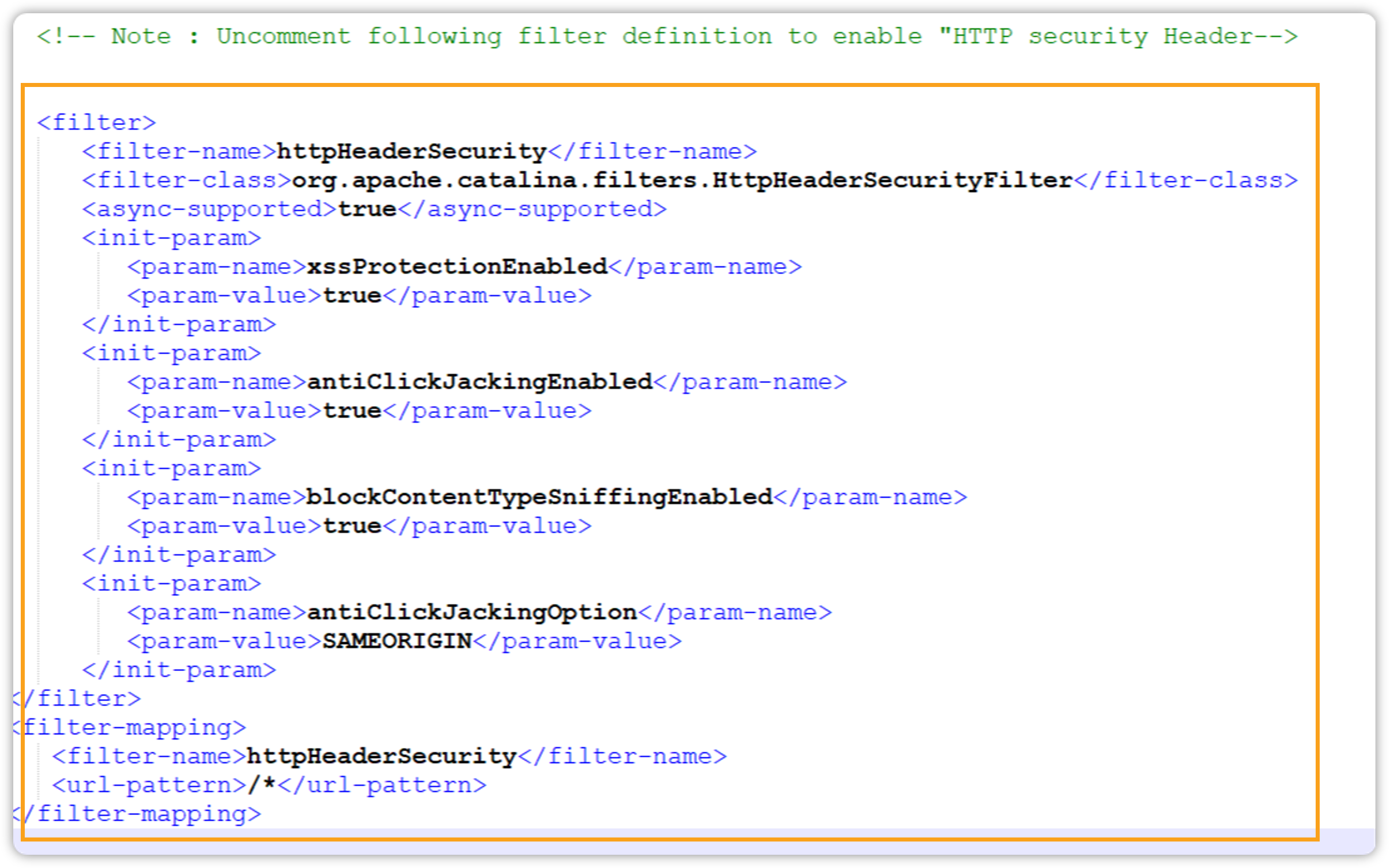
Open the web.xml file in your editor and search for the HTTP security header section.
-
By default, the HTTP security headers are disabled.
-
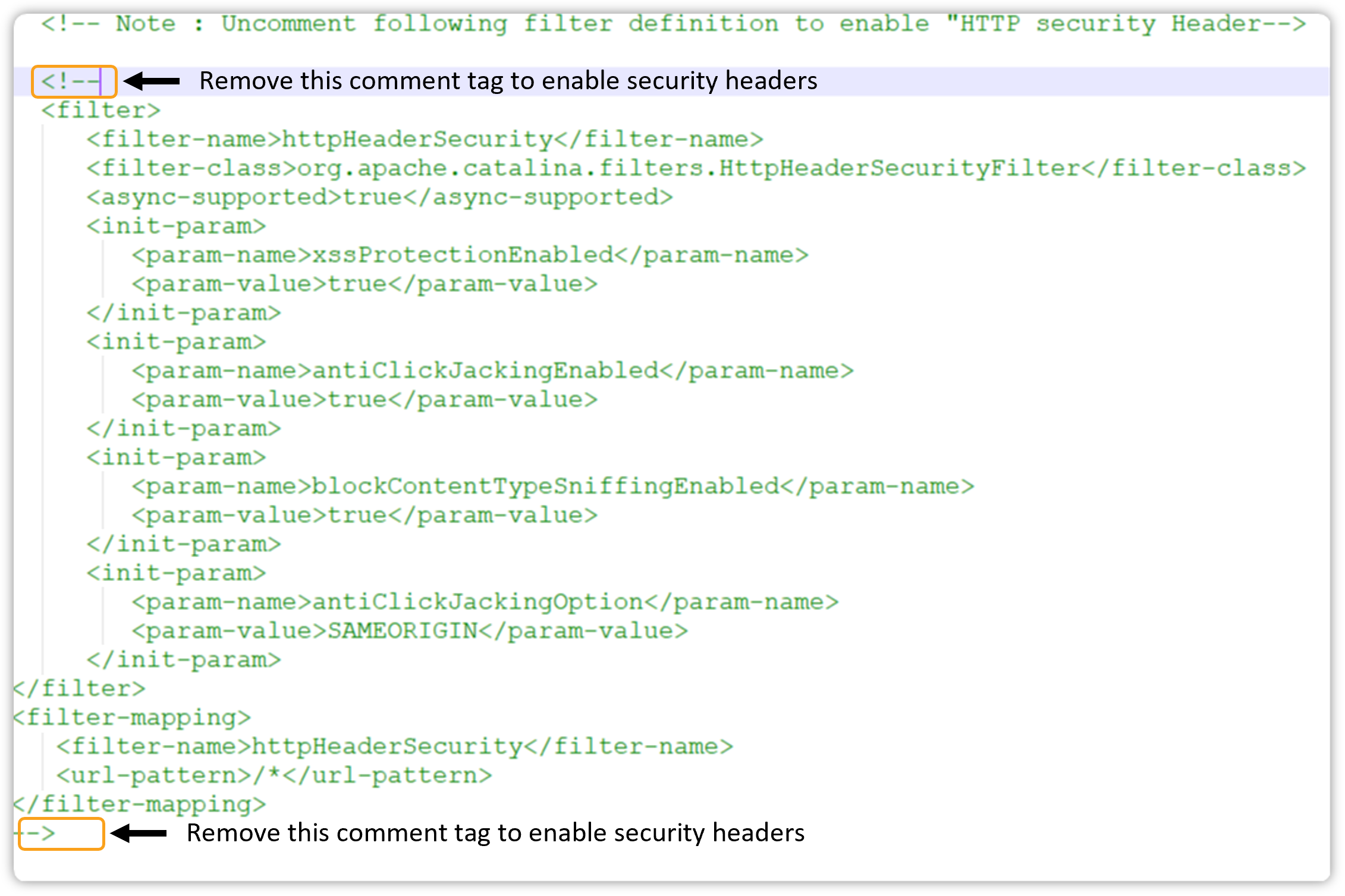
To enable the HTTP security headers, remove the comment tag <!--content to be hidden-->. Refer to screenshot below.
-
Once done, save the web.xml file.