
December 16, 2024 — v4.2.0
We're excited to announce the latest release of our QPP NextGen platform, which includes several new features, key enhancements, and a range of resolved issues. This update is designed to improve user experience, increase platform stability, and provide new capabilities to help you work more efficiently.
Explore the details below to learn how these changes can benefit your workflow.
New Features
Web Application
-
Introducing Layout Options: Streamlining Document Design in QPP NextGen
We're excited to announce the upcoming release of the Layout Options feature in our QPP NextGen product, enhancing both the Quark Author within QPP NextGen and the Quark XML Author (QXA) plugin. This feature empowers users to define and manage document layouts efficiently and preview documents before creation.

Key highlights:
-
Centralized Layout Management: Globally manage layout options within Admin > Content Models.
-
Pre-defined Layouts: Access pre-defined layout options for quick implementation.
-
Customizable Content Models: Add layout options to specific content model elements and assign defaults.
-
Improved Document-Template Relationships: Easier identification and management of document-template associations.
-
Layout Value Inheritance: Inherit layout values from content models and authoring templates.
-
Comprehensive Management View: Detailed view for managing layout options across channels.
-
Role-Based Access Control: Control viewing and editing privileges based on user roles.
-
Enhanced Publishing Channels: Seamless integration with layout options inherited from content models and templates.
-
New Sorting Parameter: Sort publishing channels by document title.
-
Visual Change Indicators: Clear visual cues for changes to default values.
-
Persistent Drop-down Selection: Publishing channel drop-down retains selection across sections and tabs.
These improvements streamline authoring and publishing, ensuring consistent, high-quality documents.
-
-
QPP NextGen Integration with Adobe InDesign
This release introduces seamless integration between QPP NextGen and Adobe InDesign, revolutionizing your publishing workflow. This powerful integration allows for a streamlined, efficient, and collaborative publishing process, empowering you to create visually stunning and information-rich documents.
Key highlights:
-
Enhanced Content Creation and Editing: Experience effortless content creation and editing with support for rich text formatting, including advanced table functionalities (merged cells, column width control, flexible formatting, cell manipulation), image insertion with precise control over placement and sizing, sophisticated list formatting (multi-level bullet and numbering), footnotes, and endnotes. Import tables from Excel while retaining all original formatting.
-
Streamlined Layout and Design: Utilize InDesign's powerful layout capabilities within the QPP NextGen workflow. Design with multiple master pages for distinct sections, control page breaks for optimal content flow, create dynamic callout boxes with leader lines, adjust text box and picture box overlap for creative visual effects, customize page numbering (including different styles per master page), and add shading and transparency to elements for visual emphasis. Automatic table resizing ensures content fits within page boundaries.
-
Robust Content Management and Publishing: Employ IDML-based publishing channels to efficiently generate PDF and JPEG outputs for Smart Content XML and IDML documents. Define rules based on document metadata to selectively include or exclude content sections, ensuring targeted content delivery. The system supports concurrent publishing requests for enhanced throughput and efficiency. Preview your document and sections directly within InDesign.
-
Improved Navigation and Collaboration: Easily navigate documents with a clear, automatically generated Table of Contents (TOC). Create hyperlinks within the document, linking to other sections, figures, tables, headings, and external websites. Cross-referencing allows for seamless navigation between related information.
-
Advanced Features: Create headers and footers with page numbers, document titles, and author details, and manage large tables that span multiple pages while maintaining continuous headers and footers.
-
-
Enhanced Quick Access: Customize Your Search Tabs
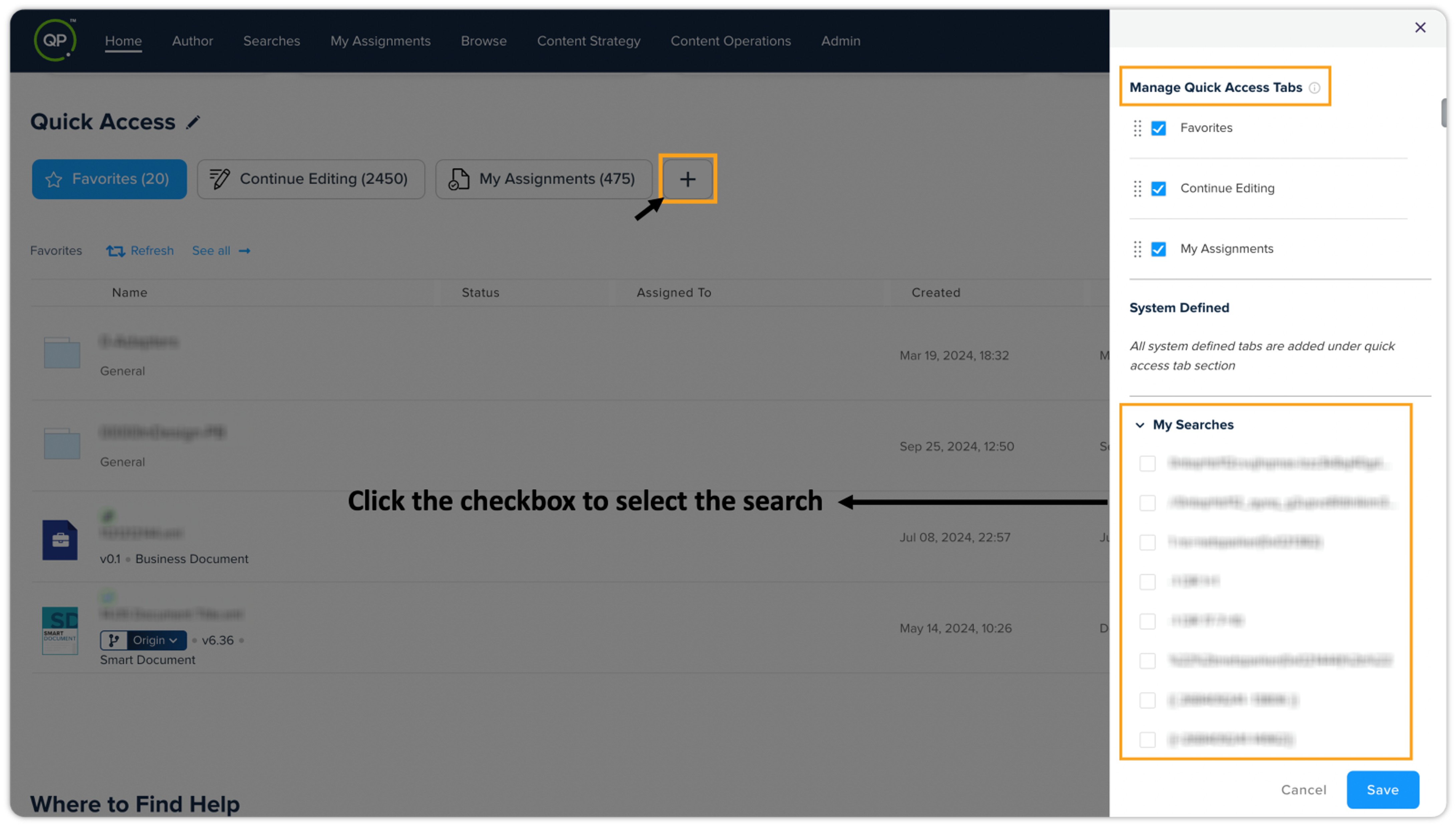
A new feature in the platform’s Quick Access section allows users to add existing search queries as new tabs. By clicking the + icon, you can open a flyout menu to select from existing search queries under "My Searches" and "Shared Searches". You can rename these tabs to fit your preferences and reorder them by dragging them into your desired position.
-
System-defined Tabs Management: Users can manage system-defined tabs by unchecking them to remove them from the Quick Access section.
-
Permissions Control: This functionality is permission controlled. Users must have the Searches privilege to view and manage existing search queries.
-
-
Introducing Support for Embedded AI Assistant Services (OOTB) in QPP NextGen
We're excited to announce the integration of new AI services into the QPP NextGen platform, enhancing content creation and management capabilities for a seamless user experience. This release introduces support for AI Assistance, Semantic Search, and various management features for tenants and environments.
Key highlights:
-
Provisioning of AI Services for Tenants
-
System administrators can now enable out-of-the-box (OOTB) AI services for individual tenants;
-
For buying the AI Credit Pack, please contact Quark;
-
OOTB AI Services include AI Assistance (powered by Azure Open AI with GPT-4.0 support).
-
-
AI Assistance Pane for Content Generation
-
Quark Author (QA) and XML Author (QXA) users can access the AI Assistant pane to facilitate content generation and semantic search once OOTB AI services are enabled;
-
Documents added to a semantic search-configured collection will be searchable within the Author.
-
-
Introduction of new AI Addon
-
Users can now manage the "AI Addon" per environment, allowing for easy customization during customer onboarding;
-
Current privileges have been renamed to: Application Privileges > Author > Allow AI Assistant (available to Admin, Author, and Contributor license types);
-
The "Allow AI Assistance" privilege has been removed from the Developer addon.
-
-
BYOAI Support
-
A new BYOAI (Bring Your Own AI) addon allows users to manage AI configuration per environment. Key updates include:
-
The same privileges as the AI Addon, with an additional new privilege for Admin license types:
-
Application Privileges > AI Configuration for managing AI settings.
-
-
-
AI Credit Pack Management
-
Introduced "AI Credit Pack" support allowing per-environment management, automatically enabled when the AI Addon is activated.
-
-
Privileged Permissions Adjustments
-
The "Allow AI Assistance" privilege has been removed from the Developer addon and added to both the AI Addon and BYOAI addon;
-
New privilege "AI Configuration" has been added to the BYOAI addon for Admin license type users, ensuring only authorized personnel can configure AI settings.
-
-
Enhancements
Web Application
-
Introducing the AI Assistant: A Fresh Look and Feel
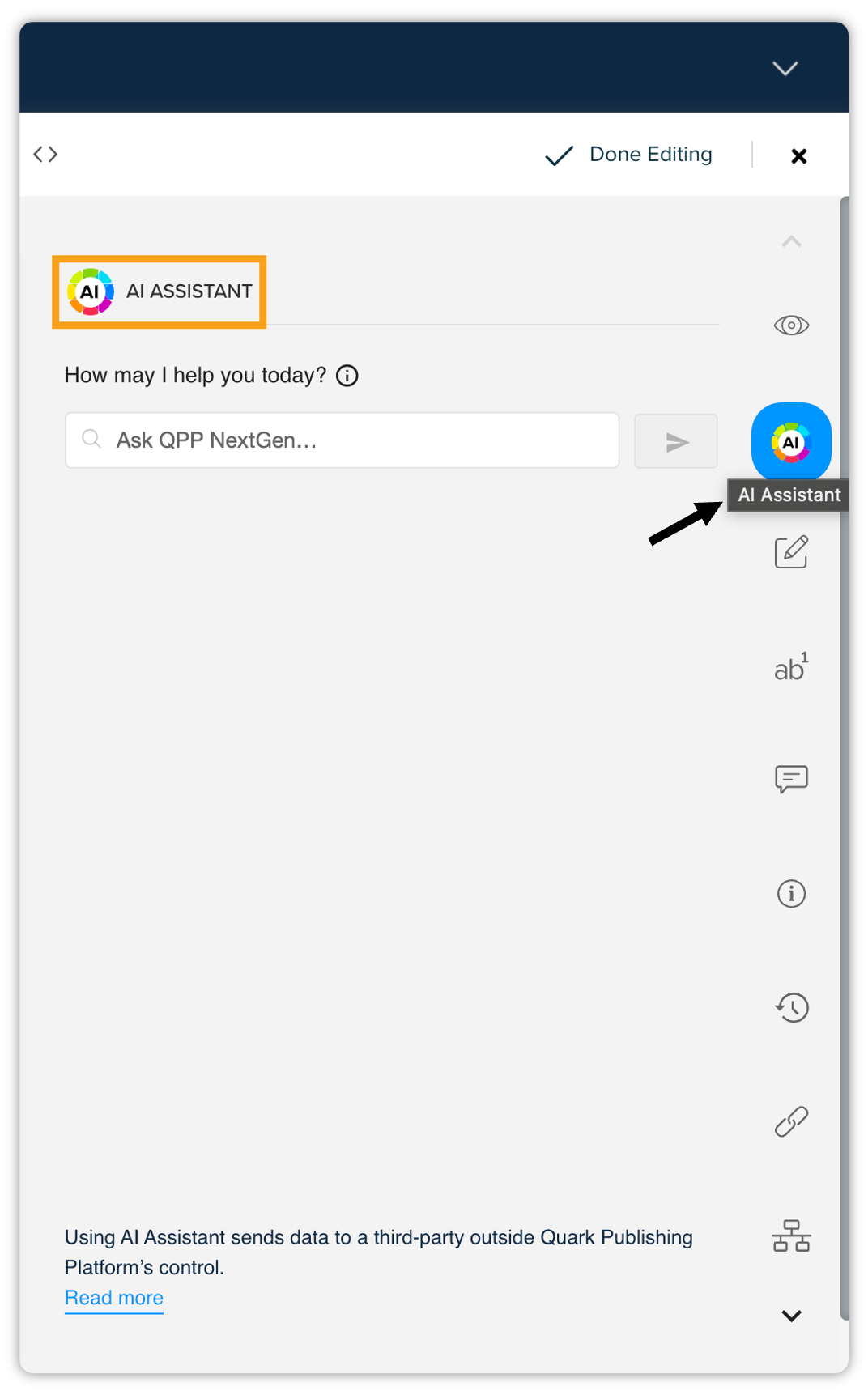
We've updated the branding for the Quarky Copilot feature, now known as the AI Assistant. This change includes a new logo that has been integrated throughout the platform. Please note that the privilege settings have been updated accordingly; the previously named "Allow Quarky Copilot" has been renamed to "Allow AI Assistant". This transition impacts both the Quark Author and the Smart Document pane within the Quark XML Author adapter.
-
Manage Your AI Credits in QPP NextGen
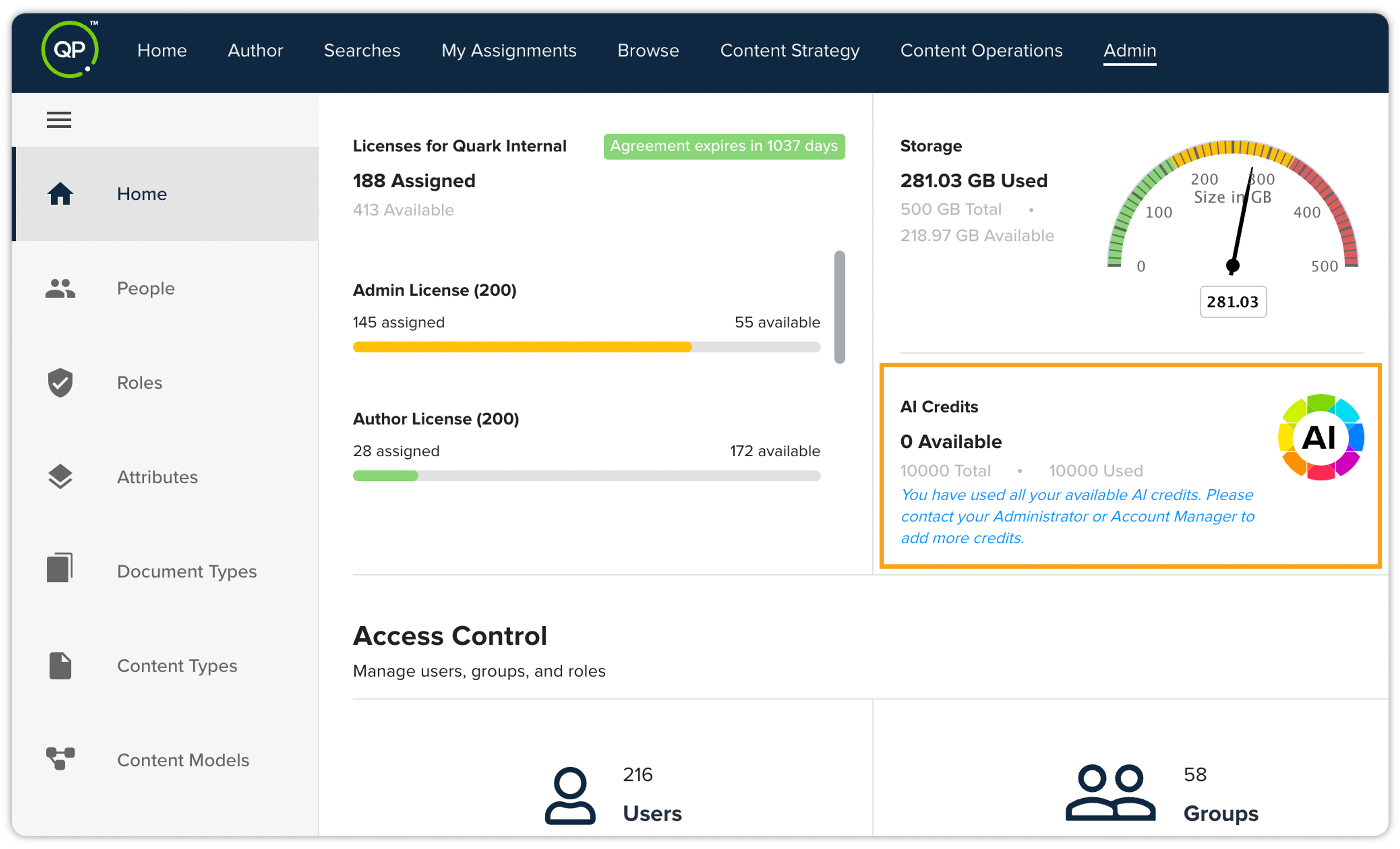
This release introduces enhanced AI credit management capabilities for administrators. You can now easily monitor your available AI credits to better manage your usage of QPP NextGen's AI-powered features, such as auto-tagging and semantic search. The number of remaining AI credits is clearly displayed within the platform.
Additionally, the platform will also display your remaining AI credits and provide instructions on how to purchase additional credits if necessary. You will need to contact your administrator or account manager to complete the purchase.
-
Streamlined Formatting: Alphabetical Organization of Menu Lists
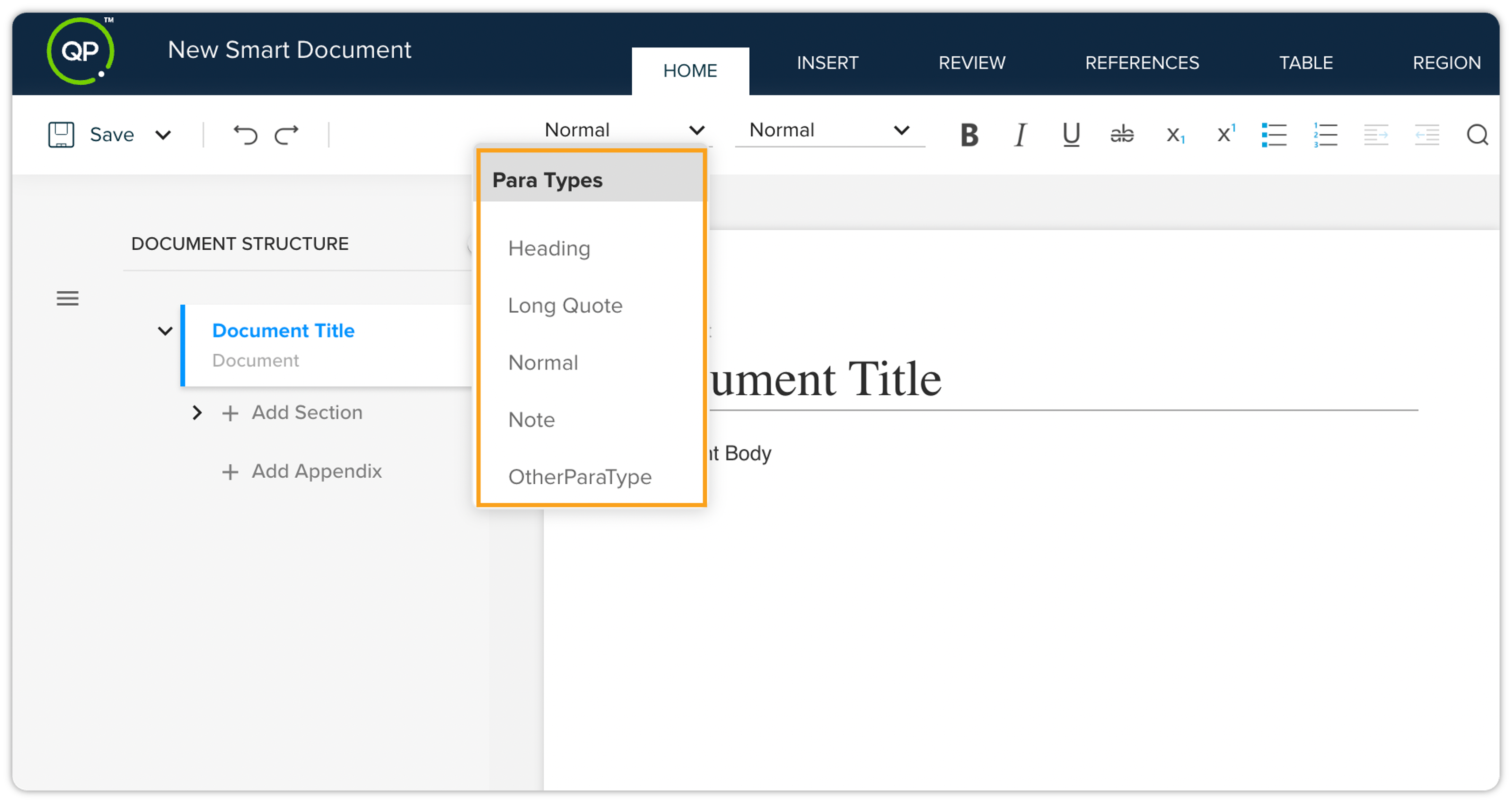
We've reorganized the paragraph type and emphasis menu lists to be in alphabetical order across both Quark Author (QA) and Quark XML Author (QXA), facilitating quicker access to formatting options needed while working on documents.
-
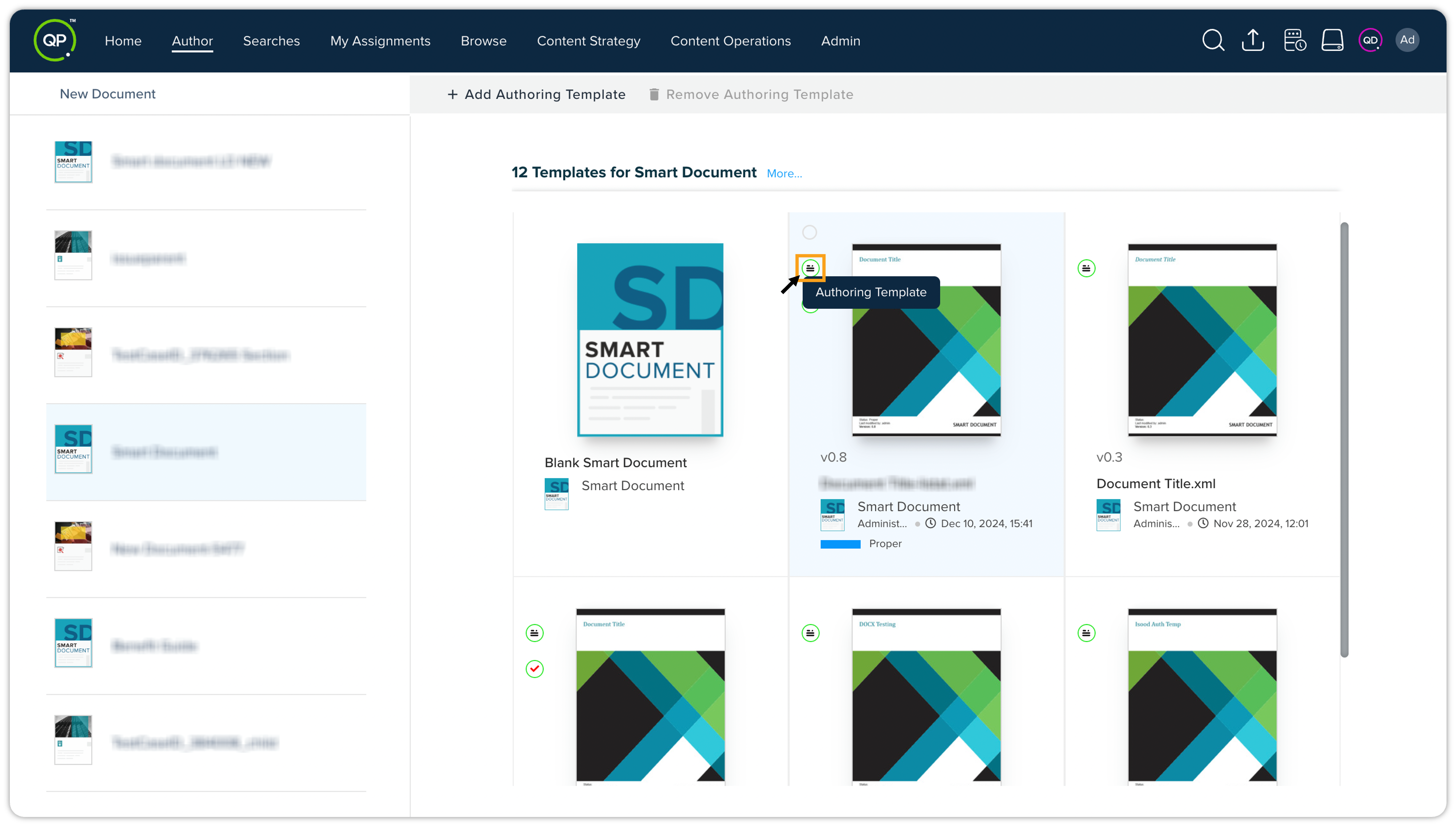
Updated Visuals: New Authoring Template Icon and Standardized Icon Sizes
The authoring templates will now feature a distinct new icon throughout the platform, enhancing visibility and user navigation. Additionally, we've standardized the icon sizes between card view and list view for a more cohesive visual experience.
QPP Server
-
Support for Group and Collection Metadata in Clone Service
The clone service now supports group and collection metadata, ensuring that new document clones retain the original document's metadata attributes organized under groups and collections. This enhancement guarantees consistency and accuracy in metadata management, enabling seamless reuse of cloned content across workflows.
Key highlights
-
Metadata attributes grouped and categorized in collections are now preserved during cloning.
-
Streamlined content creation with consistent metadata for cloned documents.
-
Improved alignment of cloned documents with original content configurations.
This update enhances efficiency and ensures metadata integrity across content management processes.
-
Resolved Issues
This release includes several bug fixes and improvements addressing user-reported issues.
Web Application
-
Citation Editing Improvements
Fixed an issue causing schema errors when editing specific fields within Journal Article and Personal Communication citations in the Reference Notes section. The problem affected the 'publicationDate' and 'author' fields specifically. This was a frequent issue reported by users working with large citation databases.
The fix involved correcting data validation within the citation editor to correctly handle these fields' data types and formats. Users no longer encounter schema errors when editing these fields.
-
Semantic Search Enhancements
Resolved an issue where inserting multiple elements from Semantic search results unintentionally added empty paragraphs to the document. This was a reproducible issue that significantly impacted user workflow. The root cause was identified as a faulty loop in the element insertion function.
The fix involved restructuring this function to correctly handle multiple element insertions. Users can now insert multiple elements without encountering unwanted empty paragraphs.
-
Improved Asset Version Drop-down Display
Corrected a display issue in the asset version drop-down within the Workspace's asset details tab. The problem involved information truncation and inconsistent formatting, making it difficult to identify the correct asset version.
The fix involved adjusting the drop-down's styling and data formatting to ensure all relevant information displays correctly, avoiding truncation and maintaining a consistent presentation. Users can now easily identify and select the correct asset version.
-
Asset Picker Accuracy
Resolved an issue where the Asset Picker dialog incorrectly displayed folder/collection names for assets selected using the quick search feature. This inconsistency affected the accurate identification of assets.
The fix involved correcting the path resolution within the quick search function. Users can now confidently select assets knowing the displayed path accurately reflects the asset's location.
-
"Recently Modified" Widget Visibility Control
The "Recently Modified"widget is now correctly shown for users with Consumer licenses, aligning the user interface with licensing restrictions. This was a simple fix involving conditional rendering based on license type. Users with Consumer licenses will now have a cleaner Home page experience.
-
Background Task Visibility for Consumer Licenses
The background task icon and dialog are now correctly displayed for users with Consumer licenses, enabling them to monitor background tasks such as publishing operations. This involved adjusting the access control settings to allow Consumer license holders to view background task status.
Users with Consumer licenses will now have appropriate visibility into the background task status of their documents.
-
Accurate Table Width Rendering
Resolved an issue causing discrepancies between the table width set on the canvas and the rendered width in the output. The problem involved miscalculations in the layout engine when handling nested tables and complex column spanning.
The fix involved optimizing the table layout algorithm to ensure consistent rendering across all scenarios. Users can now reliably rely on the visual representation of table widths in the editor.
Quark XML Author (QXA)
-
Table Column Resizing
Fixed an issue where resizing table columns required first resizing the first column. Column widths can now be independently adjusted without this constraint, improving workflow efficiency.
The underlying cause was an incorrect calculation of column widths, which has been corrected. Previously, users had to resize the first column to trigger proper recalculation.
-
Layout Options Meta Values
Addressed an issue where meta values in the Layout Options properties pane were not consistently displayed or retained. The values now correctly appear and persist, ensuring data integrity. Users no longer need to re-enter values repeatedly.
-
QXA Interoperability with Paragraph Styles
Resolved an issue causing an exception during checkout in Quark Author when paragraph styles (e.g., "Quote") were applied and then reverted in Quark XML Author. Interoperability between the two applications is now restored.
The root cause was an improperly formatted XML structure when saving the document, which has been corrected.
-
Paratype Visibility in Regions
Corrected an issue where paratypes were not visible within regions nested inside sections of a smart document. Paratypes are now consistently displayed within regions, simplifying content creation.
The issue stemmed from a conflict in the way the application handled region scoping and style inheritance.
-
Whitespace Preservation in Tables
Fixed an issue resulting in the loss of non-breaking spaces and regular spaces between images within table rows after saving and reopening the document. Whitespace is now preserved correctly.
This was due to a serialization error in the XML that omitted whitespace characters. Users can now reliably utilize whitespace for visual formatting within tables.
-
Metadata Pane Refresh for Figures
Improved the metadata pane's refresh behavior when switching between elements (e.g., from a section to a figure) in smart documents. The metadata pane now correctly updates to reflect the selected element's metadata. Users will now see the correct metadata immediately.
-
Default Title and Body Text for New Documents
Corrected an issue preventing the use of default title and body text when creating new documents based on edited content models. The default text now correctly appears, improving the initial document setup.
This was caused by a flaw in the way the application applied default values during document creation, which has been rectified. Users will now benefit from the pre-filled values as intended.