
March 13, 2025 — v4.3
New Features/Enhancements
Web Application
-
Introducing Seamless File Attachments in Quark Author
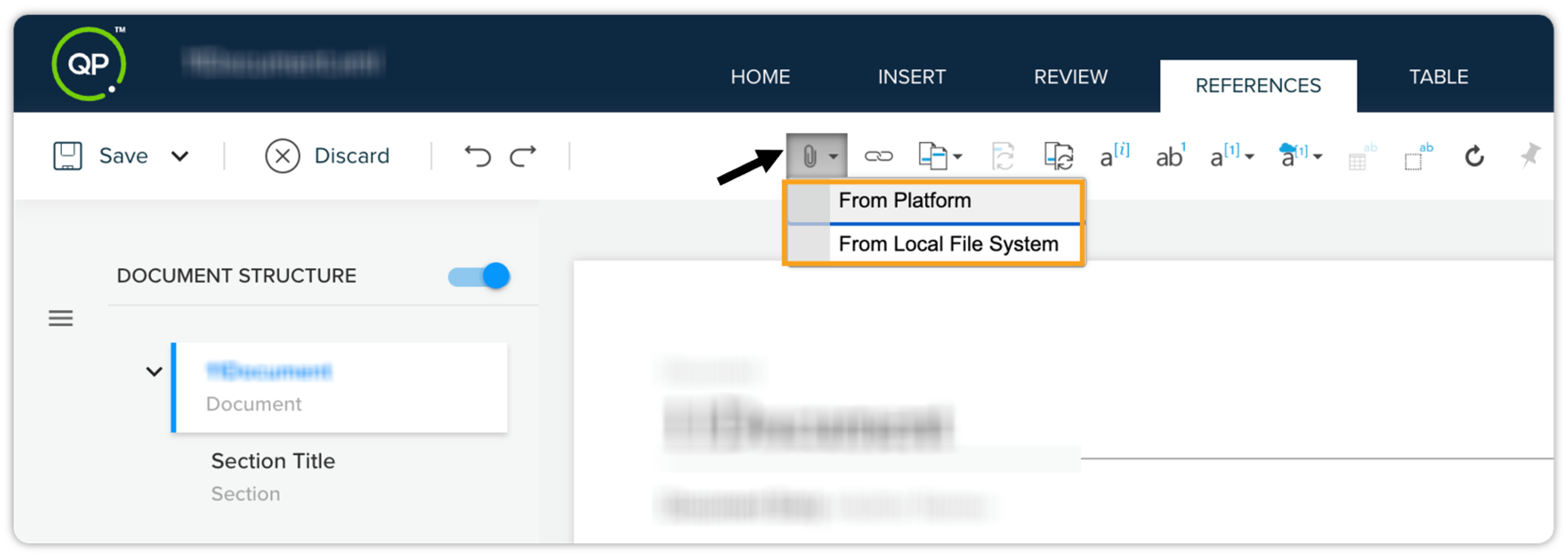
We're excited to announce the introduction of the "File Attachment" capability in the Quark Author editor. This new feature enhances the content creation process by allowing users to attach various file types directly to their documents.
Key highlights
-
File Attachment Capability: Users can now attach multiple file types to both smart documents and business documents through a new option available on the toolbar of the Reference tab. This facilitates the inclusion of supplementary resources to enrich the document's content.
-
Context Menu Options: Upon inserting an attachment, users will have access to a context menu with options for managing the attachment directly on the authoring canvas. This provides convenience and immediate access for necessary actions.
-
Attachment Overview: A comprehensive list of all attachments included in the document is now visible within Attachments > Links and Reference section of the Apps pane. This feature enables users to easily view and manage the total number of attachments at a glance.
-
Seamless HTML Publishing: Attachments will be visualized as integral elements in the HTML publishing output, ensuring that they blend seamlessly into the overall document layout.
-
Attachment Navigation: Authors can now navigate to the storage location of the attachments within the workspace, allowing for easy review and preview of the attached files.
This new feature significantly enhances the user experience for content writers by enabling more dynamic and resource-rich documents, fostering improved content integration and management. For detailed information, refer to the user guide.
-
-
Introduction of Layout Options for Images in QPP NextGen
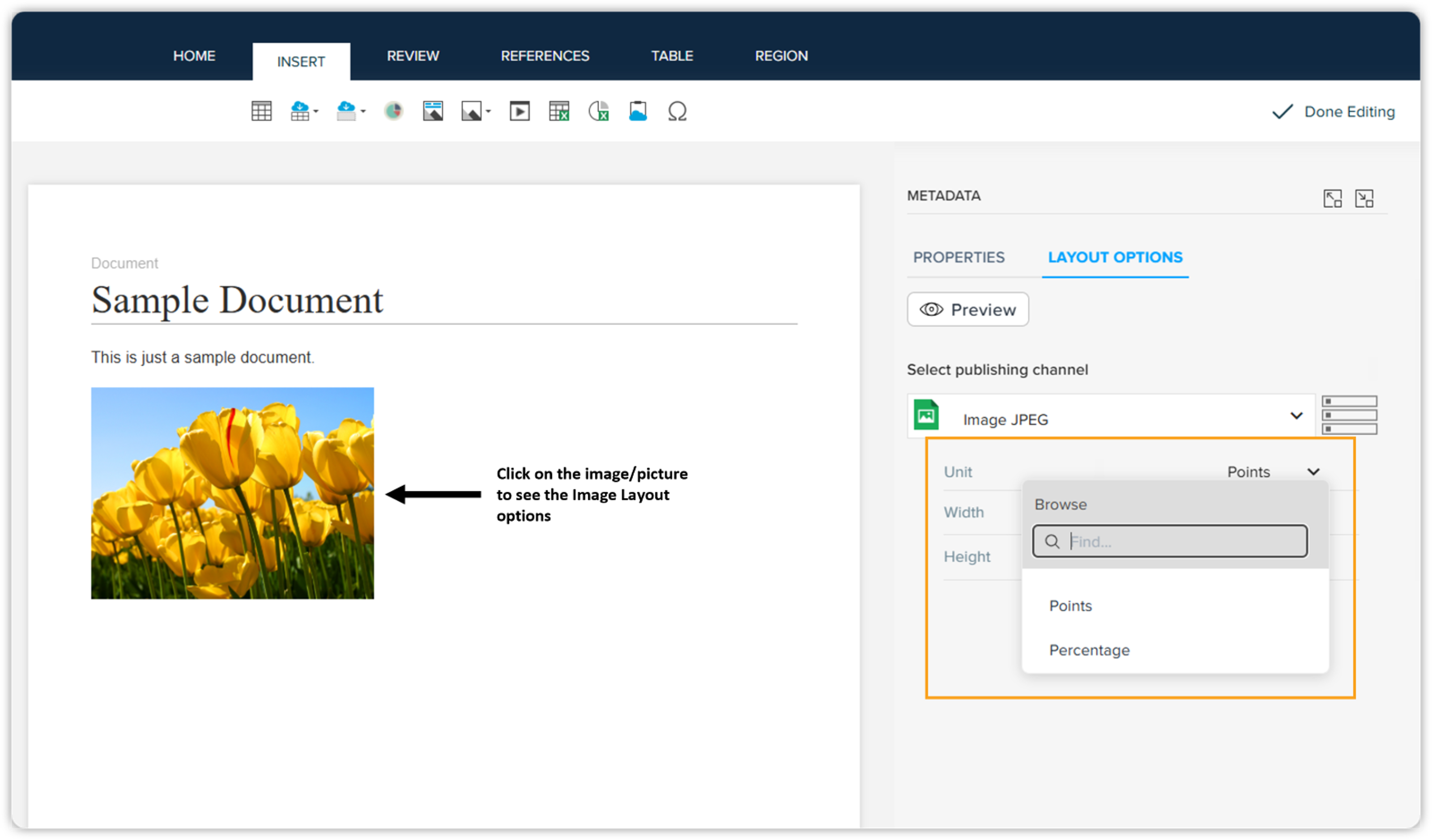
We’re excited to introduce Layout Options for Images in QPP NextGen! Previously, Layout Options were available only for content, but with this release, users can now define layout properties for images and pictures as well.
Key highlights:
-
Layout Options for Images: Users can now configure the width and height of images using either points or percentage, ensuring consistent formatting across PDF, HTML, and image outputs.
-
Default Restriction on Image Resizing: To maintain design consistency, manual image resizing is now disabled by default. However, this setting can be enabled in the backend by updating the qa-config file. More details are available in the Migration Guide.
This enhancement provides better control over image formatting, allowing for a more structured and uniform publishing experience across different output formats.
-
-
Enhancing Content Control: Introducing Read-Only Sections in Quark Author
We're excited to introduce a new capability in Quark Author that enhances content management and user control. Users can now designate specific sections as "read-only" within the Content Models screen. In the "Label and Title" section, a new checkbox is available for both the default body text and default title text. By checking these boxes, users can effectively lock these sections to prevent any modifications.
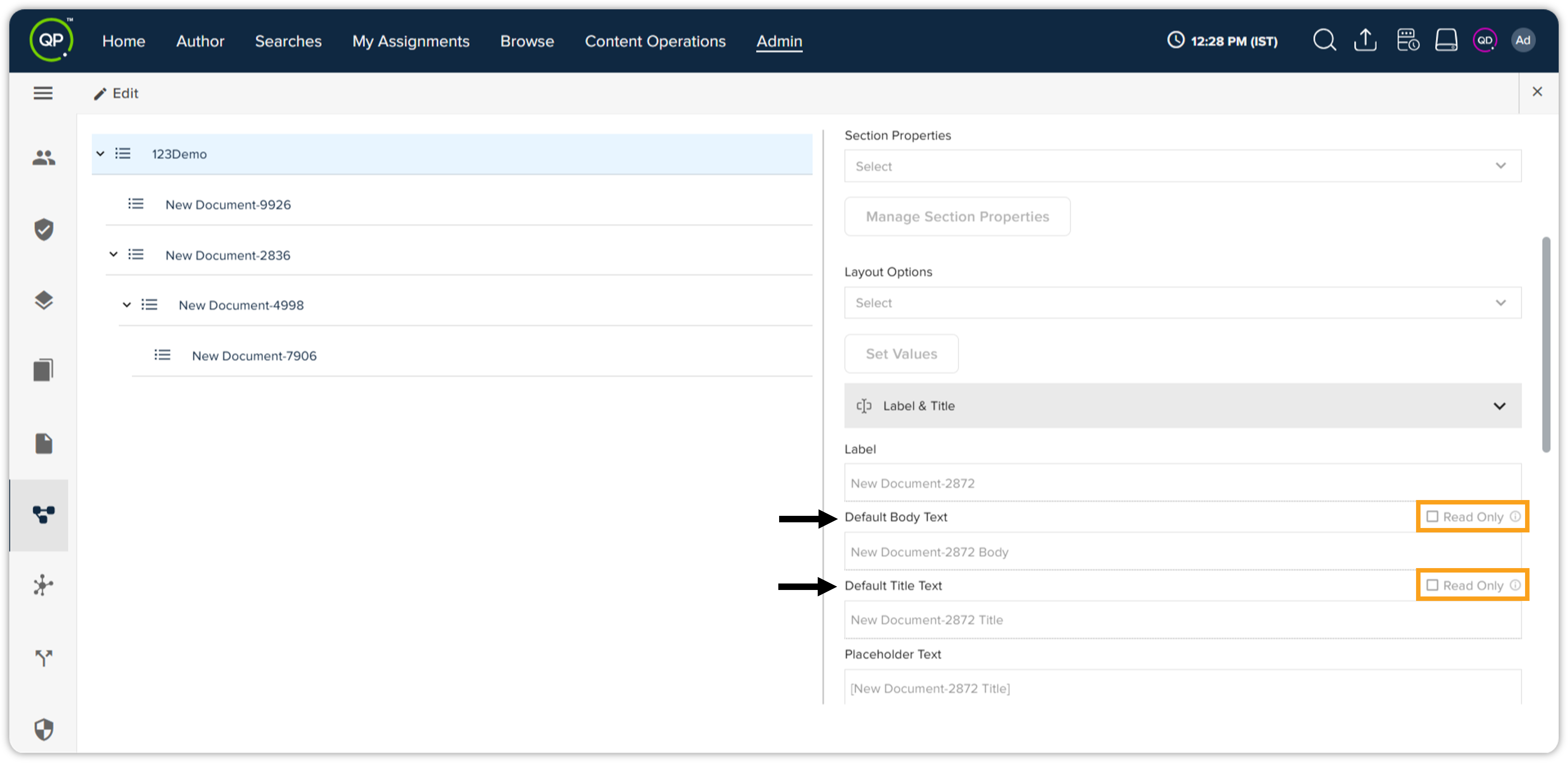
This feature empowers users to maintain the integrity of important content, ensuring that key sections remain unchanged while still allowing flexibility in other areas. This is particularly beneficial in collaborative environments where content stability and accuracy are essential, helping to streamline workflows and improve content governance.
-
Introducing "Time Zone" Display in UI
We’re pleased to announce a new feature in the QPP NextGen platform that enhances user awareness of time zones across the application:
Time Zone Display in UI:
-
A new option titled Show Time Zone has been added under the Preferences section in Admin > Settings.
-
When enabled, this feature displays the current time zone on the taskbar throughout the platform. In Quark Author, the taskbar must be made visible by clicking the drop-down arrow.
-
The time zone is presented in AM/PM format and is determined by the user's local system settings. If a time zone is set in the web browser, it will take precedence over the local system's setting.
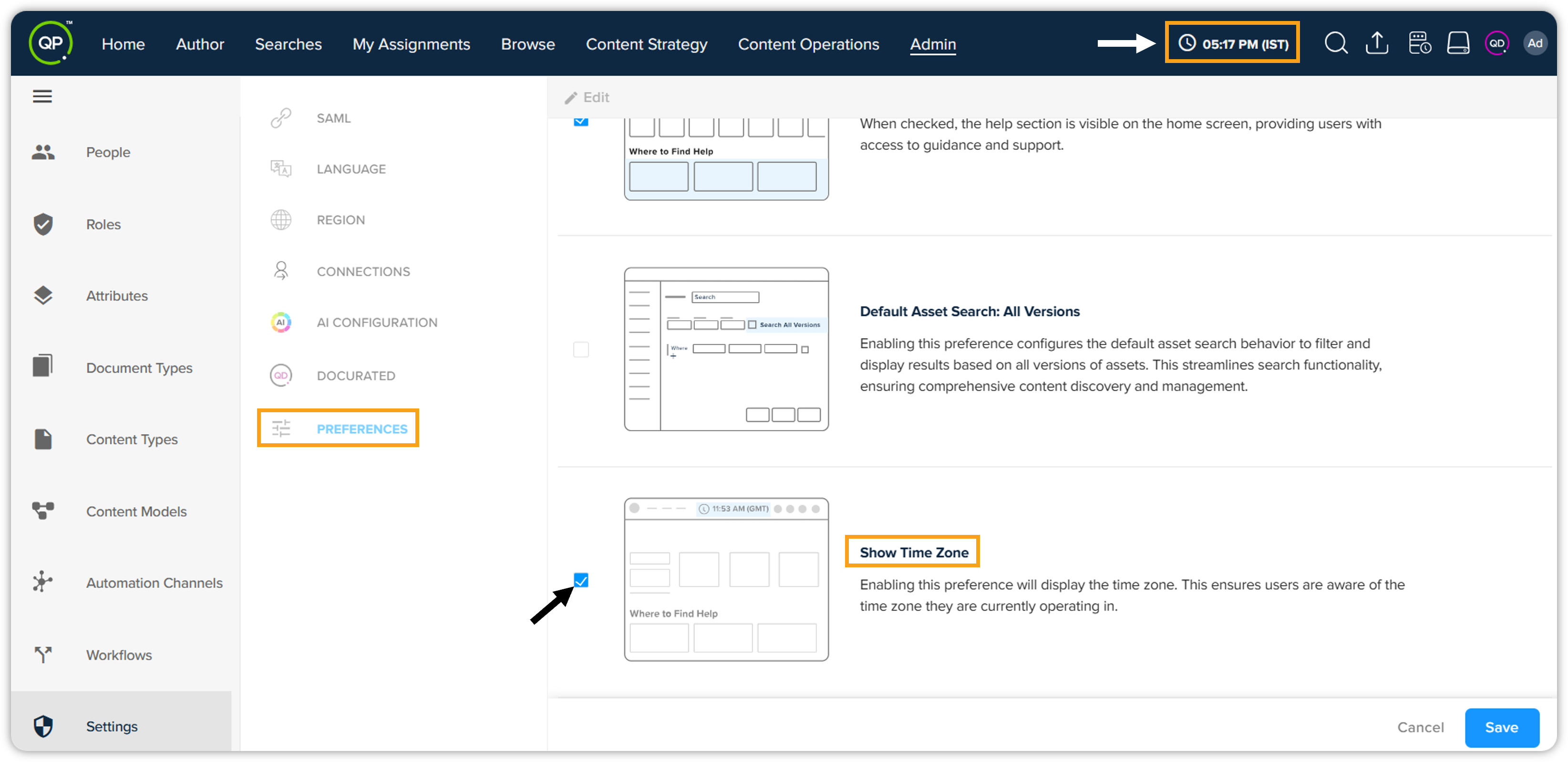
This feature allows users to manage time-sensitive activities more effectively by providing clear visibility into their current time zone, thus aiding in better time management and coordination.
For further details, please refer to the user guide.
-
-
Manage Section Properties in the UI
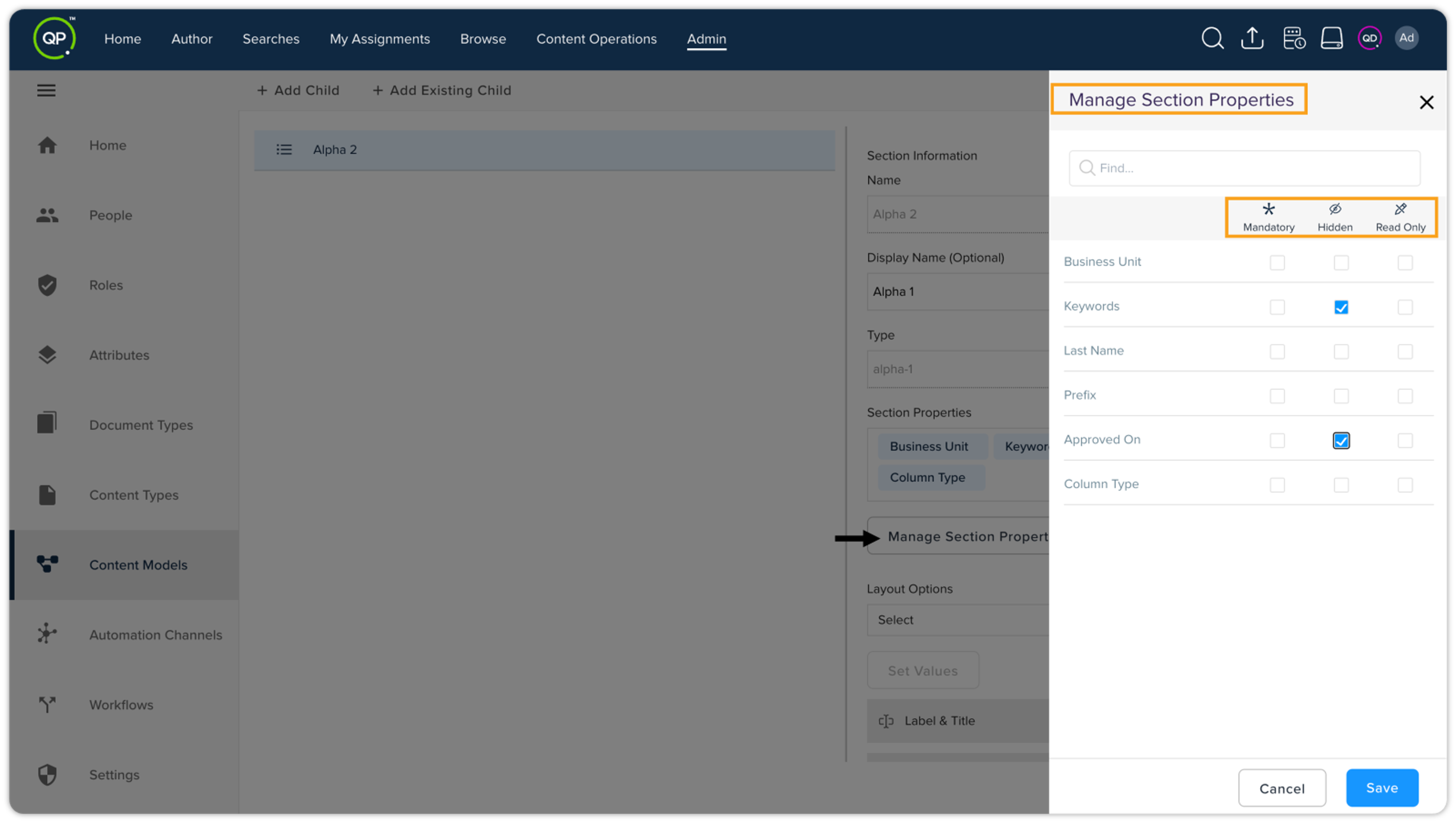
In this release, we’re introducing a new feature that enhances how administrators manage section properties within content models. This new capability aims to improve the user experience, specifically focusing on allowing admins to protect sensitive information by hiding certain metadata fields directly from the user interface.
Key highlights
-
Manage Section Properties: Admins will now have the ability to manage section properties via a new UI feature while creating or editing content models. The options are Mandatory, Hidden, and Read Only.
-
Enhanced User Interface: This feature simplifies the management of section properties, making it more intuitive and accessible than previous back-end methods.
With this update, admins can ensure that content models are tailored to their organization's needs while effectively safeguarding sensitive information.
-
-
Enhanced Document Statistics Accessibility
Previously, users could only view document statistics (such as Word Count, Character Count, Paragraph Count, and Character Count Without Space) in the Statisticstab within the Apps pane of Quark Author. Now, in this release, we’ve enhanced accessibility, allowing users to check these statistics without opening the document—directly from My Assignments, Browse, and Search windows, or anywhere documents (assets) are listed.
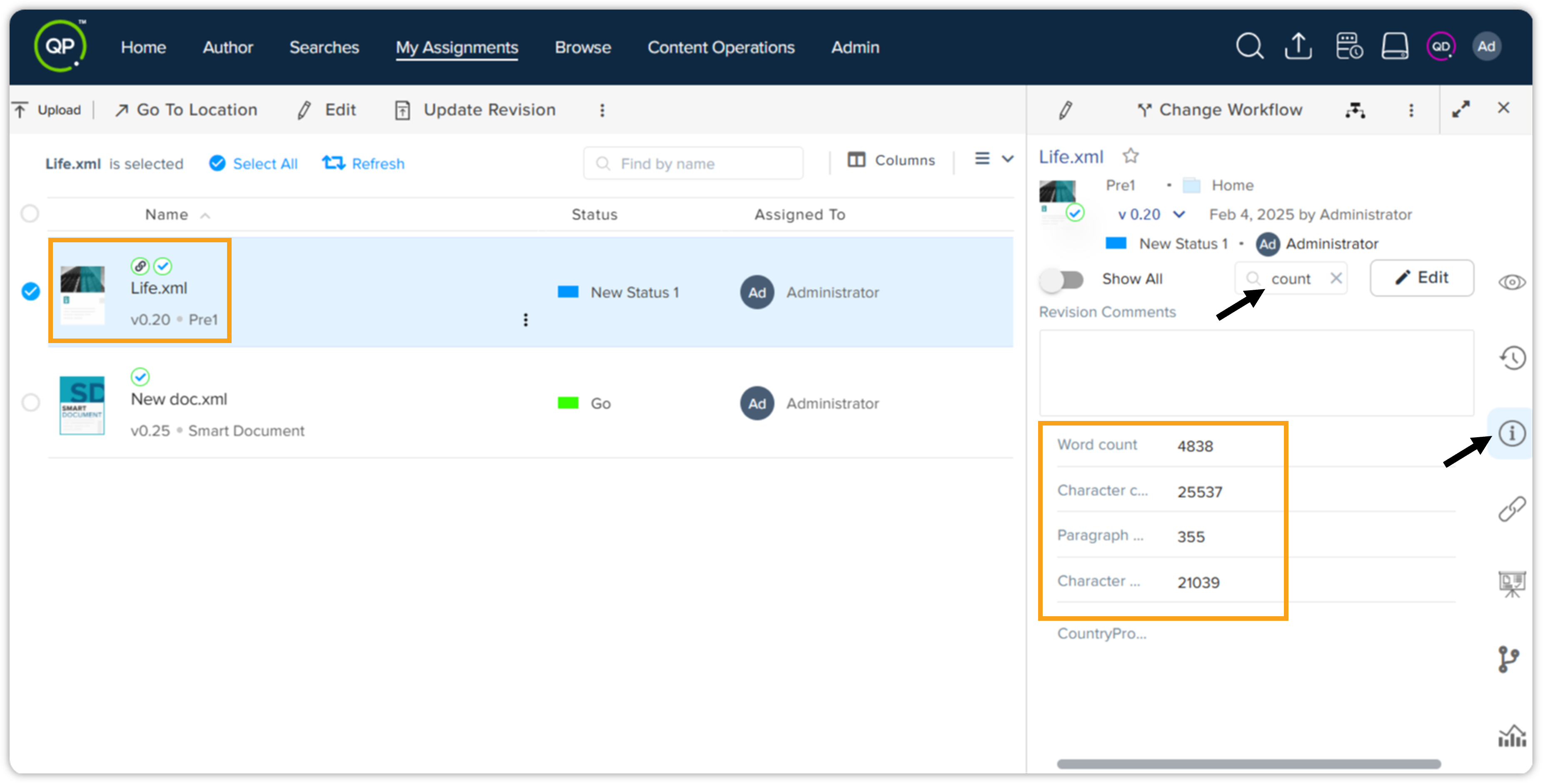
This enhancement improves efficiency and convenience, enabling users to quickly check document statistics without the need to open the document in Quark Author. It simplifies content analysis and allows users to make informed decisions at a glance.
-
Introducing "Enhanced Document Editor Layout" and "New Tab Preview" in Quark Author
We’re excited to announce the latest enhancements to the Quark Author in the QPP NextGen platform:
-
Document Editor Layout: The document editor now occupies more space towards the right, providing a larger writing area. This won’t affect the default apps pane view, but selecting an option (e.g., Preview) will shrink the editor towards the left.
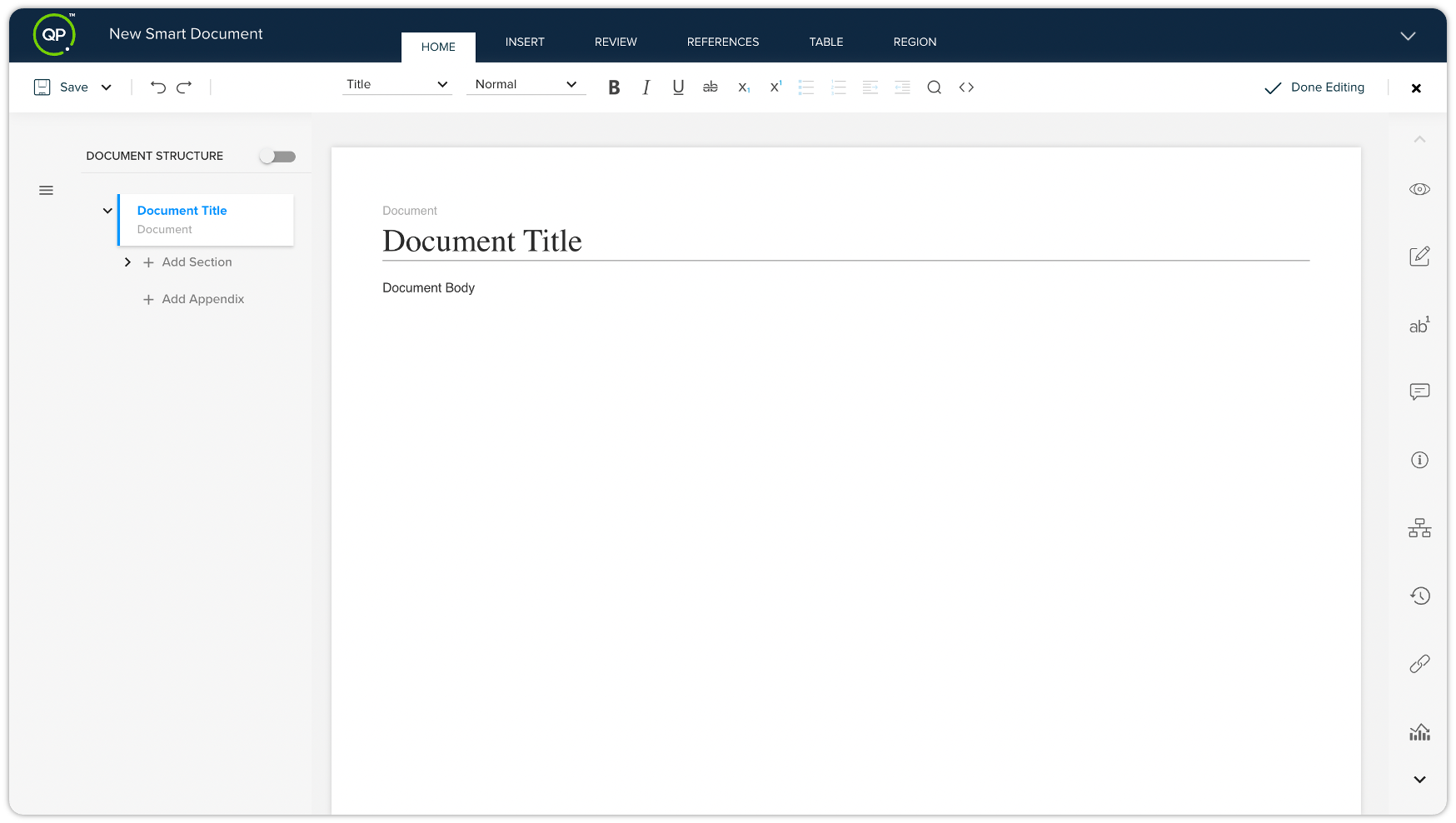
Additionally, users can also split the screen 50:50 between the editor and apps pane. In this mode, the documentation TOC is hidden but remains accessible via the Hamburger icon next to the Save button.

-
Preview in a New Tab: To enhance the editing experience, a new functionality allows users to open the document preview in a separate tab. This feature ensures that users can check the document’s appearance without interrupting their workflow in the document editor.
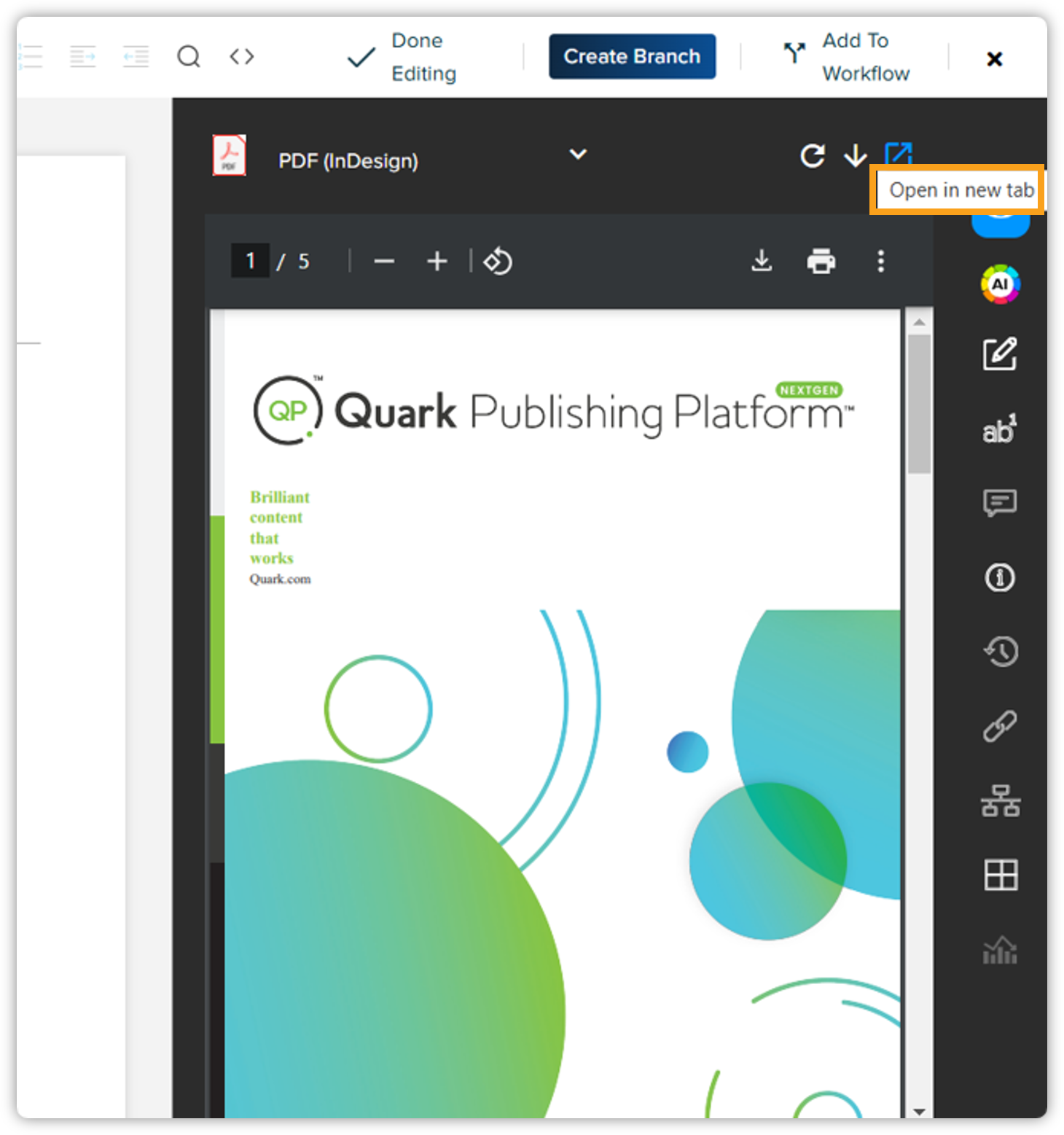
We encourage users to explore these enhancements and utilize the improved functionality for a more efficient editing experience.
-
-
Enhancing Content Management with the Custom Webpage Metadata Pane
Introducing the Custom Webpage Metadata Pane for the Quark Author within the QPP NextGen platform. This feature enhances the user experience by allowing Content Architects to create tailored metadata displays specific to each document type.
Key Features
-
Configuration-Based: The Custom Webpage Metadata Pane is not available by default. Users must create a manifest.json file and update the qa-config.json file to enable this functionality.
-
Flexible Metadata Display: Content Architects can configure which metadata tabs are visible in the pane and the order in which these tabs appear, ensuring users only see relevant information.
-
Document-Specific Visibility: The custom pane will only appear for the document types for which it has been configured.
-
Metadata Inheritance: Values entered in the Custom Webpage Metadata Pane will inherit to the Properties tab within the Metadata section of the Apps pane in Quark Author.
Detailed configuration steps and guidelines can be found in the developer portal. -
QPP Server
-
Seamless Migrations Ahead: Skip Existing Entities with Ease!
To provide greater flexibility during migrations, we've added a new 'override' flag to our APIs. This newly added flag will help users manage existing entities more effectively:
-
Default Settings: The 'override' flag is set to 'true' by default, allowing the API to automatically skip migration of any entities that already exist in the environment.
-
Custom Configuration: Users have the option to set the override flag to 'false'. When this is done, in case of importing data where entity with same name already exists in QPP NextGen Server, that entry will not be updated or changed. Import for that entry will be skipped since override flag is false.
We encourage you to leverage this new functionality to manage your entity migrations more efficiently and effectively. For detailed information, refer to the migration guide.
-
-
Project Dependency Upgrades
As part of our continuous efforts to enhance performance, security, and compatibility, we've upgraded key project dependencies to their latest stable versions. These upgrades improve overall system efficiency, align with modern standards, and ensure long-term support.
Key improvements include:
-
Java, Spring Boot, and Spring Framework upgrades for better performance and security.
-
Migration from Javax to Jakarta EE for compliance with the latest frameworks.
-
Updated security configurations to align with Spring Security best practices.
-
Project structure refactoring to improve backward compatibility and maintainability.
For a detailed breakdown of the specific upgrades, please refer to the Upgrade Guide — Dependency Upgrades section.
-
Resolved Issues
We've addressed several issues reported by our users to enhance the platform's functionality and user experience:
-
Error with Document / Cannot Revert to Previous
Users encountered an error when opening a document ("could not open document") and when reverting to a previous version ("unhandled server exception"). We've fixed these issues, and now documents will open correctly, and the revert functionality will work as expected.
-
Missing "Add to Favorites" and "Go to Location" Options
Users reported that the "Add to Favorites" icon was missing for documents, and the "Go to Location" option was not visible in the Topbar menus. We've resolved these issues, and both options are now correctly displayed.
-
[Quark Author] Display Name for Paragraph Type Not Appearing
Users reported that the para-type name was displayed instead of the intended display name on the canvas. We've fixed this issue, and now the correct display name appears as expected.
-
[Quark Author] Longer Paragraph Type Names Not Fully Visible
Users reported that long paragraph type names were not fully visible in the menu. We've resolved this issue, ensuring that longer names are now readable.
-
Content Type Mapping Removed When Saving Model
Users encountered an issue where content type mapping with the QPP attribute was being deleted upon saving the model. This has been fixed, and the mapping will now persist correctly when the model is saved.
-
Preview Not Showing Complete Rendition/Channel Name
Users reported that the preview was not displaying the full rendition/channel name. We've resolved this issue, and the complete channel name is now visible in the preview blade.
-
Auto-notification Email Attachment Fix
Users reported receiving auto-notification emails with garbled attachments. We investigated the matter and have successfully resolved the issue. Users can now expect a properly formatted PDF attachment in the notification emails.
-
Incorrect File Name for Asset's PDF Rendition Downloaded from Preview Blade
Users reported that when downloading an asset’s PDF rendition from the preview blade, the file name was incorrect. We've fixed this issue, ensuring that the downloaded file always retains the asset name.
These fixes improve platform stability and usability. Thank you for your valuable feedback!