
May 23, 2024 — v4.0.1
New Features/Enhancements
In this release, we're thrilled to introduce a range of exciting new features and enhancements designed to elevate your QPP NextGen experience.
-
Empower global communication: QPP NextGen now supports right-to-left language authoring and publishing
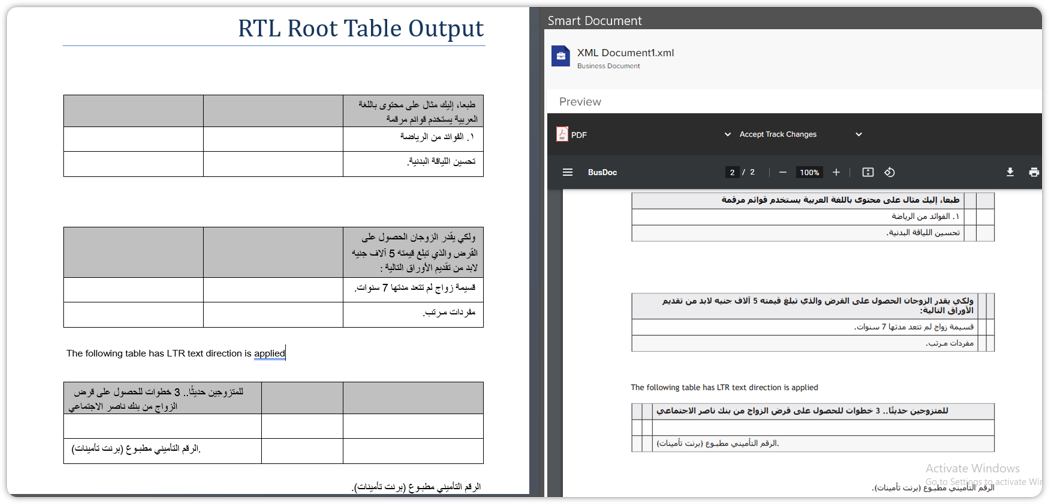
Our QPP NextGen platform now fully supports right-to-left (RTL) languages in Quark XML Author. This enhancement empowers content publishers and authors to seamlessly work with RTL languages, such as Arabic and Hebrew, with intuitive controls and accurate interpretation during the publishing process.
Use cases supported
-
Content Publishing in QXPS: As a content publisher in QPP NextGen, you now have the capability to publish BusDoc in right-to-left languages using QXPS (QuarkXPress Publishing Server). This update ensures accurate interpretation and maintenance of text direction during the publishing process, enabling efficient publication of RTL content with confidence in the integrity of text alignment.
-
Content Authoring in Quark XML Author: As a content author in Quark XML Author, you can effortlessly create and edit content in right-to-left languages. The intuitive interface now supports text direction and alignment controls, facilitating a seamless authoring experience for RTL language content without any constraints or complications.
Key benefits
-
Effortless RTL Language Support: Seamless creation and editing of content in RTL languages, empowering authors to work with Arabic or Hebrew effortlessly.
-
Intuitive Interface: The interface provides intuitive controls for text direction and alignment, ensuring a user-friendly experience for content authors.
-
Accurate Publishing: QuarkXPress Publishing Server preserves the accurate interpretation and maintenance of text direction during the publishing process, enabling precise RTL content publication.
With this feature, we aim to empower our users to efficiently produce content that caters to the linguistic and cultural diversity of audiences worldwide.
-
-
Enhanced file delivery functionality in Template Service Connector and Data Source Service
We’ve made a significant enhancement in the Template Service Connector channel and Data Source Service, geared towards meeting the demand for file delivery to external services. This enhancement introduces the much-anticipated functionality for Binary and Multi-part requests, marking a notable advancement in the capabilities of these integral services.
Key enhancements
-
Template Service Connector Channel: The enhanced Template Service Connector channel now facilitates the seamless execution of REST API requests via configuration in FTL files and incorporates the vital feature of file delivery to external services.
-
Data Source Service: The Data Source Service has been bolstered with the capability to support file delivery to external services through the addition of Binary and Multi-part request options.
How it works
The upgraded Template Service Connector channel and Data Source Service empower users to efficiently integrate file delivery into their interactions with external services. This enhancement simplifies the process of executing REST API requests and delivering files, presenting a unified and streamlined approach.
Key benefits
-
Expanded Functionality: The addition of Binary and Multi-part request options enriches the capabilities of the Template Service Connector and Data Source Service, enabling you to seamlessly deliver files to external services.
-
Enhanced Versatility: You can now leverage the enhanced services to execute REST API requests and efficiently transfer files, thereby streamlining their workflows.
-
-
Unleashing dynamic data visualization: Introducing row type refactoring and custom meta integration
Our platform now offers enhanced data visualization capabilities, with the introduction of dynamic row type refactoring and seamless integration of custom meta for extracting visualization tables.
Feature updates
-
Refactoring of ExtractRowDataFromMasterDataDoc.xslt and TableVisualization.xslt
-
The refactoring is based on the finalized "column-mapping.json" file, which serves as the cornerstone for the extraction and visualization of data based on row type.
-
-
Dynamic Visualization Based on Row Type
-
The "row-type-visualization-mappings" in the JSON file extends the functionality of the "filter-column-id-mappings", providing a more flexible and intuitive approach to data visualization.
-
-
Priority-based Visualization
-
When visualizing tables, the platform now gives top priority to the "row-type-visualization-mappings". If no mapping is found here, the system seamlessly falls back to the mappings in "filter-column-id-mappings".
-
In absence of mappings in both, the default display name will be used, ensuring a smooth and consistent visualization experience.
-
-
New Meta for Row Filters in Data Integration
-
The introduction of a new meta, Row Type, in the Row Filters for Data Integration provides you with the capability to extract a visualization table from a single row of the data source.
-
This meta is designed to offer flexibility and customization, empowering you to tailor your visualization experience to your unique requirements.
-
-
Customizable Meta Configuration
-
The Row Type meta is not mandatory, offering you the flexibility to configure your visualization workflow as per your specific needs.
-
While not available Out-of-the-Box, this meta can be seamlessly added to the Row Filter Collection based on individual requirements, providing a tailored visualization experience.
-
The new release introduces an innovative way to visualize data, empowering you with greater control and flexibility. The seamless integration of row type refactoring and custom meta for visualization empowers you to extract meaningful insights tailored to their unique needs.

-
-
New privilege for adding values to drop-down menu attribute lists
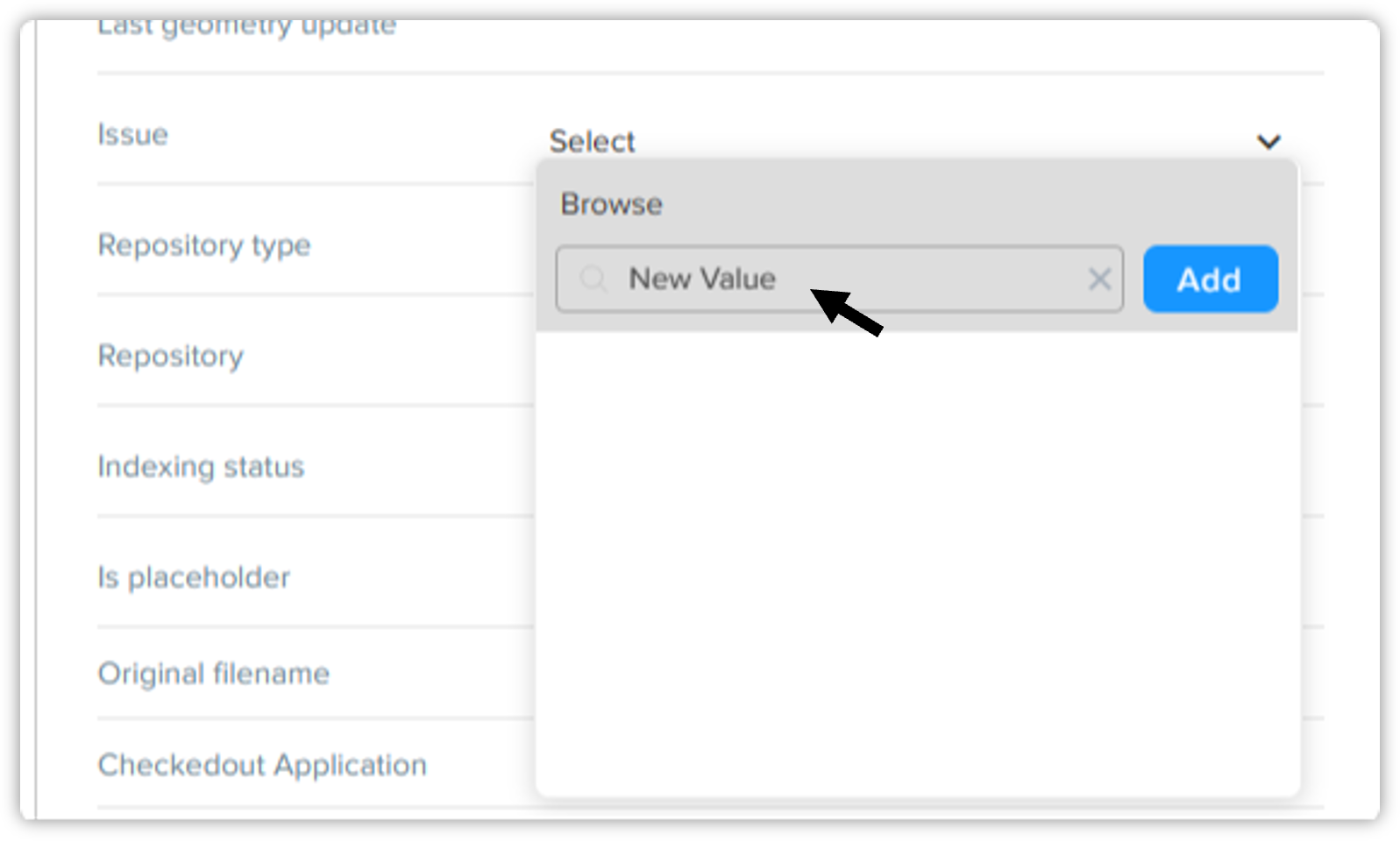
We're introducing a powerful new capability in our upcoming release, aimed at providing you with greater control and flexibility in managing drop-down menu attribute lists for assets. With this enhancement, users with specific privileges will have the authority to add values to drop-down menu attribute lists from workspace/author on Asset Details > Attributes Pane based on user/group roles, offering a more tailored and secure approach to content management.
Key features
-
User-defined control: Users with the designated privilege can strategically add values to drop-down menu attribute lists, aligning with user/group roles for enhanced customization and security.
-
Enhanced role-based access: Admin, Author, and Contributor license types will have access to this privilege, empowering designated users across different levels of authorization.
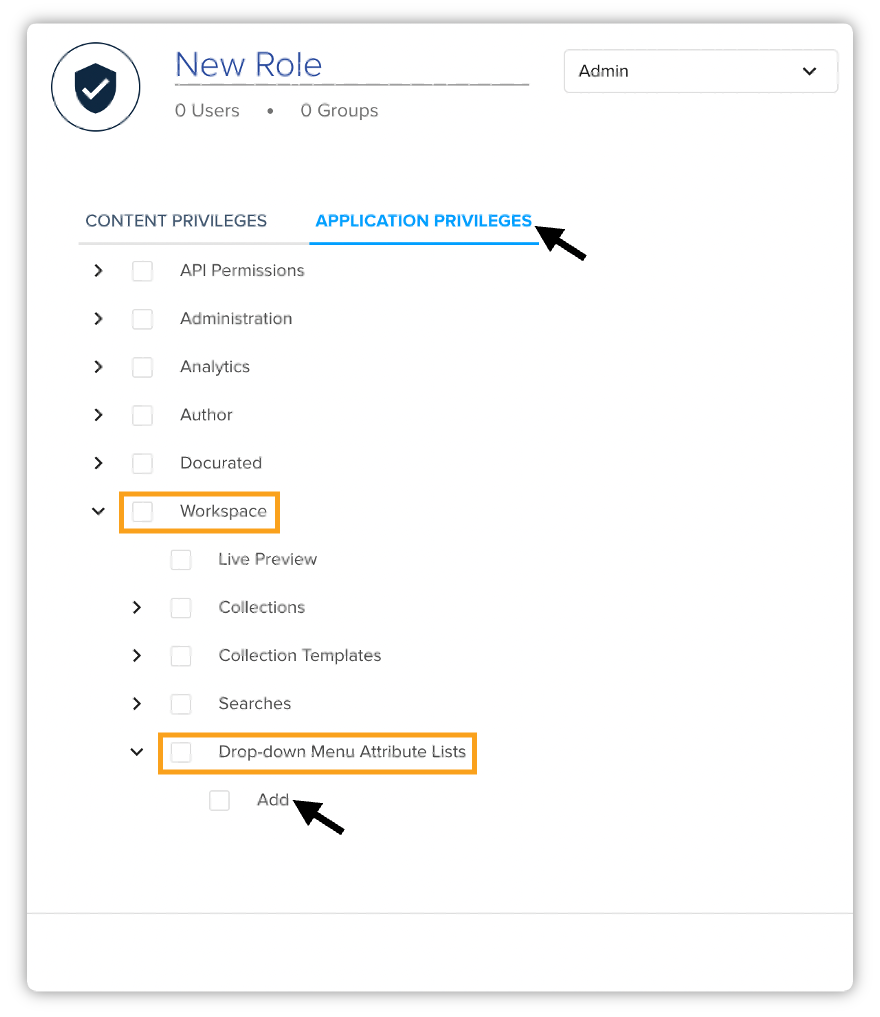
This new privilege will be found within Application Privileges → Workspace → Drop-down Menu Attribute Lists → Add.
-
-
Quark XML Author feature update — Enhanced XML document saving capability
We're excited to announce a new feature enhancement in Quark XML Author, specifically addressing your need to save XML documents along with the content of referred components. Previously, when saving a document/component in XML format, content within elements that have conref was being omitted, including paragraphs, sub-headings, images, and tables.
To meet your needs effectively, we've introduced a configuration option that’ll empower you to save the expanded XML document/component including all its content elements. To implement this enhancement, please refer to the Configuration section in migration guide.
-
Quark XML Author update — Removal of outdated C++ Redistributable libraries
We've made a significant update to the Quark XML Author installer, tailored to address your concerns about security, maintenance overhead, and system compatibility. In response to your feedback, we've removed the outdated 2010 C++ Redistributable libraries from the installer, ensuring a streamlined and secure deployment process.
This modification was meticulously validated through comprehensive regression tests to guarantee the uninterrupted functionality of existing features. Our commitment to maintaining the highest standards of software reliability and security has been at the forefront of this update.
We're confident that this change will enhance the performance, security, and overall experience of using Quark XML Author on modern systems while reducing maintenance complexity.
-
Passwordless SSO Authentication capability added
We've enabled the seamless adoption of Passwordless Single Sign-On (SSO) authentication for users. This pivotal update empowers users to leverage modern authentication methods, eliminating the need for traditional password prompts and elevating the security and convenience of the authentication process. This update extends our platform's capabilities to embrace the evolving landscape of authentication methods, catering to users who have already adopted Passwordless Authentication mechanisms as part of their Azure configurations.
Resolved Issues
We're pleased to announce that the 4.0.1 release addresses several reported issues, ensuring a more robust and seamless user experience.
-
Seamless BusDoc PDF Publishing: Issue Resolved!
We've successfully resolved the recent BusDoc PDF publishing issue that arose following an update to address vulnerabilities. Our dedicated team has worked tirelessly to rectify the issue, ensuring that the publishing process for BusDoc documents will now proceed without any failures, even when referenced components are not present in the system. This comprehensive resolution guarantees a seamless and error-free publishing experience, allowing you to continue your operations with confidence and efficiency.
-
Empowered event retrieval: Limit parameter fixed
We’ve successfully resolved the issue concerning the "getAllEvents" API, where it was returning only 5 records regardless of the specified limit value. We swiftly investigated and addressed this issue, ensuring that the limit parameter will now be respected, providing you with more control over the number of events retrieved. Additionally, setting the limit to "-1" will enable the retrieval of all matching events, offering comprehensive access to your data.
-
Quark XML Author component creation fixes
Fixed an issue where users were unable to create a component for sections with cross-references. Now, users can successfully create components without any hindrance.
-
Enhanced navigation pane functionality in QXA
Resolved the issue where Delete option was not hideable/disabled in the Navigation Pane. Now, the platform will not display the Delete option if the node is configured as "allowRemove=false".
-
Resolved track changes component creation issue
Fixed an unusual behavior where users were unable to create a component in Quark XML Author when track changes are turned on. Now, users can seamlessly create components even with track changes enabled.
Known Issues
We introduced a new capability - RTL language support in our Quark XML Author adapter for Microsoft Word. This enhancement aimed to provide better support for right-to-left languages and text direction. However, several known issues have been identified that are currently being addressed to ensure a smooth and reliable experience for users.
Below are the details of these known issues:
-
Issue: Applied Bullet and Numbering in Table cell level displaying missing in PDF output if RTL text direction is applied on the table cell.
-
Impact: Incomplete representation of bullet and numbering in PDF output may lead to document inconsistencies.
-
-
Issue: English & Mixed content direction changed from RTL to LTR on performing Undo/Redo operations.
-
Impact: Inconsistencies in text direction following Undo Redo operations may lead to confusion and readability issues.
-
-
Issue: English & Numeric, Arabic and English mixed Content is displaying incorrect in PDF output on applying LTR text direction in an RTL root document.
-
Impact: Incorrect display of content in PDF output may affect document accuracy and readability.
-
-
Issue: First entry of Arabic content with Numbers in the table cell is displaying incorrectly in PDF output.
-
Impact: Incorrect display of content may lead to misinterpretation of information in the document.
-
-
Issue: Footnote & Endnote numbering at the bottom of the page are not displaying properly in PDF output in both LTR and RTL text directions when adding mixed content (Arabic & English).
-
Impact: Improper display of footnote and endnote numbering may affect document clarity and referencing.
-
-
Issue: Issue: Getting "something went wrong" alert while generating PDF/Image preview of the attached RTL document in the Smart Document pane (working fine on the browser).
-
Impact: Disruption in generating previews may hinder the review and editing process for users.
-
-
Issue: Endnotes are always left-to-right on the canvas in an RTL root document.
-
Inconsistencies in the directional display of endnotes may lead to visual discrepancies in the document layout.
-
-
Issue: Table notes are always displayed left-to-right on the canvas in an RTL root document.
-
Impact: Misalignment of table notes may affect the overall document layout and readability.
-
-
Issue: Footnotes are always displayed left-to-right.
-
Impact: Inconsistent directional display of footnotes may lead to visual discrepancies within the document.
-
-
Issue: Tab order is not working correctly in table cells if the document root is set to RTL.
-
Impact: Inaccurate tab order may hinder navigation and editing within table cells.
-
These known issues are being actively investigated and worked on to provide users with a seamless experience when utilizing the RTL language support in the Quark XML Author adapter for Microsoft Word. Regular updates on the status and resolution of these issues will be provided to ensure user satisfaction and smooth functionality.