
August 14, 2024 — v4.1.0
We're excited to announce the latest release of our QPP NextGen platform, which includes several new features, key enhancements, and a range of resolved issues. This update is designed to improve user experience, increase platform stability, and provide new capabilities to help you work more efficiently.
Explore the details below to learn how these changes can benefit your workflow.
New Features
Web Application
-
Unleashing Powerful Document Management and Performance Enhancements
In this release of the QPP NextGen platform, we’re excited to introduce a new tab, Document Types, in the Admin section. This enhancement will provide a streamlined interface for managing and creating document types, similar to the existing Content Types tab.

Newly introduced Document Types tab in the Admin section Key highlights:
-
View Existing Document Types: Administrators can now view a comprehensive list of all existing document types. This feature provides an overview of document types and their associated settings, making it easier to manage and update them as needed.
-
Create New Document Types: The New Document Type option within the Document Types tab empowers administrators to create new document types. This allows administrators to define new types of content, such as Standard Operating Procedures (SOPs), Fund Fact Sheets, Research Reports, and more, enhancing the platform's flexibility and adaptability.
-
Integrated with Content Type Privileges: The new "Document Types" section in the Admin section is linked with existing Content Type privileges. This integration ensures that access to this section can be controlled, maintaining the platform's security and user management protocols.
-
Associate Sub-Types with Document Types: Administrators can now associate sub-types with document types, creating a structured hierarchy. This feature enhances content organization and management, facilitating more effective content handling.
-
Redirect to Content Modelling Screen: Users can be redirected to the content modelling screen for the specific content model of a document type. This feature provides quick access to detailed content modelling, improving workflow efficiency.
-
-
Ability to Set a Document as an Authoring Template
We now allow users, especially content architects, to set documents as authoring templates in the QPP NextGen platform. This update is designed to enhance your content creation process by enabling you to reuse documents as foundations for future work, enhancing efficiency and flexibility within the authoring workflows.
Key highlights:
-
Create Authoring Templates: You can easily set a document as an authoring template directly from the authoring tab canvas, allowing for seamless reuse of foundational content for future authoring work.
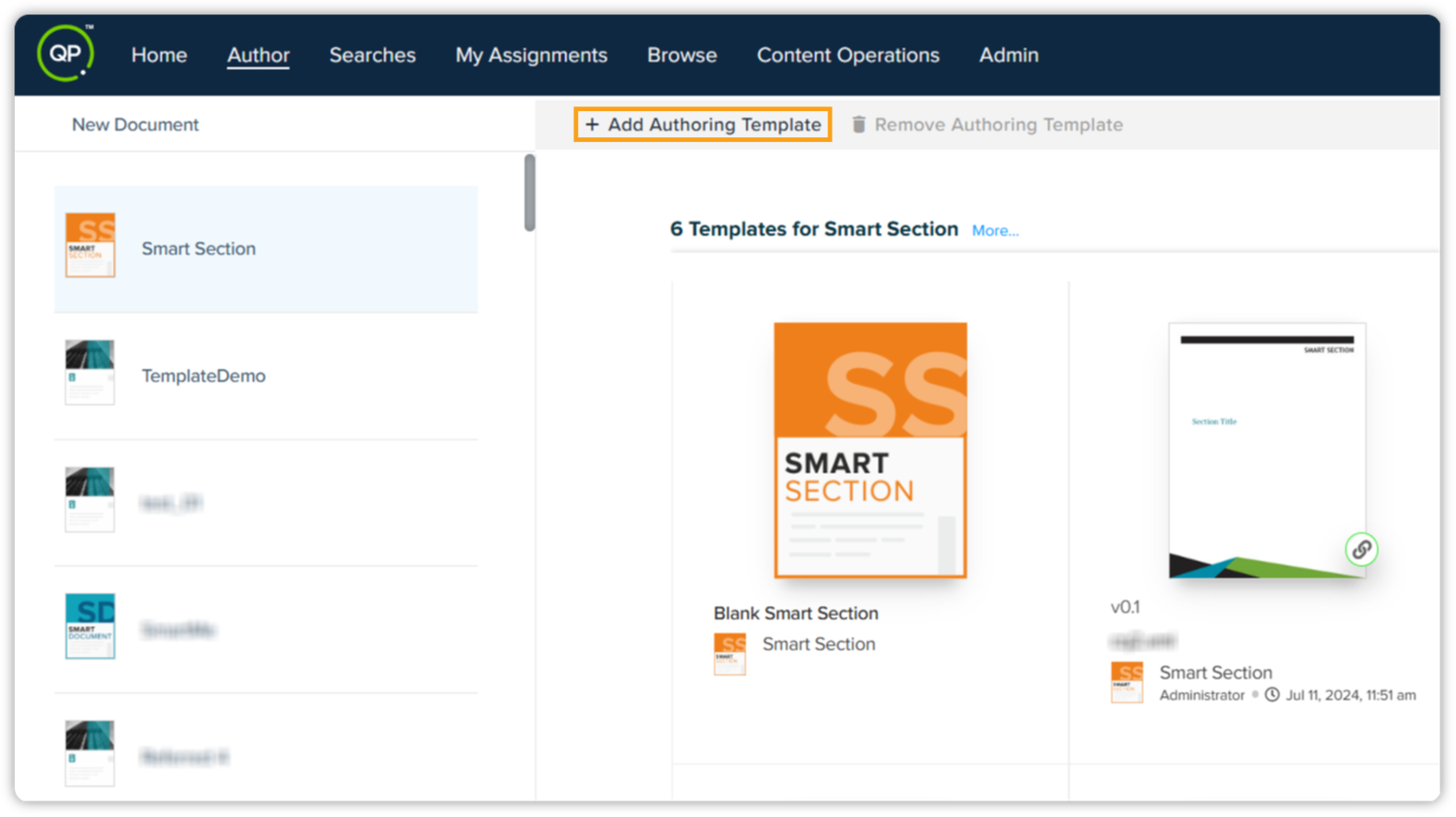
Add Authoring Template button in Quark Author -
Save as Authoring Template: An additional functionality enables you to save a document as an authoring template from within QA and QXA, providing unparalleled flexibility during the authoring process.
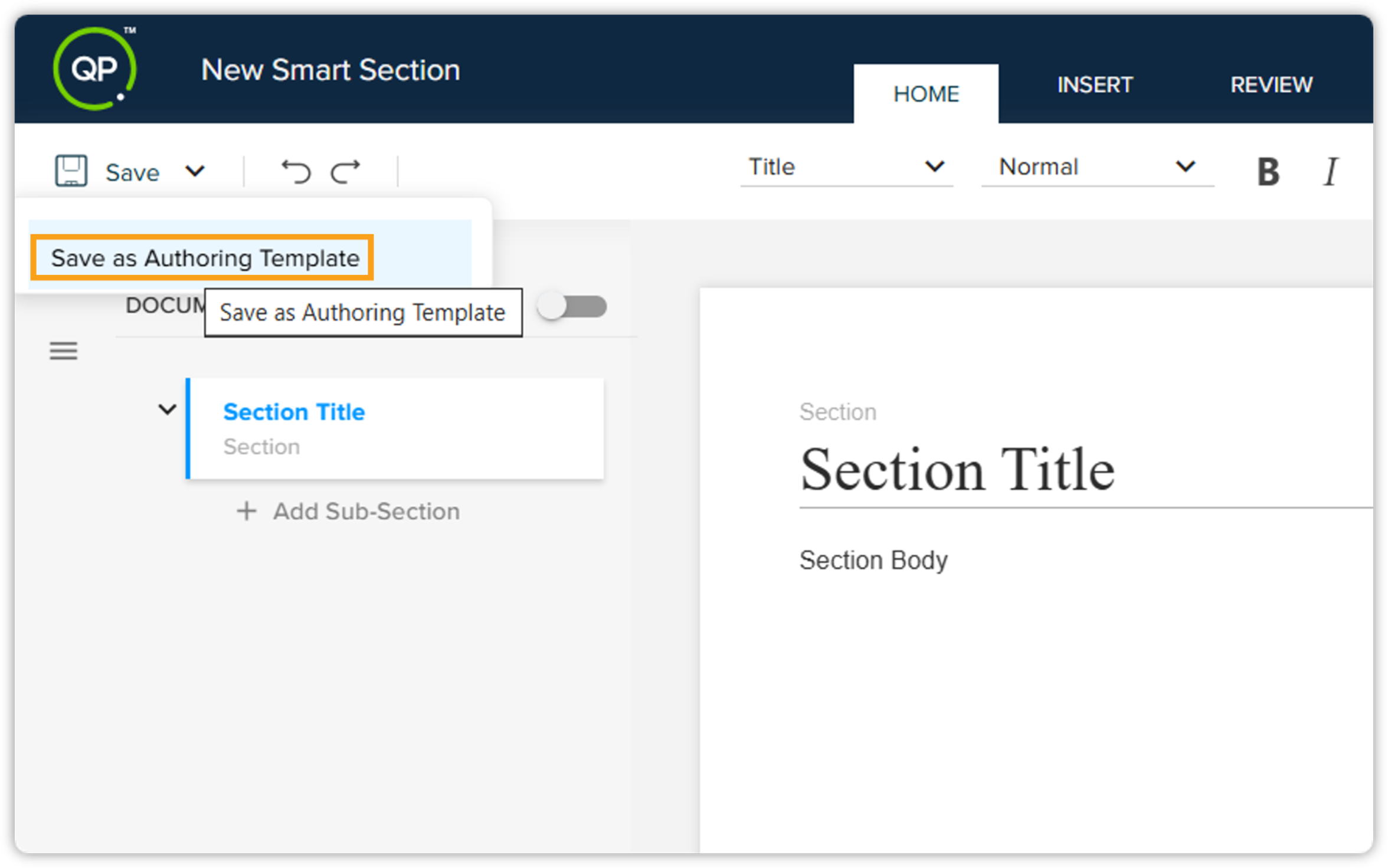
Save as Authoring Template option in document editor -
Managing Roles for Authoring Templates: You can set which roles can set or remove a document as an authoring template. This will help you manage the ownership and control of authoring templates, ensuring only authorized roles can create or modify templates.
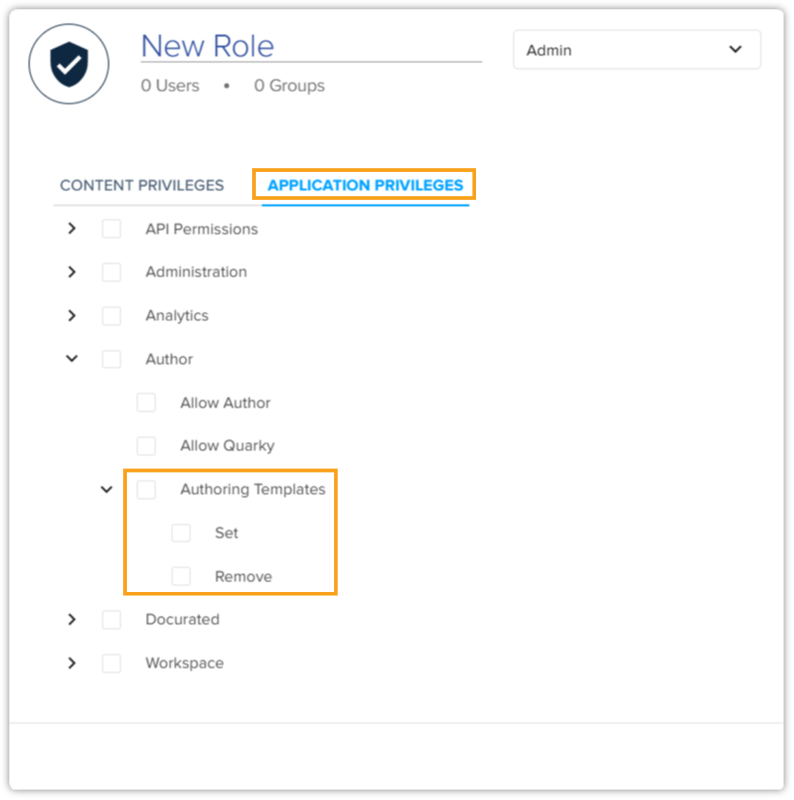
Authoring Templates privileges within Application Privileges
These key features are tailored to streamline the process of creating and utilizing authoring templates, providing a robust foundation for efficient and effective content authoring.
-
-
New User Interface for Setting Default Workflow and Status
We’re excited to introduce two powerful functionalities within the newly added Defaults tab, accessible via Admin > Document Types and Admin > Content Types. Previously, these capabilities were only available through backend configuration, but now they’re seamlessly integrated into the user interface.
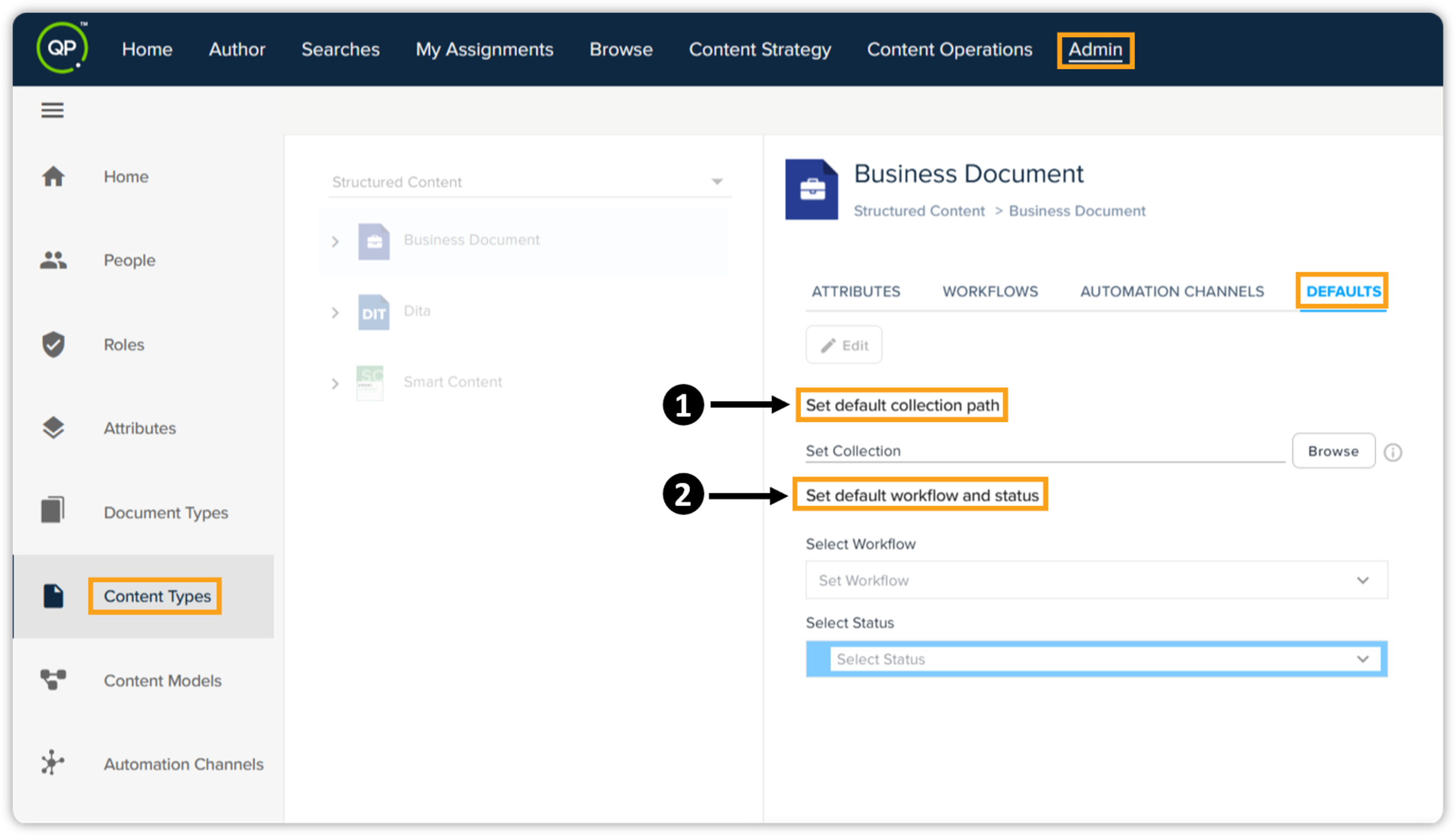
Defaults tab for Content Types and Document Types -
Configure Autosave Path for Documents: Content Architects can now set a default collection path for specific content types. This feature ensures that new documents are auto-saved based on the configured path, streamlining the document creation process and ensuring consistency in content storage.
-
Set Default Workflow and Status: To promote standardization in content creation, Content Architects can now set default workflows and statuses for specific content types. This new capability enables a more structured and uniform approach to managing content, ensuring that all new documents follow predefined workflows and statuses right from the outset.
-
-
Out-of-the-Box (OOB) Layout Options for Enhanced Document Layout Customization
We're excited to introduce a new feature that provides Out-of-the-Box (OOB) layout options linked to metadata. This enhancement empowers content writers to modify specific design and layout parameters directly within the authoring environment. Until now, content writers have faced limitations in adjusting the design and layout of their documents during the preview and publishing stages. This lack of flexibility has made it challenging for authors to visualize the final appearance of their documents before they're published.
With this functionality, users can now preview the look and feel of their documents in real-time, ensuring that their content meets the desired design specifications before publishing. This feature is available in both Quark Author and the Quark XML Author (QXA adapter), allowing for seamless integration and enhanced user experience across our platforms.
Key benefits
-
Increased Flexibility: Content writers can now make precise design and layout adjustments during the authoring process.
-
Enhanced Preview Accuracy: Authors can tweak layout options to preview the final design of their documents before publishing, reducing the need for post-publishing corrections.
-
Streamlined Workflow: The ability to adjust layout parameters in real-time simplifies the authoring process, improving overall efficiency.
-
Quark XML Author (QXA)
-
Introducing Dependent Attribute Support in Meta for QXA
This release of QPP NextGen platform includes the addition of support for dependent attributes in meta for Quark XML Author (QXA). This enhancement aligns QXA with the capabilities previously introduced in Quark Author, providing a seamless display of linked dependent attribute values in content model properties, enabling real-time updates.
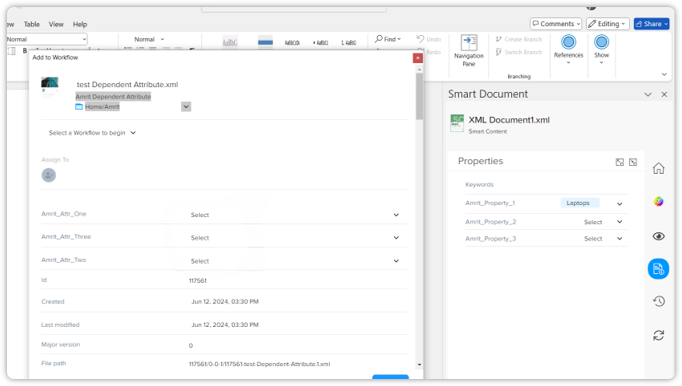
Dependent attribute support in Meta Key highlights:
-
Efficient Content Model Management: Manage content model properties linked to dependent attributes with ease, enhancing the workflow for content creation and management.
-
Real-time Data Reflection: Immediate updates in content model properties, providing real-time representation of linked dependent attribute values.
-
Enhanced User Experience: Offers a more intuitive and user-friendly experience, empowering users to make meaningful connections between content model properties and dependent attributes.
This update significantly improves the content creation and management experience for QXA users, equipping them with tools to streamline their workflow and maintain an up-to-date representation of their content.
-
-
Support for Asset Picker Metadata Field in QXA Smart Document Metapane
We’re excited to introduce the asset picker metadata field in the QXA Smart Document metapane. This new feature allows users to:
-
Integrate an asset picker field in the meta pane, enabling easy browsing and selection of relevant assets from the available repository in QPP NextGen.
-
Visually display the selected asset's name within the meta pane, providing a clear overview of the attached asset.
-
Configure the asset picker to support various asset types, including images, videos, smart documents/sections, and smart tables, enabling users to attach diverse content to their documents.
-
Remove and replace previously selected assets directly from the asset picker field.
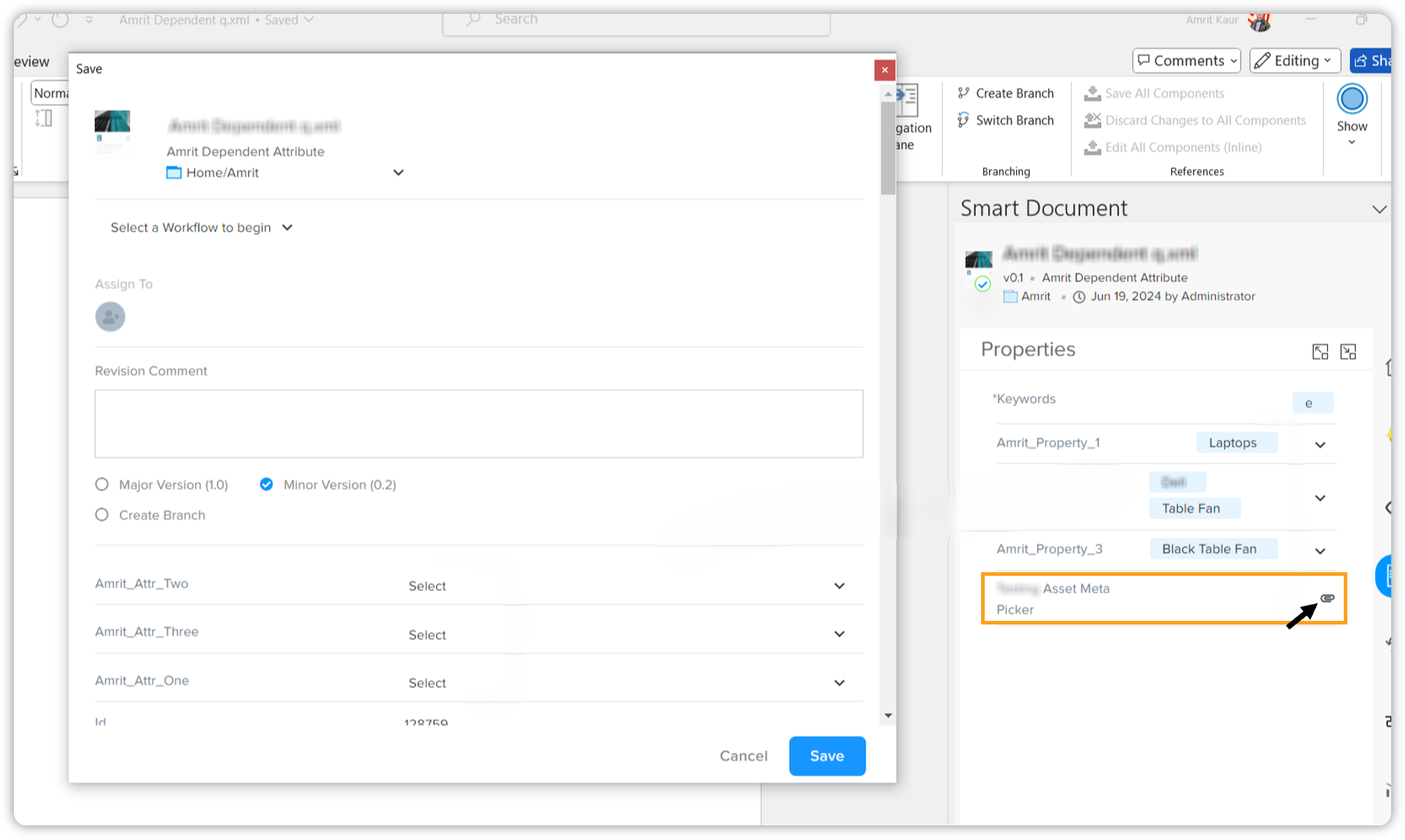
Asset picker metadata field is highlighted Please note that there is no maintenance of the relation between the asset selected via the asset picker from the meta pane and the current document, as already implemented in Quark Author. -
-
Introducing Data Integration Support in QXA
The highly anticipated data integration feature that was previously available for Quark Author is now also available for Quark XML Author. This feature allows you to seamlessly integrate external data sources, such as Excel, directly into the Quark XML Author, providing the same level of flexibility and efficiency previously introduced in the QPP NextGen platform.
Key highlights:
-
Streamlined Integration: Effortlessly connect and integrate external data sources, including Excel, into the Quark XML Author without the need for complex manual processes or 3rd party tools.
-
Enhanced User Empowerment: Empower users to independently manage and integrate external data, saving valuable time and resources.
-
Seamless Transition: Enjoy a smooth and intuitive integration process with user-friendly interfaces, making the feature accessible to all users regardless of technical expertise.
With this update, we continue to improve the Quark XML Author, ensuring that our users have the tools they need to manage and utilize external data effectively.
-
-
Ability to Replace from Server on Inline Sections in QXA
We’ve introduced the ability to use the "Replace from Server" functionality directly within inline sections in Quark XML Author. Previously, users needed to create a component for an inline section to use this functionality. This enhancement allows content writers to streamline their workflow by eliminating the need to create separate components, thereby reducing manual effort and improving efficiency.
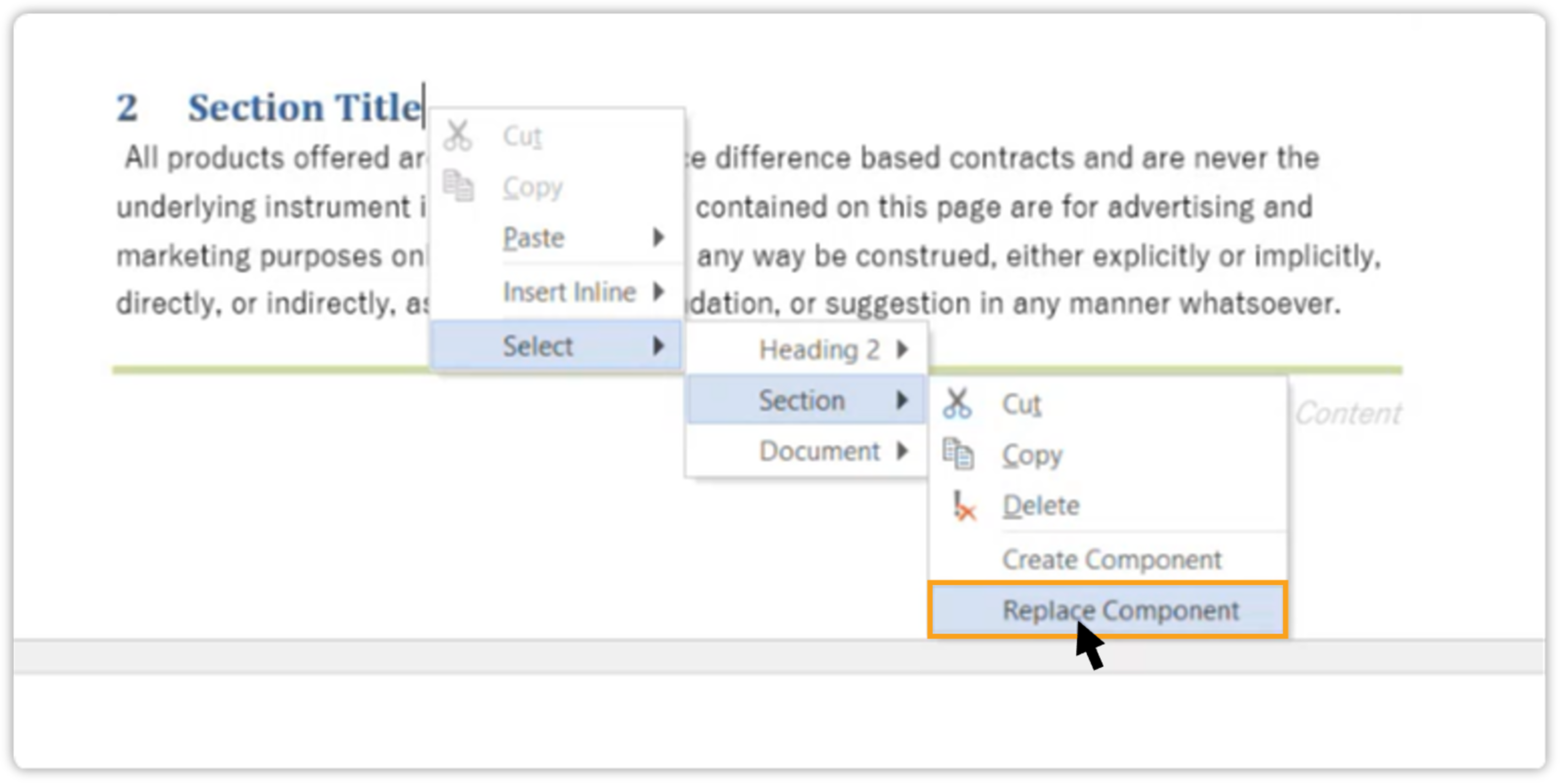
Replace from Server functionality is available within Inline Sections Additionally, the functionality previously known as "Replace Reference" has been renamed to "Replace Component" to better reflect its purpose and usage.
Enhancements
Web Application
-
Enhanced Preview Usability in Quark Author and Quark XML Author
We’re excited to announce significant enhancements to the preview usability in Quark Author (QA) and Quark XML Author (QXA) in this release of QPP NextGen platform.
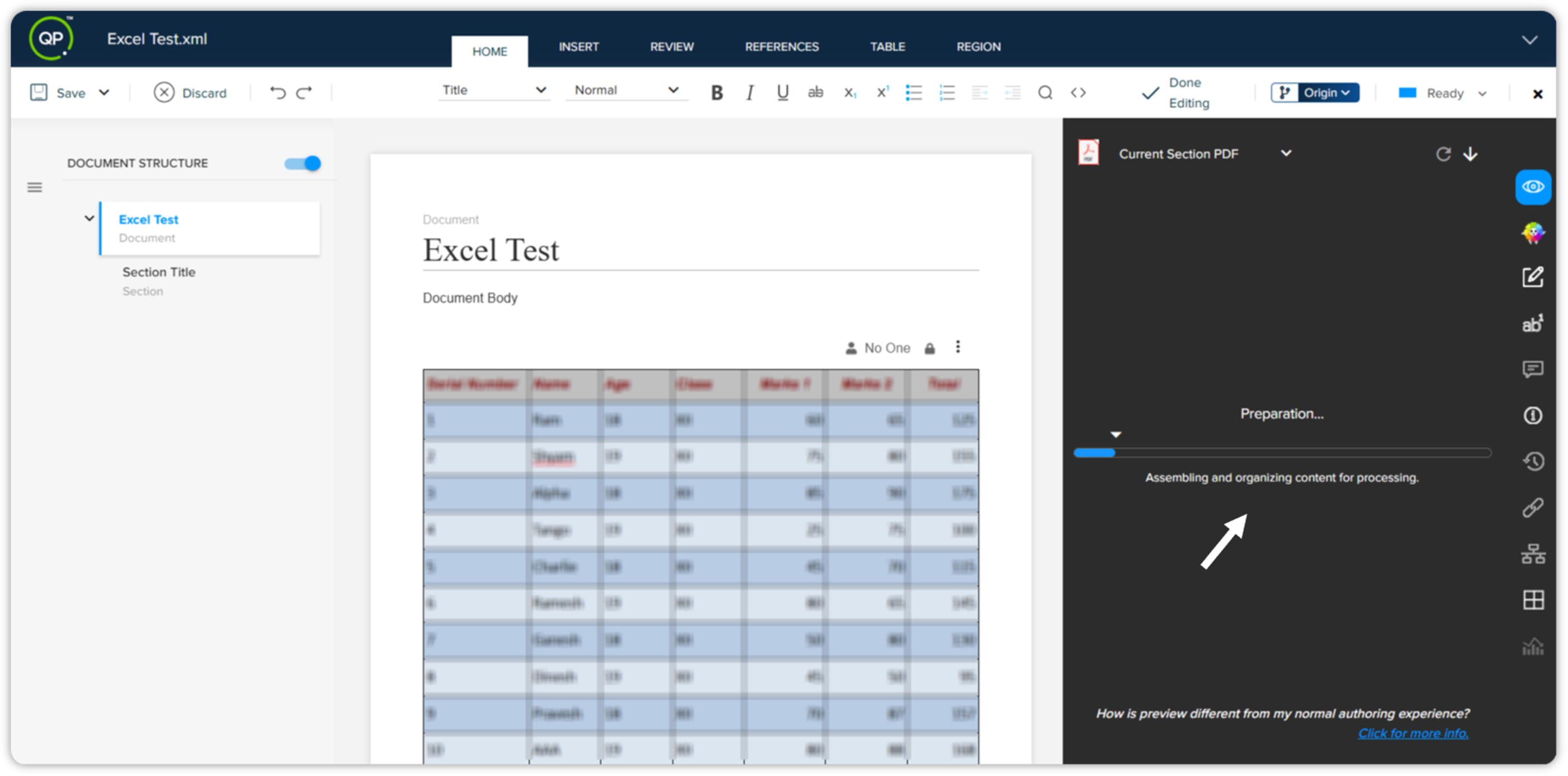
Preview is being generated Key highlights:
-
Efficient Page and Section Preview: You can now quickly preview the current page and entire current section in QA and QXA, allowing for a seamless preview experience to visualize document changes efficiently.
-
Clear Progress Indicators: The preview feature provides clear progress indicators, ensuring users have visibility into the completion stages and progress while generating previews.
-
In-Application Guidance for Preview: In-application guidance has been incorporated to assist content writers in understanding the variances between preview and typical authoring experiences, directing them to a Knowledge Base article for detailed insights.
-
Dedicated Preview Generation Button: A dedicated button to generate the preview upon navigating to the preview pane for the first time has been introduced, enabling users to initiate previews conveniently without unnecessary requests.
These enhancements aim to improve the preview usability in Quark Author and Quark XML Author, offering content writers a more efficient and informative previewing experience to ensure the quality and accuracy of their final document output.
We've added a new parameter for Current Section and Current Page previews. For more information, please refer to How to add Automation Channel Params using APIs. -
-
Quark Author's Table Column Formatting Enhancements
We've made a significant enhancement to the QPP NextGen platform that will greatly improve the user experience for content writers. With this update, users can now maintain the width and formatting of table columns in both preview and publishing stages, ensuring accurate and visually appealing content delivery.
Key highlights:
-
Retained Table Column Width: Say goodbye to the frustration of losing the width of your table columns during the preview and publishing process. The Quark Author (QA) within QPP NextGen now ensures that the width of table columns remains intact, providing content writers with precise and consistent layouts.
-
Preserved Cell and Font Colors: Enhancing your content with colorful elements is now more seamless than ever. The platform retains the cell colors and font colors of table columns in both preview and publishing stages, allowing content writers to maintain the visual integrity of their content.
-
-
Control Visibility of Attributes in Save Dialogue
We're introducing the ability to control the visibility of form attributes within the Save Dialogue. This enhancement provides developers with the flexibility to toggle the visibility of attributes which include Name, Content Type, Revision Comment, and Version Selection.
Key highlights:
-
Improved User Experience: Customize the Save Dialogue to display only the necessary attributes, streamlining the saving process.
-
Increased Flexibility: Developers can tailor the Save Dialogue to better suit their workflow and project requirements.
-
Enhanced Customization: Specifically designed for better integration with our DOCX Converter tool, which works in conjunction with the QPP Server.
This feature will be available for both the QPP NextGen platform and the DOCX Converter tool, enhancing the overall customization and user experience.
-
-
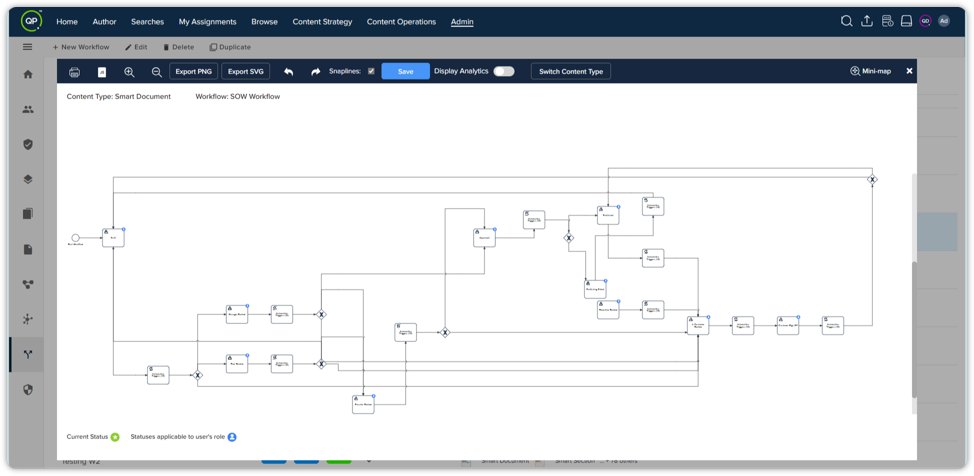
Enhanced Workflow Visualization Access
In this release, we're introducing an enhanced workflow visualization experience and a new contributor view feature. You can now enjoy a more intuitive workflow management process with improved visualization access and enhanced insights into your contributions to the content workflow.
Key highlights:
-
Enhanced workflow visualization access:

-
Access workflow visualizations seamlessly within the workflow tab for improved usability.
-
Effortlessly choose and modify content types using the drop-down menu within the visualization window.
-
Navigate back to the workflow tab easily from the visualization view for streamlined workflow management.
-
-
Keep an eye on your contribution
-
Seamlessly transition to the visual representation of the current workflow with enhanced accessibility.
-
Gain deep insights into your involvement in the workflow by viewing your role and tasks highlighted in the workflow diagram.
-
Access a detailed workflow diagram showcasing the current state of the document and possible transitions in a new pop-up window by hitting the "View Workflow" button in the document details pane.
-
-
-
Persistent Preview Channel Selection
We've improved the user experience in Quark Author (QA) and Quark XML Author (QXA) by ensuring that your preview channel selection persists when switching tabs in the Smart Pane. This enhancement saves time and reduces frustration by maintaining the preview channel as per your last selection, unless you choose to change it. Enjoy a smoother and more efficient workflow with this update.
-
Configurable Workflow Integration Checkbox
With this release, users now have the ability to configure the visibility of the workflow customization option within the DOCX Converter tool. This new functionality empowers users to tailor their experience according to their specific needs and preferences.
By enabling or disabling the workflow integration checkbox, users can choose whether to expose the workflow customization feature in the tool's user interface.
Quark XML Author
-
Enhance Your Writing with Our Latest Usability Updates in QXA
We've made some significant usability improvements in Quark XML Author to enhance your content creation experience.
Key highlights:
-
Consistent Increase/Decrease Scope Functionality: We've refined the "Increase/decrease Scope" feature to ensure it operates seamlessly across all elements, including figures and lists. This improvement provides a more reliable and predictable way to adjust the scope of your document's components, streamlining your editing process.
-
Dynamic Paragraph Type Drop-down: The paragraph type drop-down now updates dynamically to reflect the type of the currently selected content. This real-time update allows you to immediately see and understand the paragraph type you're working with, reducing the need for manual checks and improving your efficiency.
These enhancements are designed to make your experience with Quark XML Author more efficient and enjoyable, allowing you to focus on creating high-quality content without the hassle of dealing with inconsistent or outdated functionality.
-
-
Enhanced Content Pasting Accuracy from Microsoft Word
We've made a significant enhancement to the Quark XML Author (QXA) Adapter that focuses on improving users' content pasting experience. With this update, users can now enjoy accurate and comprehensive content pasting from Microsoft Word to QXA, preserving formatting and data integrity, including footnotes.
Key highlights:
-
Accurate and Complete Content Pasting: Say goodbye to the frustration of lost or repetitive content. Pasting content from Word to QXA now ensures the retention of all original information, including footnotes, without any loss or duplication.
-
Preservation of Footnote Styling: Whether it's a bold text or any other styling applied to footnotes, you can now have confidence that the content won’t repeat or lose data, thus maintaining consistency and integrity throughout the pasting process.
-
-
Accurate Reflection of Spaces Between Paragraphs in Preview
We've enhanced the preview functionality to ensure that spaces between paragraphs are accurately reflected. This update maintains the intended layout and formatting, ensuring that the final output matches the desired design. Any spaces between paragraphs in the content will now be represented in the preview without being disregarded.
-
Schema Validation During Auto-Save in QXA
We've enhanced the Quark XML Author (QXA) adapter for Microsoft Word to include schema validation during the auto-save process. This ensures that content writers are promptly notified of any schema validation issues, preventing potential document corruption.
If a schema is found to be invalid, changes will automatically revert to the last non-corrupt save point, maintaining the integrity of your document and providing a smoother editing experience.
-
Metadata Support for Structured Elements in QXA
We're excited to announce the completion of phase 2 of our enhancement for metadata support in Quark XML Author (QXA). This phase introduces metadata support for the Image element in QXA. With this update, you can now view and manage metadata for Image elements directly within the Smart Document pane, ensuring seamless integration and improved document handling.
This enhancement builds upon the foundation laid in Phase 1, providing a more robust and comprehensive metadata support system for structured elements in QXA.
QPP Server
-
Introducing Keycloak Health Check
We're introducing a new health check feature for Keycloak in this release. This enhancement was developed with a focus on enabling devops to monitor the health and auto-recovery of platform services, ensuring greater stability and reliability.
Key highlights
-
Allows system administrators to proactively monitor the health of Keycloak and related services.
-
Facilitates timely identification of issues and automatic recovery, enhancing overall platform resilience.
Configuration requirements
To enable this feature, specific configurations must be applied. Detailed instructions are provided in the Configuration section of the migration guide. Please refer to it to ensure proper setup and utilization of this new functionality.
-
-
Enhanced Import/Export APIs for Streamlined Configuration Management
We're introducing new and improved APIs to import and export critical system configurations, aimed at streamlining the configuration management process and enhancing system stability. With these enhancements, you will be able to efficiently manage system configurations by automating the import/export of Domains, Attributes, Content Types, Searches, Workflow, Roles, Groups, Users, and Collections across different instances.
These improvements are designed to empower system administrators and configuration managers to efficiently handle system configurations, promoting consistency, operational efficiency, and system stability across multiple instances.
For detailed information, please refer to the API section in the migration guide. -
Upgrade of Aspose Libraries for Aspose Word and Aspose PDF
In this release of QPP NextGen, we're upgrading the Aspose libraries for Aspose Word and Aspose PDF to version 24.3.0 and 24.3 respectively. This upgrade ensures improved functionality, enhanced features, and greater system stability, aligning with the latest standards and capabilities provided by Aspose.
This enhancement will provide admins with a more robust and efficient environment for managing and maintaining system components and functionalities.
-
Streamlined Privileges Upgrade for Enhanced Efficiency
We're introducing a new feature in this release that automates the privileges upgrade process.
-
This enhancement ensures that IT Managers automatically receive the latest privileges for their licenses, enabling a seamless and efficient upgrade experience.
-
Additionally, addon privileges are now represented separately within the system, allowing QLM Managers to easily identify and enable them according to the specific requirements to their environment.
This streamlined approach simplifies privilege management and enhances overall system functionality.
-
-
Enhanced Security with Controlled Error Messages in QueryQuest Service
We've enhanced the security of our QPP NextGen platform by modifying the error handling for qcpqueryquest service APIs. Previously, error responses displayed the code stack trace, which posed a security risk. Now, the stack trace won't be displayed by default in case of failures, addressing a low-risk security issue identified by Coalfire 2024.
The stack trace will only be shown when required for debugging in specific environments, ensuring a more secure and controlled error reporting mechanism.
Resolved Issues
We're pleased to announce that the following issues reported by our customers have been resolved in this release. These fixes span across our web platform QPP NextGen, MS Word Adapter Quark XML Author (QXA), and QPP Server.
Web Application
-
Collection Tree Hierarchy in Workspace
-
Previously: The collection tree hierarchy was not displayed correctly.
-
After fix: The collection tree now accurately displays the correct hierarchy of collections and folders.
-
-
Duplicate Content Model Issue
-
Previously: Attempting to duplicate the SoP content model resulted in an error message.
-
After fix: Users can now successfully duplicate the content model without encountering errors.
-
-
AFTER_REVERT_TO_VERSION_ACTION Event on Revert to Previous Version
-
Previously: The AFTER_REVERT_TO_VERSION_ACTION event was not consistently triggered when using the Revert to Previous Version functionality.
-
After Fix: The platform now reliably triggers the AFTER_REVERT_TO_VERSION_ACTION event during the Revert to Previous Version process.
-
-
Publishing Fails on Adding Special Characters (<,>) in Table Notes
-
Previously: Preview stopped working when special characters (<,>) were added in table notes.
-
After Fix: The platform now handles special characters in table notes correctly. The preview works as expected even if track changes are ‘On’ and special characters are added.
-
Quark XML Author (QXA)
-
Applied Paragraph Style Not Displayed in Home Tab
-
Previously: Applied paragraph styles were not displayed, with the "Normal" style being shown in all cases.
-
After Fix: The correct paragraph style is now displayed.
-
-
Download Option in Smart Document Pane Not Working
-
Previously: The download option was non-functional in the document preview of the Smart Document pane.
-
After Fix: The download option now functions as expected, similar to its behavior in Workspace.
-
-
Excel Tables Formatting in Patch 3.3.2
-
Previously: Formatting was lost when attaching Excel files.
-
After fix: The original formatting of attached Excel files is now preserved.
-
-
Text Type Indication
-
Previously: It was difficult to identify the type of text entered.
-
After Fix: The type of text entered is now highlighted in the menus for easy identification.
-
-
Spell Check Modifying Read-Only Components
-
Previously: Read-only components were inadvertently modified during spell check.
-
After Fix: Read-only components remain unchanged during spell check.
-
-
Preview Loading Unnecessarily When Switching Panes
-
Previously: Switching between side panes (from preview to properties pane) caused unnecessary preview loading, even without content changes.
-
After Fix: The preview no longer loads unnecessarily when switching panes.
-
-
Words with Emphasis Deleted When Changing Paragraph Type
-
Previously: Words with emphasis were deleted when changing the paragraph type back to normal.
-
After Fix: Emphasized words are no longer deleted.
-
-
Copy/Paste Issues from Source Word Document
-
Previously: Additional spaces or content loss occurred during copy/paste from source Word documents.
-
After Fix: Copying and pasting content no longer results in additional spaces or content loss.
-
-
Missing Space Between Consecutive Bold Words in Publishing Output
-
Previously: Space between consecutive bold words was missing in the publishing output.
-
After Fix: Correct spacing is maintained in the publishing output.
-
-
Properties Not Retained for Figures
-
Previously: Properties were not retained for two figures in a document.
-
After Fix: Properties for figures are now correctly retained.
-
-
Content Model Breaks with White Spaces in Attribute Names
-
Previously: Creating collection type attributes with member names containing white spaces caused the content model to break.
-
After Fix: Quark Author now prevents adding member names with white spaces, avoiding breakage of Quark XML Author.
-
-
Missing Content in Publishing Output
-
Previously: Content visible on the canvas was missing in the publishing output.
-
After Fix: Content on the canvas is now correctly rendered in the publishing output.
-
-
Error Opening Compliance File
-
Previously: An error message appeared when attempting to open a compliance document.
-
After Fix: Compliance documents now open without errors.
-
-
User Logged Off While Working
-
Previously: Users were logged off while still working in QXA.
-
After Fix: Users remain logged in while actively working.
-
-
Document Invalidated by Missing Element
-
Previously: Copying bullet points from a source DOCX to XML document caused the document to become invalidated due to a missing <p> element inside the <li> element.
-
After Fix: Document now opens successfully without validation errors.
-
-
Smart Enter Not Working in Publishing Output
-
Previously: The "Smart Enter" feature was non-functional in the publishing output.
-
After Fix: "Smart Enter" now works correctly in the PDF custom channel output.
-
-
Document Corruption When Changing Lists to Paragraphs
-
Previously: Changing a bulleted/numbered list back to a normal paragraph corrupted the document.
-
After Fix: Lists are now converted back to normal paragraphs without corrupting the document.
-
QPP Server
-
Row Height Increases in Smart Document Preview
-
Previously: Row height increased unexpectedly in the preview, though it appeared correct on the canvas.
-
After Fix: Row height now remains consistent between the canvas and the preview.
-
-
Access After Agreement Expiry
-
Previously: Users could access the platform even after their agreement tenure had expired.
-
After Fix: Users are now blocked from accessing the platform after their agreement expires, with a message displayed informing them of the expiry.
-
-
Publishing Issue with Branches
-
Previously: Publishing documents with multiple branches resulted in incorrect PDF outputs.
-
After Fix: Publishing now generates correct PDF outputs for documents with multiple branches.
-
-
Incorrect Excel Table Formatting in Financial Reports
-
Previously: Excel table formatting was not rendered correctly in financial report outputs.
-
After Fix: Excel table formatting is now accurately rendered in the outputs.
-
-
Exception Occurrence When Viewing Members with Collection Access
-
Previously: Clicking on the "Members" option caused a "Something went wrong" exception.
-
After Fix: The "Members" option now displays the users and groups with collection access without errors.
-