
September 17, 2024 — v4.1.1
Enhancements
Web Application
-
New Layout Options Tab in Meta Pane
We've added a dedicated tab for Layout Options within the meta pane of authoring applications (QA & QXA).
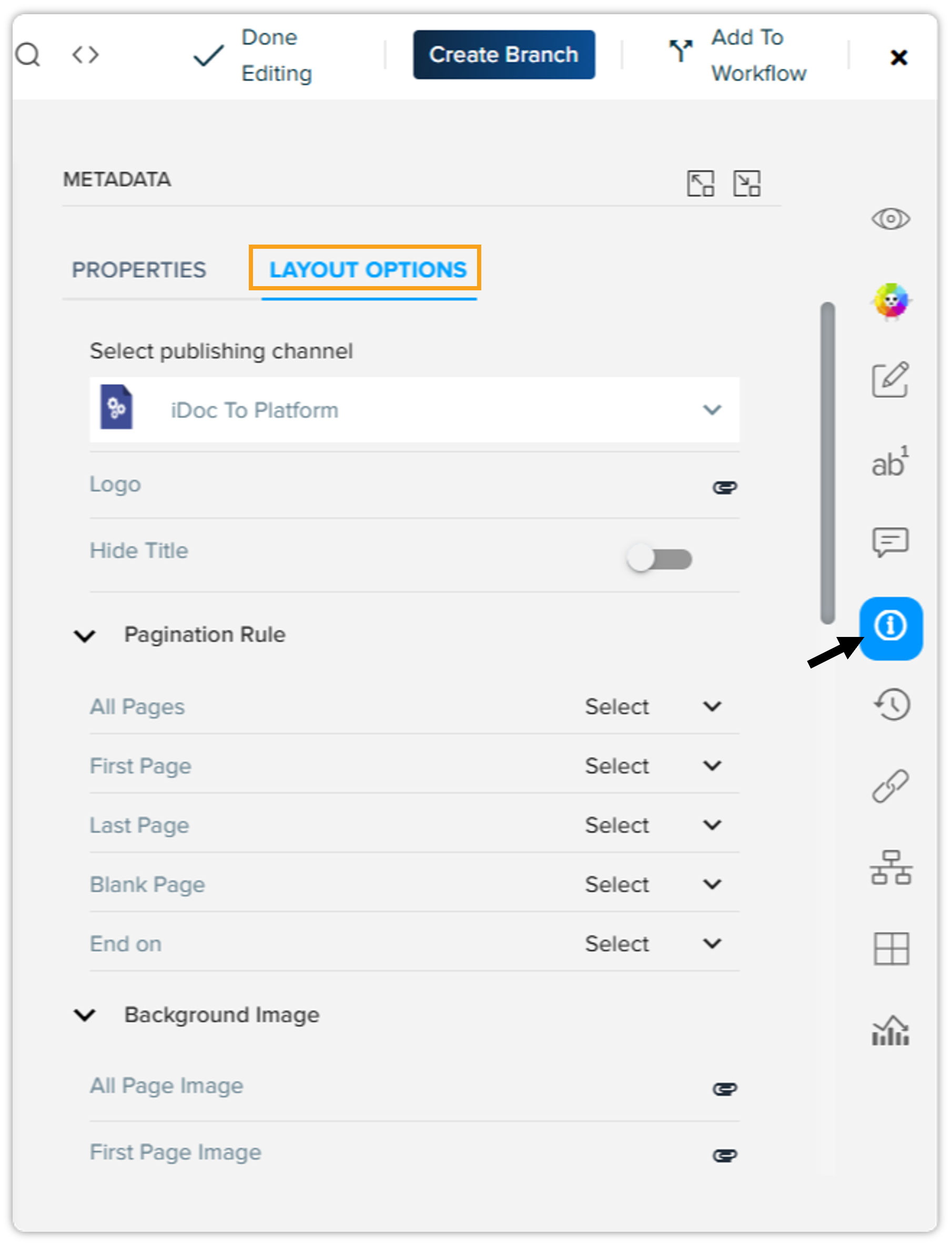
Layout Options in Quark Author (QA) 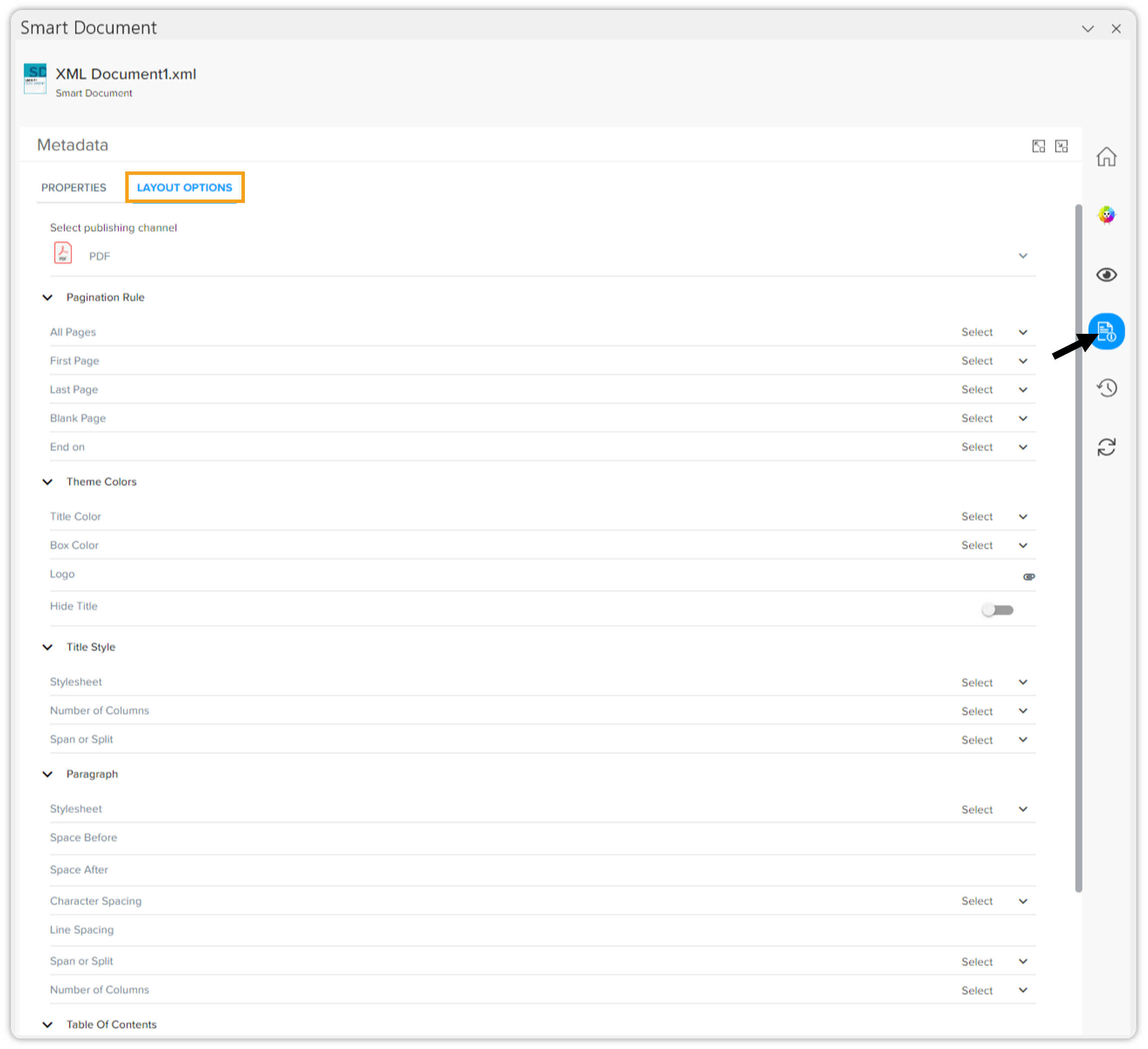
Layout Options in Quark XML Author (QXA) This enhancement provides the following improvements:
-
Efficient Management of Layout Values: Content writers can now easily manage layout option values in both Quark Author (QA) and Quark XML Author (QXA) environments for each publishing channel, streamlining the management process and allowing for quicker adjustments.
-
Convenient Preview Functionality: Content writers can now toggle or expand the preview window and switch between different preview channels directly from the Layout Options tab in QA/QXA. This feature offers a seamless experience for previewing content changes in real time, improving overall productivity.
-
Simplified Attribute Updates: The new tab allows for easy updates to attribute values related to layout options, making it simple to modify content as needed and maintain consistency across various publishing outputs.
-
-
Rate Limiting for API Calls
In response to security concerns, we've introduced the capability to implement rate limiting on API calls. This enhancement addresses potential vulnerabilities and bolsters server defenses against Distributed Denial of Service (DDoS) attacks. System administrators can now set customized rate limits, ensuring better control over API traffic and enhanced server protection. For details related to configuration, please refer to the migration guide.
Quark XML Author (QXA)
-
Improved Document Recovery Process
In response to user feedback, we've implemented a new feature that displays document details when recovering from a schema invalid error in QXA. This addition allows content writers to easily view the pertinent details of their document, facilitating a smoother recovery to the previous state without losing track of critical information.
-
Enhanced Performance for Word Pasting
We've made significant improvements to the performance of pasting content from Microsoft Word into documents with existing content in QXA. This enhancement allows content writers to paste text swiftly, eliminating unwanted delays.
DOCX Converter Tool v4.1.1
-
Support for Image Conversion
We're pleased to announce the addition of support for image conversion during the DOCX to XML conversion process. For example, if the embedded images are in EMF format, you can now choose to convert them to JPG or any other supported image format.
This flexibility ensures that users can optimize their images according to their needs while maintaining the integrity of the document.
-
Interoperability Improvements
In this release, we've addressed several issues related to interoperability within the DOCX Converter tool. These enhancements improve the tool’s compatibility with other Quark products, such as Quark Author (QA) and Quark XML Author (QXA), ensuring that users experience a consistent and efficient workflow when utilizing the DOCX Converter alongside other Quark tools.
Resolved Issues
Web Application
-
Automatic Scrolling on Document Selection
Users reported an issue where the collection listing screen didn't refresh properly when a document was selected, resulting in the QPP NextGen platform failing to automatically scroll down to the selected document. This issue has been addressed, and now the collection listing screen will refresh appropriately, ensuring that users can easily view the selected document as the screen scrolls down to its location.
-
Free Text Value List Display
An issue was identified regarding the free text (user-modifiable) value list property, where the QPP NextGen platform didn't display available values after a user deselected an option. This has been resolved, and now when a user deselects an option, the option control will continue to display the available values while correctly removing the deselected option from the list.
-
Properties Blade Functionality in Workspace
Users experienced a problem with the properties' blade in the workspace where no properties of an asset were displayed under certain conditions. We've fixed this issue, ensuring that the QPP NextGen platform will consistently display the applicable properties of documents regardless of the scenario, improving visibility and access to relevant asset information.
QPP Server
-
Collection Tree Display
Users reported that the collection tree in the Workspace was not displaying newly created collections. We've addressed this issue, and the collection tree now accurately reflects all available collections, ensuring users can easily access and manage their content.
-
TIFF Image Rendering in Document Rendition
An issue was identified with TIFF images not appearing in the document rendition when users created a business document in Quark XML Author (QXA) and subsequently verified the "DOCX Preview" PDF rendition.
This problem occurred due to the upgrade to Aspose Word v24.3.0 in the previous release, which introduced a TIFF rendering issue. To resolve this, we've reverted to the earlier version of Aspose Word v24.2.0 that doesn't exhibit this problem, ensuring that TIFF images are now correctly displayed in the rendition, enhancing document fidelity.
-
Retention of Citation Subtype in Refnote Elements
Users reported an issue with the refnotes subtype attribute not being retained during publishing. The subtype will now be consistently retained in refnote elements during publishing for special handling.
Quark XML Author (QXA)
-
Item Preservation of Hyperlinks in Footnotes
We've addressed a critical issue where hyperlinks embedded in footnotes were lost during conversion from DOCX files using our DOCX Converter. You can now convert your files without worrying about losing hyperlinks or associated content, ensuring a seamless transition to QXA.
-
Fix for Document Freezing During Track Changes
A problem that caused documents to freeze while utilizing the track changes functionality has been successfully resolved. You can now edit documents without interruptions, enhancing overall usability.
-
Bullet List Format Integrity
We've fixed an issue where bullet lists were unintentionally converted to numbered lists upon pasting into QXA. Now, bullet lists will retain their original formatting during paste operations, providing a consistent and accurate editing experience.
-
Accurate PDF Generation from Selected Pages
Previously, clicking on a hyperlink resulted in generating a PDF for the entire document instead of just the current page. This issue has been rectified, and you can now generate PDFs that accurately reflect only the selected page, simplifying document review.
-
Improved Responsiveness in QXA
Users reported slowness in QXA when working on certain types of documents, particularly financial reports. We've investigated and resolved these performance issues, allowing users to work without lag or delay.
-
Last Bullet Item Copying Issue Resolved
An issue was identified where the last bullet item was mistakenly copied as regular body text. This has been corrected, and now the last bullet item will maintain its bullet formatting during copy operations.
-
PDF Preview Layout Enhancement
We've addressed a bug where the entire layout PDF was generated when selecting the current page upon clicking inside an Excel table. The PDF preview now correctly reflects only the specified page, improving user accuracy and experience.
-
Data Integrity in Review Comments Import
Users encountered a significant issue where selecting the option to import review comments led to the removal of list items from the content. This problem has been fixed, ensuring that all relevant data is imported accurately without loss during the review process.
-
Document Opening Speed Improvements
Another critical performance issue was identified where documents took an excessive amount of time to open from the server. We've optimized the opening process, and documents should now load within seconds, allowing users to navigate and select content efficiently.
-
Corrected Preview Functionality
Users reported that the preview function displayed the content of the latest version rather than the selected version. We've implemented corrections, and now the preview will accurately reflect the content from the chosen version, ensuring that users can review the appropriate draft.
-
Table Note Behavior Consistency Restored
After migrating to version 4.0.4, users experienced inconsistent behavior with table notes, particularly when trying to delete them using the Backspace key. We've resolved this issue, and the table notes will now function as intended.
-
Two Issues Resolved in Review Comments Import
-
We've fixed an issue where review comments were not included when documents were sent for review. You can now rest assured that all comments and changes will be imported seamlessly.
-
Additionally, we've addressed a problem with importing review comments containing formatted text, ensuring that all such comments are now accurately captured.
-
-
Fixes for Smart Copy-Paste Functionality
We've resolved several errors related to the smart copy-paste feature. You can now perform smart copy-paste actions without encountering errors, including the successful copying of flowcharts, enhancing user capability for complex documents.
-
Cross-Reference Errors During Publishing
Users reported issues with cross-references not functioning correctly while publishing documents, resulting in error messages in the PDF preview. This problem has been addressed, and all cross-references will now work properly, eliminating any previous error notifications.
-
Resolved Slowness During Copy-Paste Operations
Users experienced performance issues, particularly slowness when copying and pasting content. We've optimized this function, and you'll now enjoy a fluid and responsive experience during copy-paste actions.
-
Mitigation of Data Loss During Copy-Paste
An issue leading to data loss during copy-paste operations has been resolved. You can now perform these actions without fear of losing critical content.
Known Issues
-
Publishing Failure with Pagination Rule
It has been noted during testing that publishing fails when only the last page is selected within the pagination rule.
-
QXA Smart Content Interoperability
-
Opening an QA document in QXA that includes an inline equation within a list is not possible.
-
Comments added in QA lose their replies when the document is opened and saved in QXA.
-
The dimensions of images or charts inserted from Quark Author don't display correctly in Quark XML Author.
-
Footnotes added to hyperlinked content in Quark Author are removed when the document is opened in QXA.
-
An error occurs when attempting to open a document created in Quark Author that includes a footnote within a figure title in QXA.
-
Content with strikethrough formatting is lost when a QA citation document is opened in QXA.
-
Table note text in a QA document, which has emphasis and a link applied, disappears upon opening the document in QXA.
-
-
QXA Smart Content & BusDoc
-
Users are currently able to copy and paste content that contains hyperlinks and character formatting into footnote text, which shouldn't be allowed.
-
-
QXA Smart Content
-
Users face difficulties in applying a user-defined emphasis if the emphasis name contains a hyphen ("-") in documents created with QXA Smart content (this issue doesn't occur in QA).
-
When importing a Word review document, numbered lists that utilize the "Continue Numbering" feature don't display correctly in the Smart Document.
-
-
QXA Smart Content Smart Paste
An additional blank paragraph is inadvertently added when pasting content from Word into a smart document.
We're actively working on resolving these issues, and they will be addressed in the next release.