
June 05, 2025 — v4.3.3
New Features/Enhancements
Web Application
-
Streamlined Component Pinning with New Bulk Actions
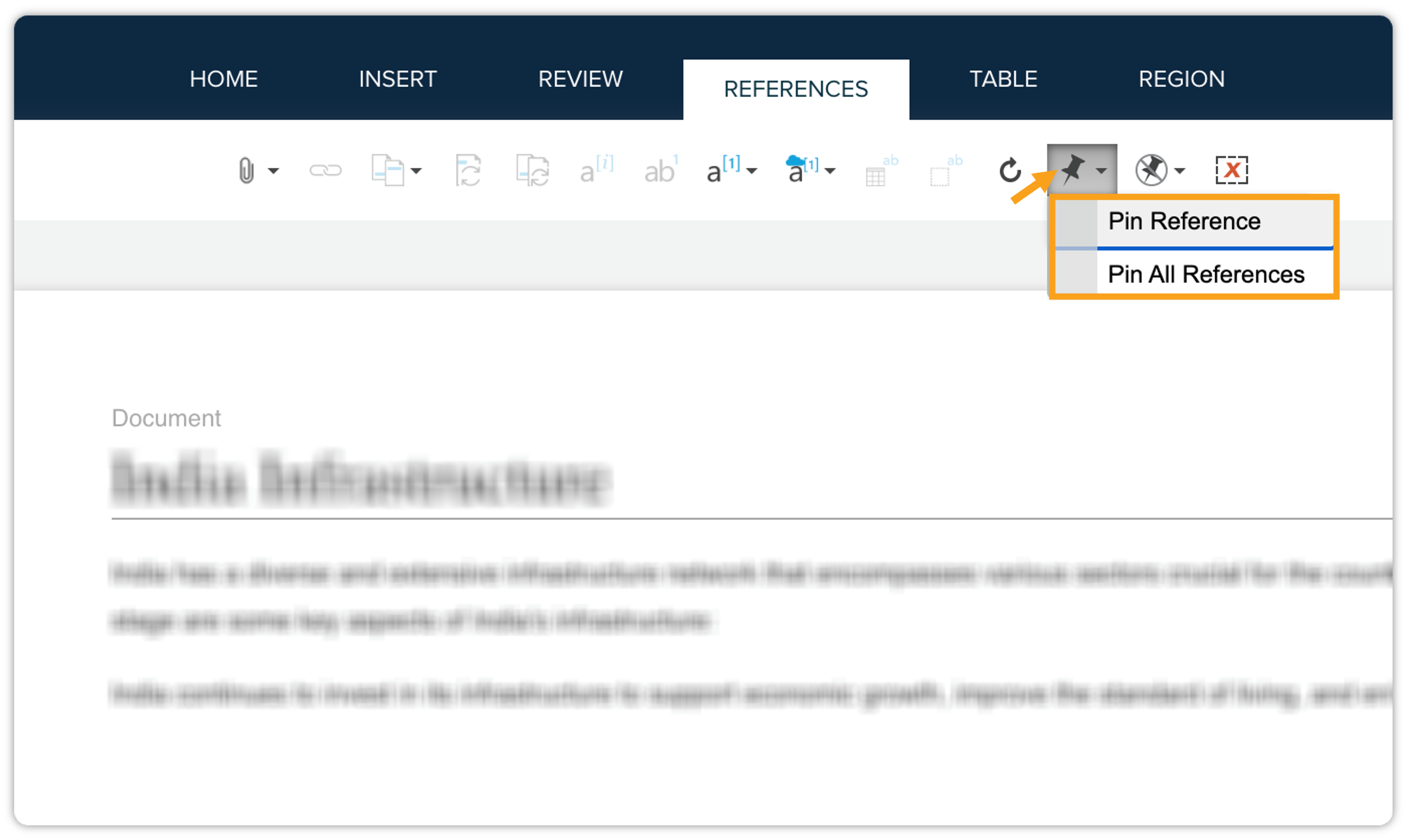
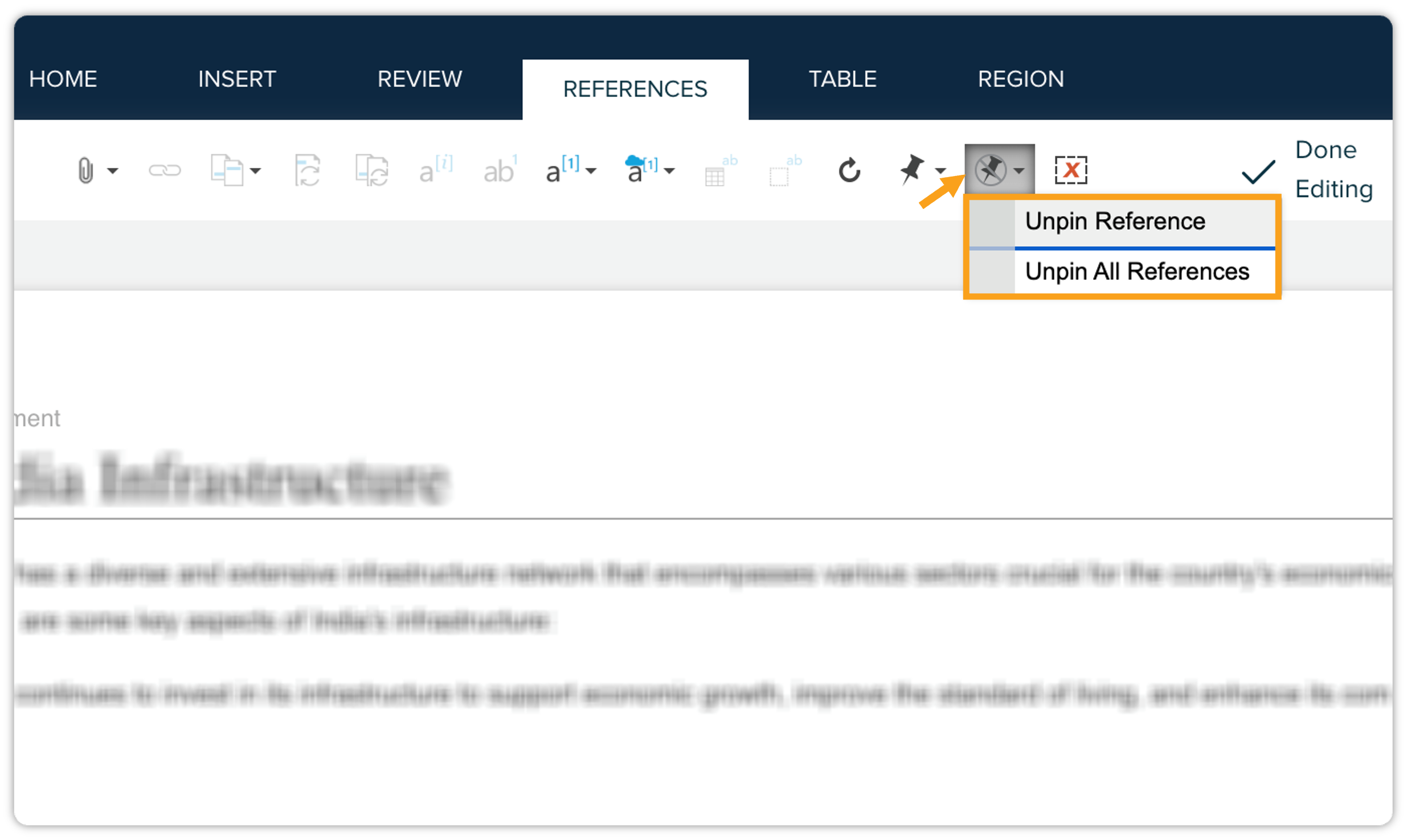
The component pinning functionality has been expanded to include bulk pinning and unpinning actions for references, enabling users to manage large documents more efficiently. New Pin All References and Unpin All References options have been added, significantly reducing the number of steps to pin and unpin all components.
Previously, users could only pin or unpin references individually, which was time-consuming and inefficient for large documents with many components. We've now enhanced the pinning functionality with bulk actions:
-
Pinning References: Now includes two options: Pin Reference and Pin All References.
-
Unpinning References: Now includes two options: Unpin Reference and Unpin All References.
-
-
Usability Enhancements in Quark Publishing Platform NextGen
This release introduces several usability enhancements to the QPP NextGen platform, designed to improve user experience and workflow efficiency.
Key updates include:
-
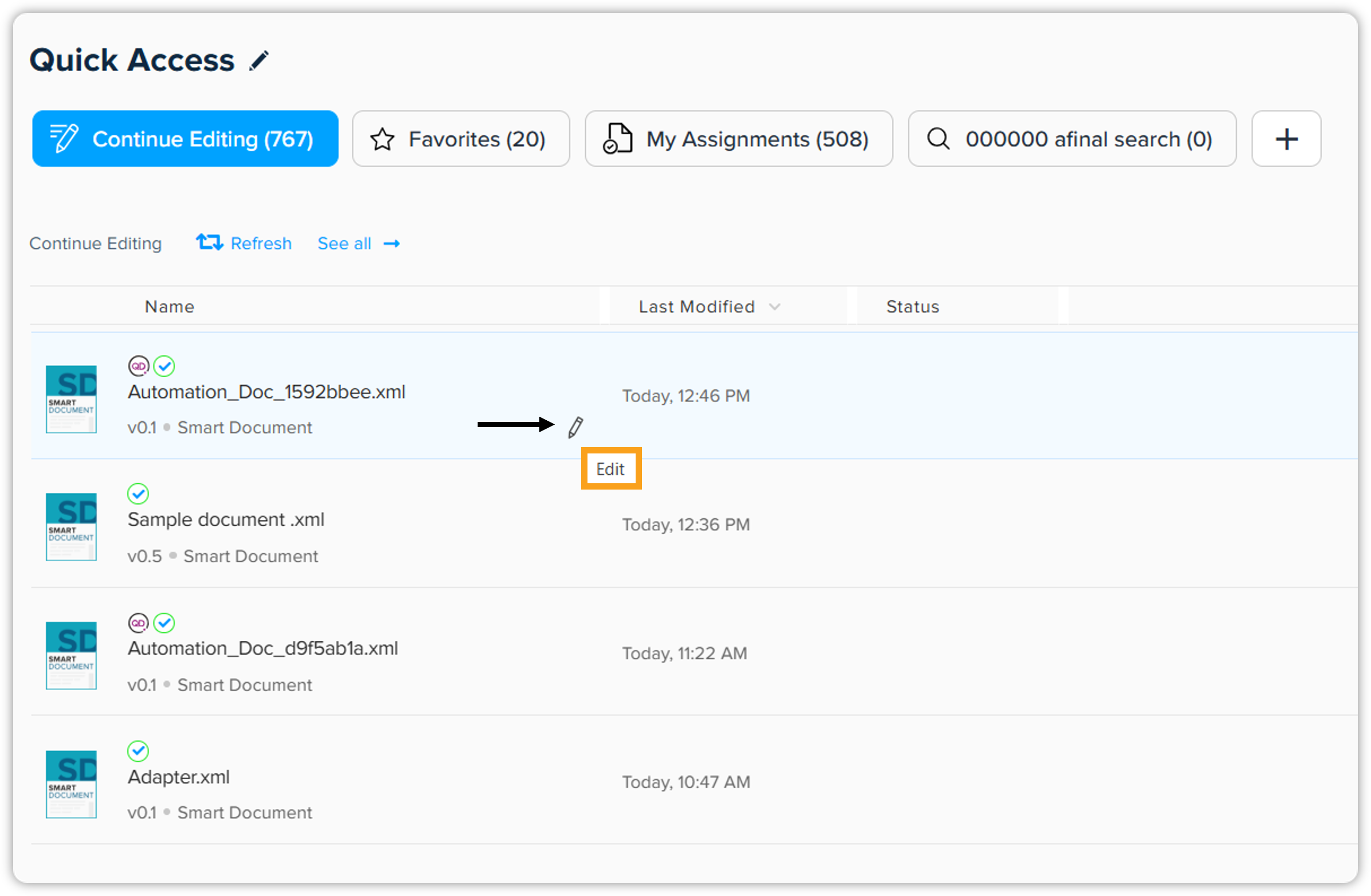
Direct Document Editing from Home Page: Users can now directly edit documents from the QPP NextGen home page. An Editicon is available in both Card View and Column View within document listings. Clicking this icon opens the document directly in edit mode, streamlining the editing process.
-
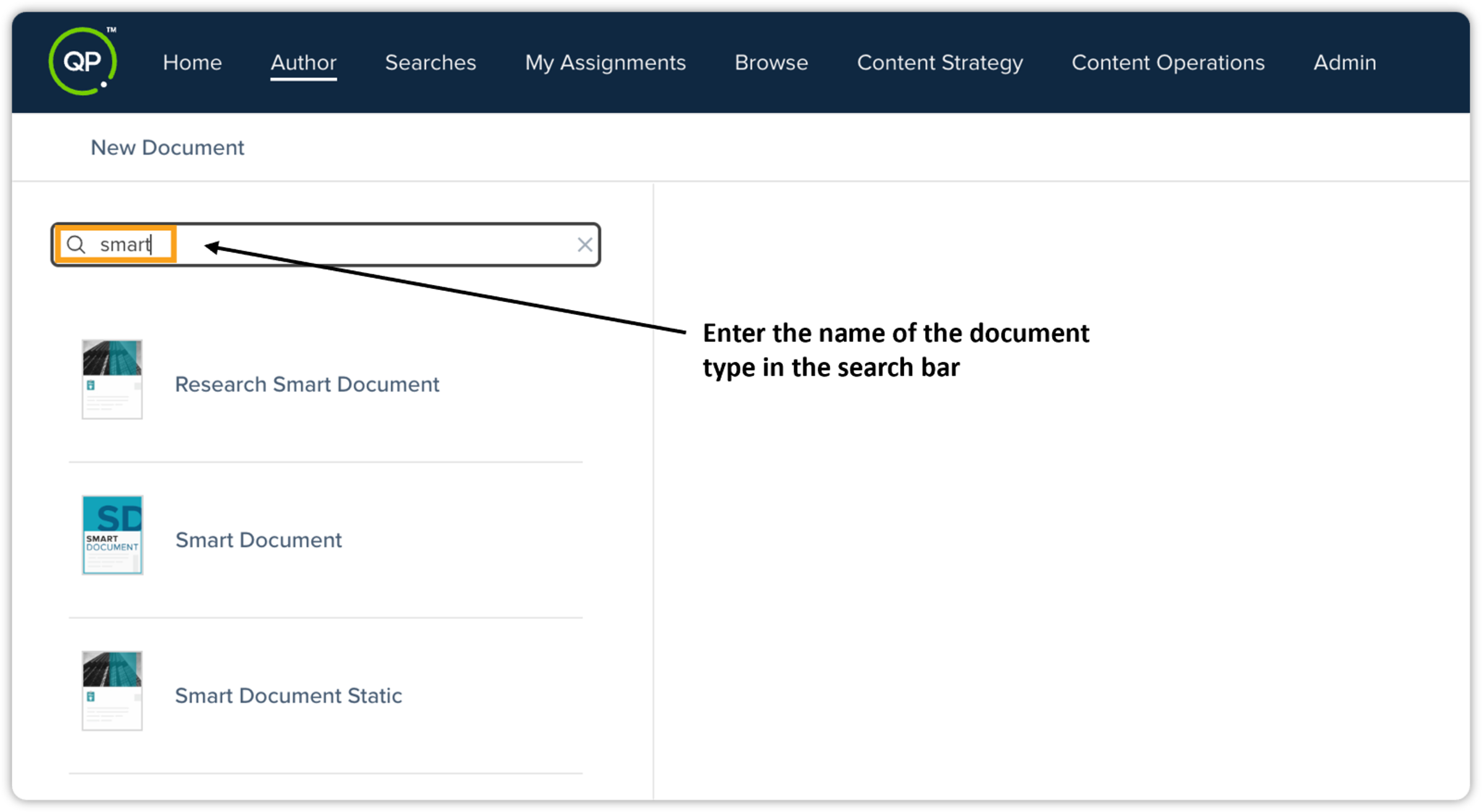
Improved Content Type Filtering in Author Page: The document type selection process in the Author tab has been enhanced with a search functionality. Users can now quickly find the desired document type by entering its name (or a partial match) in the search bar, eliminating the need to scroll through the entire list. Additionally, the Document Type list is now organized with models at the top, citations at the bottom, and all document types sorted alphabetically.
-
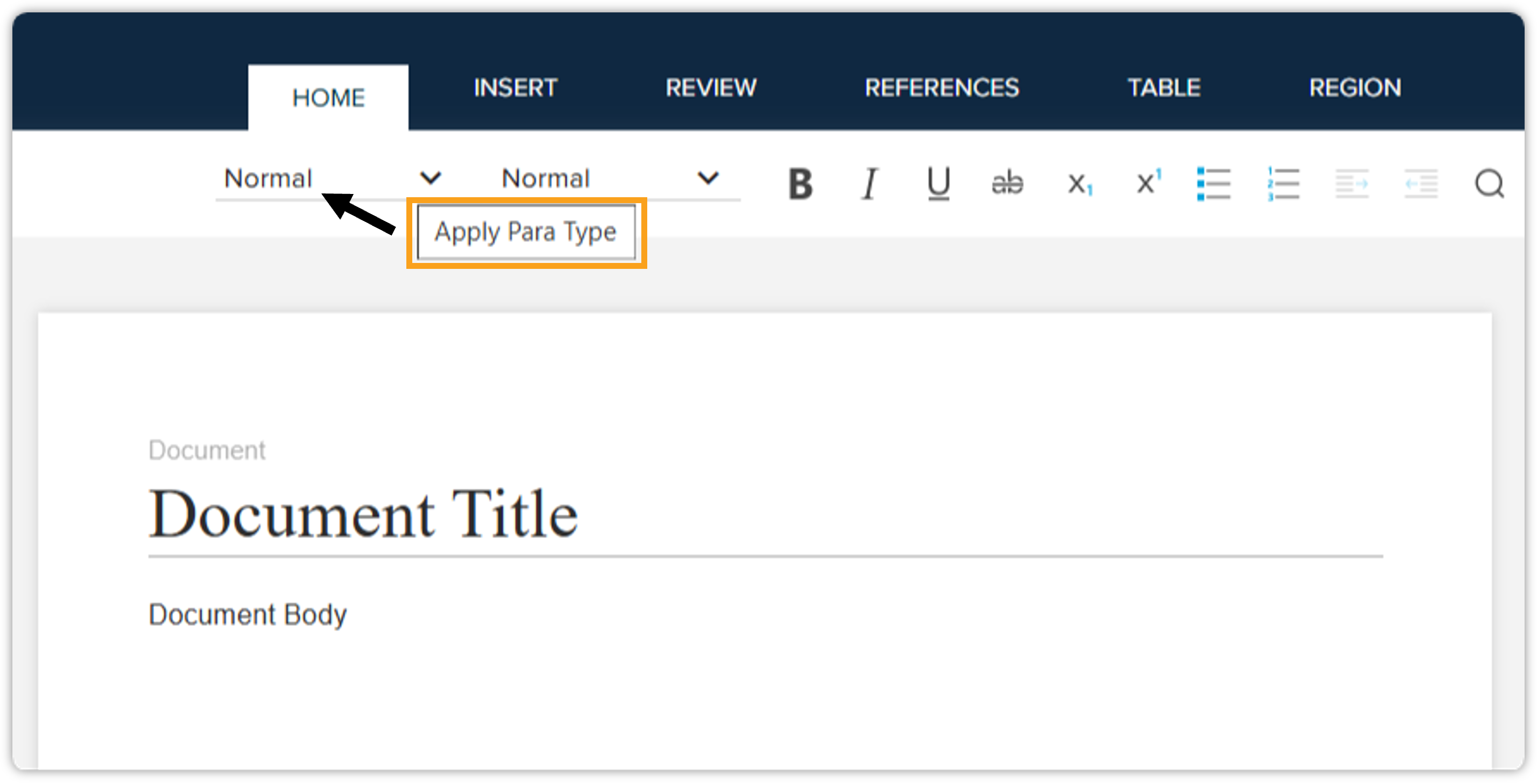
Enhanced Tooltips for Home Ribbon Items: Tooltips have been added to key ribbon items (Para Types, Tags, Table Type, and Region Type) to clarify drop-down option functions, reducing user confusion and improving workflow efficiency. These tooltips provide clear descriptions, such as Apply para type or Apply tag, clarifying the function of each drop-down option and reducing user confusion.
-
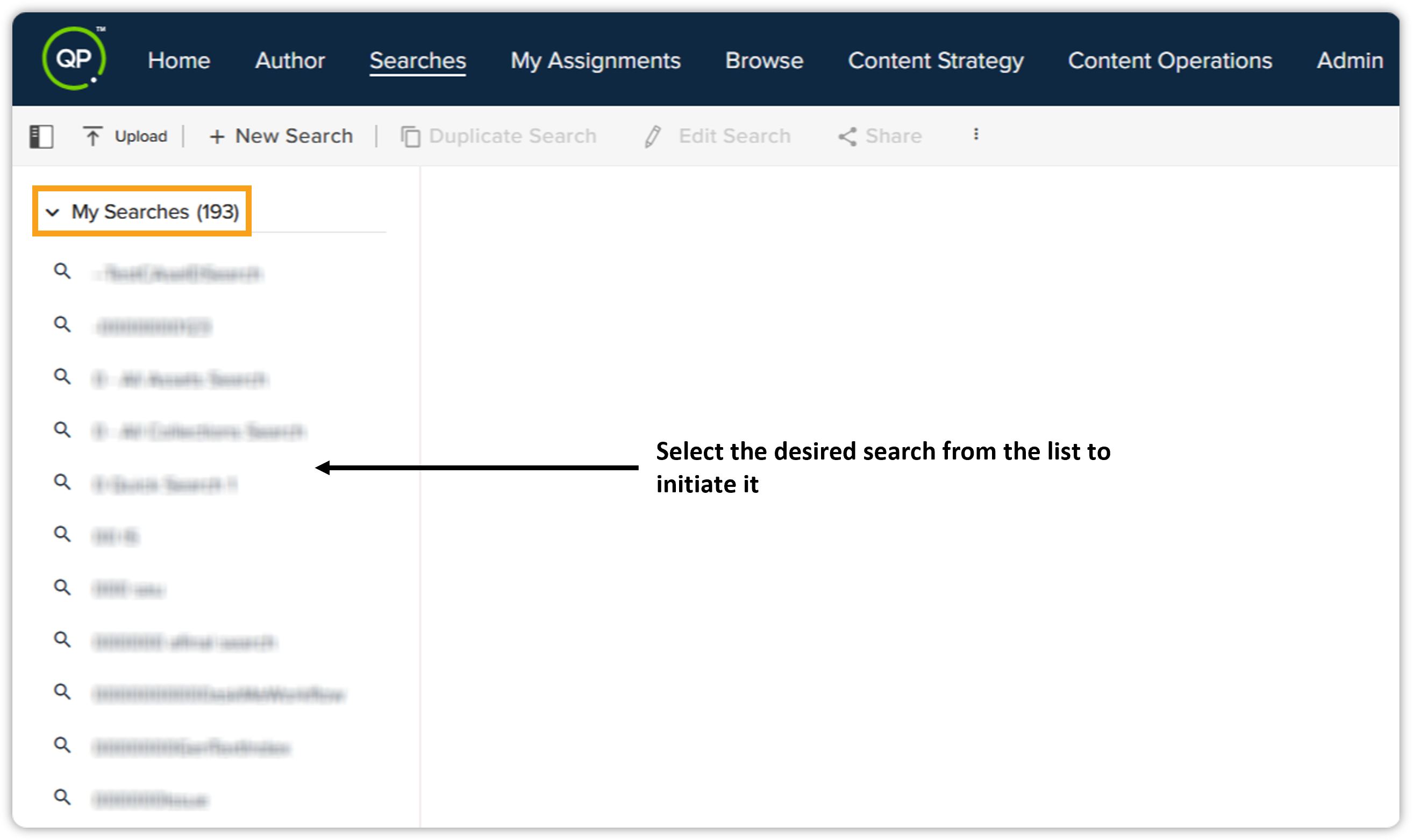
Enhanced Search Control: When navigating to the Search page (either from the Searches tab in the top menu bar or via browser dialog), no search will be executed automatically. Users will now have to select the desired search from the list to initiate it.
-
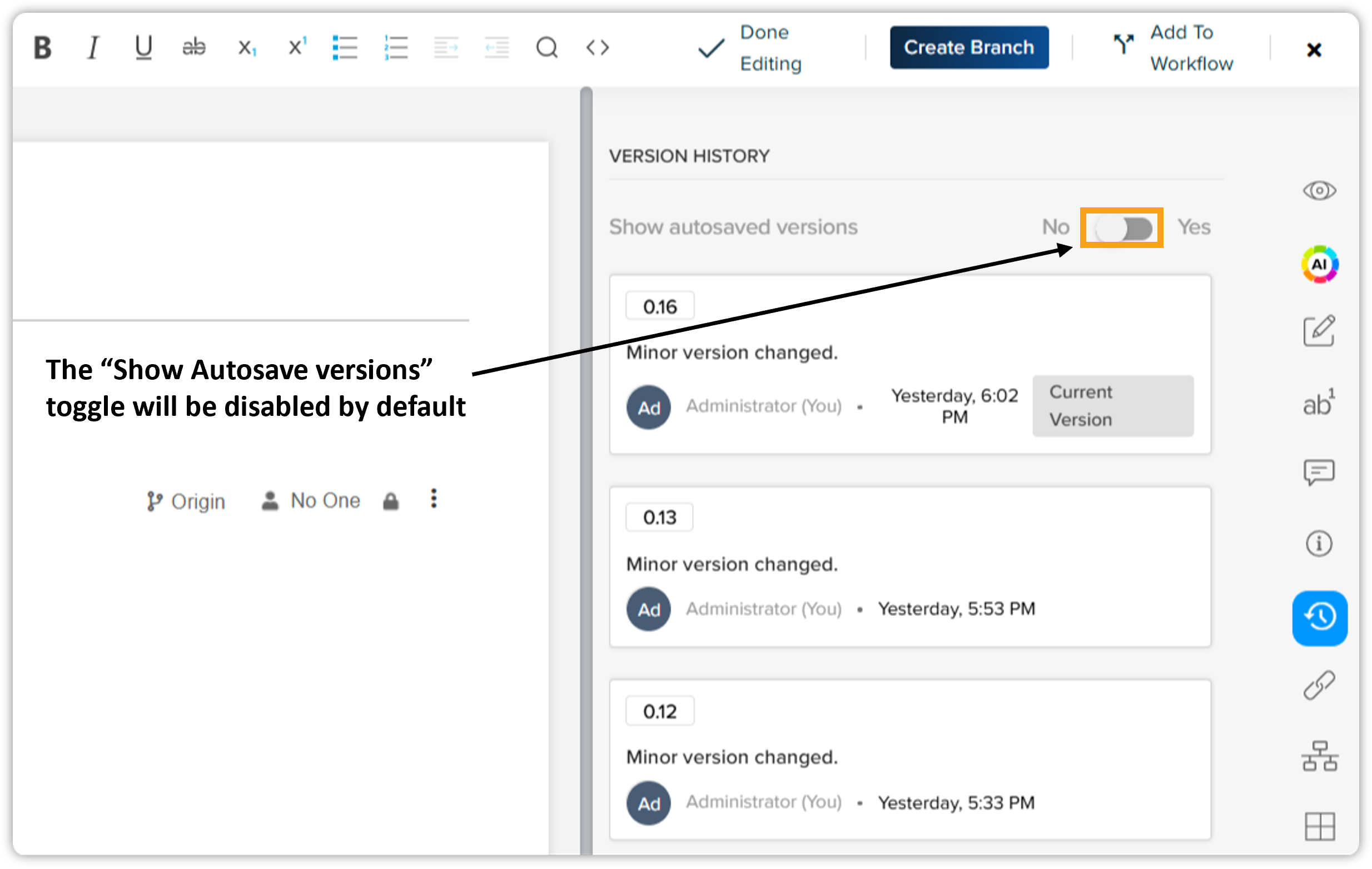
Default State Change for "Show autosaved versions" Button: The Show autosaved versions button in the History tab (within the Apps Pane) is now disabled by default. This means only manually saved versions will be displayed initially. To view auto-saved versions, users must toggle the button to the "on" position.
-
-
Usability Improvements to Automation Channel Management Interface
This release introduces streamlined management of Automation Channels within the Content Types & Document Types section of the Admin page.
Key changes include:
-
Default Channel State: Newly added automation channels in newly created document types are now enabled by default.
-
Renamed UI Strings: The Add Existing button has been renamed to Add/Remove Channels for clarity.
-
Dynamic Enable/Disable Buttons: The Enable and Disable buttons have been replaced with Enable Preview and Disable Preview buttons. The appropriate button will appear based on the selected automation channel's current state.
These updates simplify the process of managing automation channels, providing a more intuitive and efficient user experience.
-
-
Enhanced "Replace Component" with External Document Support
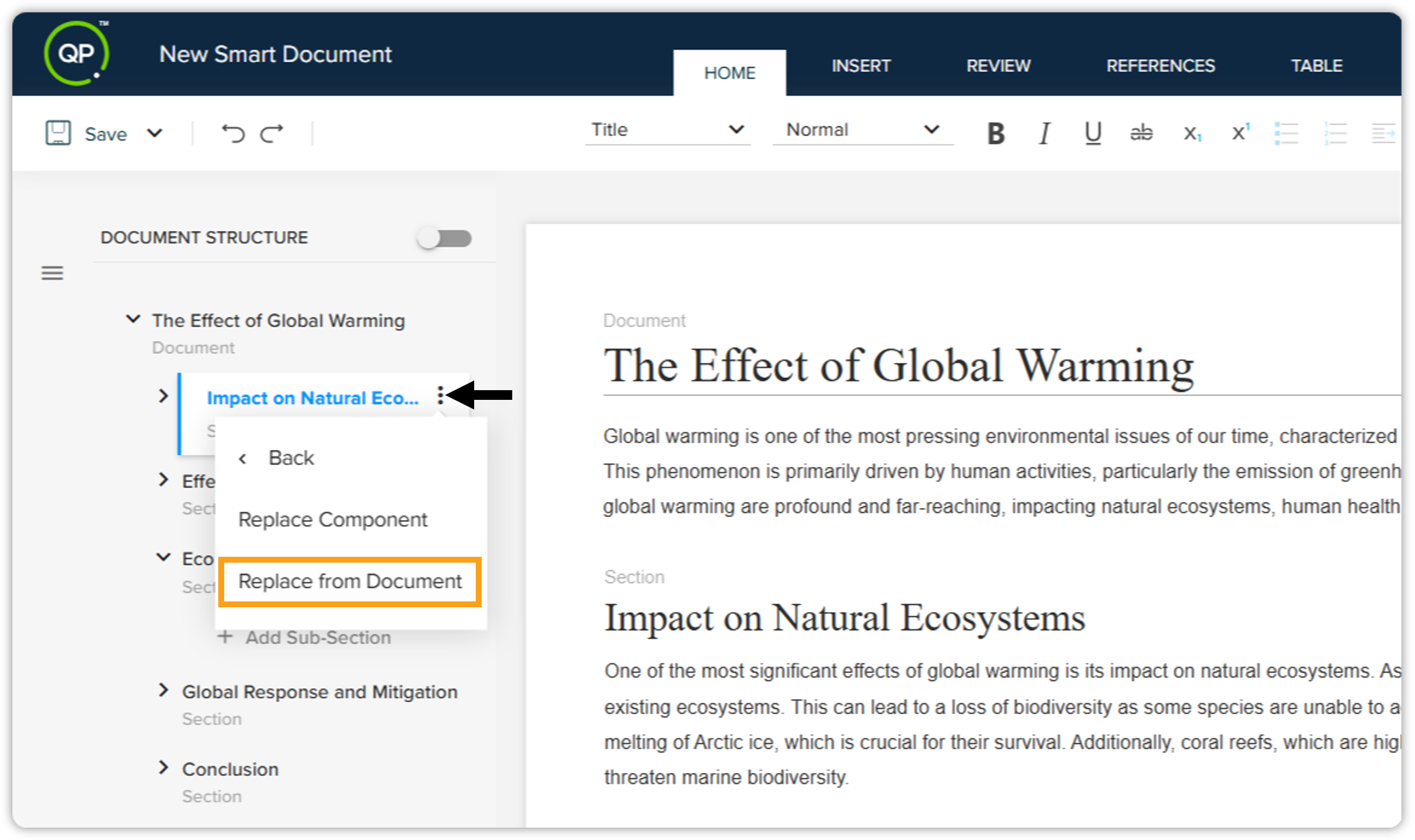
The Replace Component functionality has been significantly enhanced to allow users to replace components not only from the same document but also from external structured documents, thus facilitating content reuse and improving efficiency.
The Replace Component feature now offers two options:
-
Replace Component (existing functionality — replaces from within the same document)
-
Replace from Document (new functionality — replaces from an external structured document)
-
-
"Replace Component" Callback Hook
Introducing a new callback hook for the Replace Component feature in the Quark Author. This enables developers to execute custom code immediately after a component is selected, allowing dynamic modification of asset details before insertion into the document.
Benefits:
-
Automates tasks like creating component branches.
-
Enables dynamic updates to component asset details and versioning.
-
Streamlines component replacement workflows.
A new hook has been added to theQaCallbackManagerto support custom callback functions. -
-
Enhanced Table Metadata Configuration
This release introduces enhanced metadata configuration, allowing administrators to assign specific metadata values to each table type for improved data accuracy and consistency.
Key Features:
-
Table-Specific Metadata: Configure metadata fields and distinct value lists for each table type via qaconfig.json.
-
Dynamic Updates: Metadata dynamically updates in Quark Author when the table type is changed.
-
Data Integration: Ensures correct metadata values are applied for tables from various data sources.
-
Legacy Compatibility: Seamlessly integrates with existing metadata structures.
Refer to the Setup/Configuration section of the migration guide for detailed configuration instructions.
-
-
Dynamic Configuration Enabled by Default on New QPP NextGen Deployments
Dynamic Configuration is now enabled by default for all new, vanilla (fresh) deployments of the QPP NextGen platform utilizing a Smart Document-Based Schema. This simplifies initial setup for system administrators, ensuring out-of-the-box readiness for QXA environments by eliminating the need for manual configuration. This change applies only to new deployments, streamlining the process and reducing setup time.
Quark XML Author
-
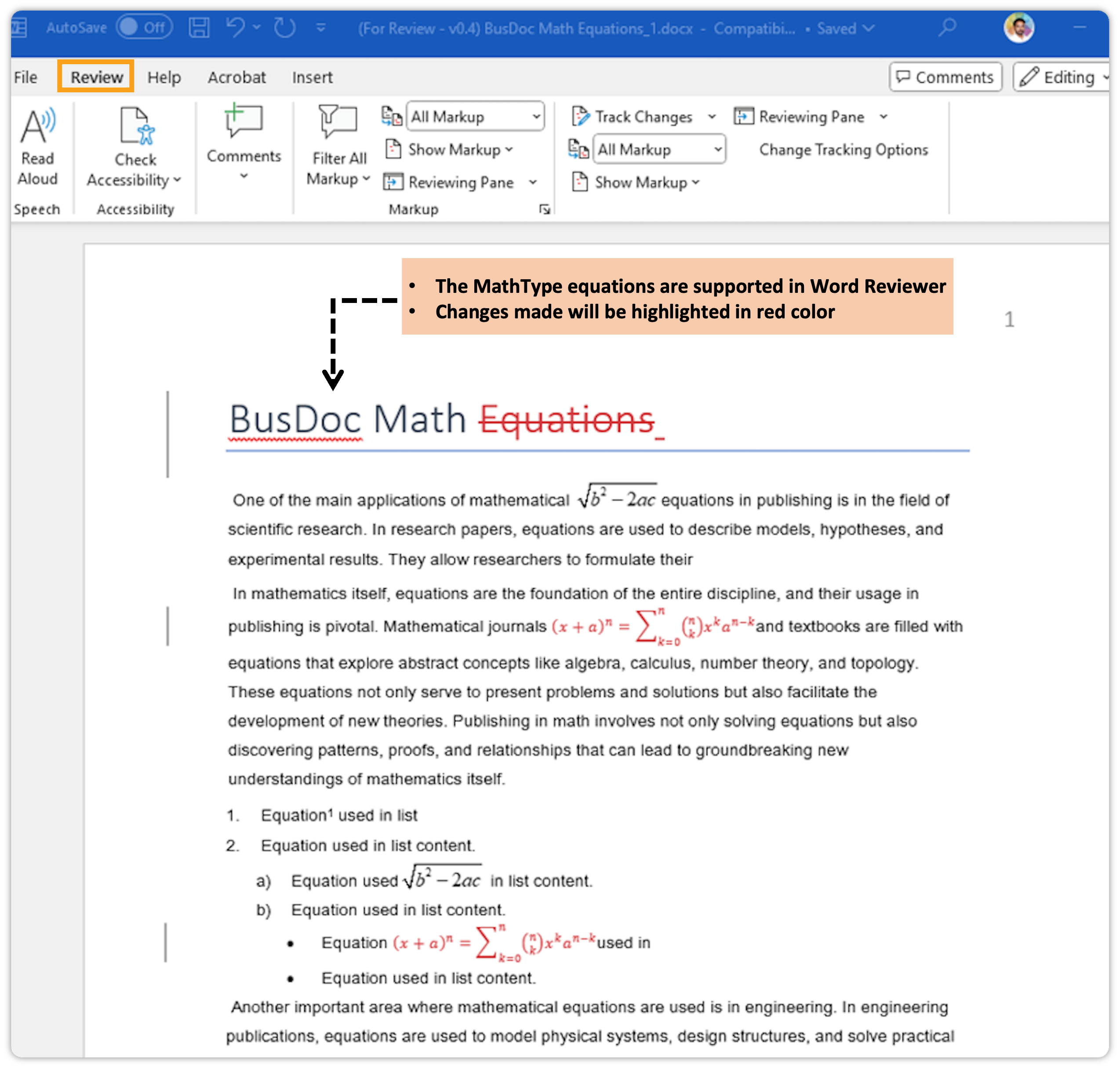
MathType Equation Support in Quark XML Author (QXA) Word Review
We're excited to announce that the Quark XML Author (QXA) Word Review now supports MathType equations! This enhancement streamlines the review process for technical documentation containing mathematical content, ensuring accuracy and efficiency.
Key Benefits:
-
Seamless MathType Integration: Authors can now send documents containing MathType equations for Word review. Reviewers can view and insert new MathType equations directly within the Word Review environment.
-
Enhanced Collaboration: This feature ensures that mathematical expressions are accurately represented and can be collaboratively refined during the review process, bridging the gap between authors and reviewers.
-
Interoperability: Documents created in Quark Author containing MathType equations are fully supported in the QXA Word Review flow, maintaining consistency across platforms. MathType equations inserted via the Word Review flow are also imported correctly into the system and function as expected within Quark Author.
-
No Information Loss: Conversion between MathType and Word native equations, or across the Quark Author and QXA editors, is seamless and lossless.
-
-
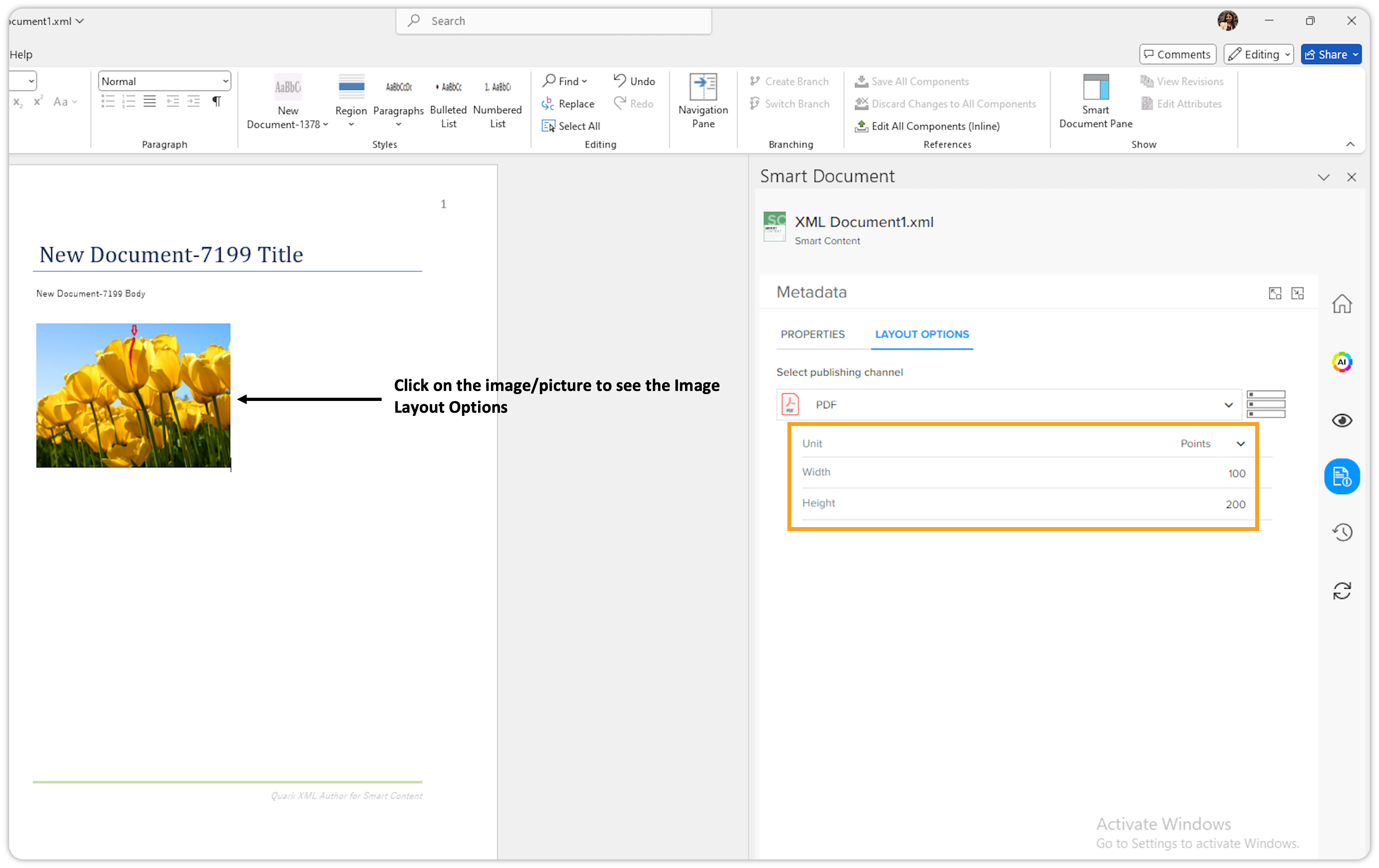
Introduction of Layout Options for Images in Quark XML Author
We’re excited to introduce Layout Options for Images in Quark XML Author (QXA)! Previously, Layout Options were available only for content, but with this release, users can now define layout properties for images/pictures as well.
Resolved Issues
Web Application
-
Missing Image Reference Indicator in Canvas
Previously, when a referenced image was deleted from the workspace, users received no indication of the missing reference. With this update, a message/indicator now appears directly in the canvas, allowing users to identify missing images during editing—ensuring consistency with the preview.
-
HTML Preview Pane Scrolling Fixed Previously, users had to click inside the HTML publishing channel’s preview pane to restore mouse wheel scrolling after resizing. This issue has been resolved. The preview pane now remains fully responsive to scrolling without requiring additional clicks.
-
Content Validation Rules UI Sync Fixed Updates to content validation rules were not correctly reflected in the UI, causing inaccurate enable/disable button states. This issue has been resolved to ensure the UI stays in sync with the latest rule configurations.
-
Successful Document Migration to QPP NextGen Document migration from QPP to QPP NextGen previously failed due to date format inconsistencies. This issue has been fixed, and documents now migrate correctly in the current version.
-
Stability Improvement for qaservice Post-Deployment Users randomly encountered “connection refused” errors from qaservice after pipeline executions, rendering it unresponsive. The root cause has been identified and resolved. QAService now restarts reliably and remains responsive after deployments.
-
Excel Table Formatting Preserved on Insertion Previously, inserting Excel tables using the Insert Excel Table feature in Quark Author applied an unintended light blue background to table cells. This has been fixed. Table cells now retain their original or user-defined background colors, preserving formatting consistency.
Quark XML Author
-
Improved Handling of Pasted Images
Pasting images from external sources appeared successful, but the image data was not saved—resulting in empty XML and missing images when reopening documents. This has been addressed to ensure pasted images are now properly saved and retained.
Adapter for Microsoft Office
-
Better Handling of Hidden or Missing Excel Sheets
Attempting to "Update All" components after hiding an Excel sheet previously resulted in an uninformative exception. Users now receive a clear alert message if a sheet is hidden or removed. The system skips such sheets and updates only components from visible ones.
QPP Server
-
Correct Collection Access for New Users
New users incorrectly received a “You do not have accessible collections” message, even when their user group had access. This issue has been resolved. New users now inherit collection access from their groups as expected.
DOCX Converter Tool
-
Documents with MathType Equations Now Open Error-free in QA
Documents containing MathType equations, when converted using the DOCX Converter and checked into the QPP NextGen repository, caused validation errors when opened in Quark Author. We've addressed this issue, and documents converted in this manner now open successfully in Quark Author without validation errors.