Numeric Formats
QuarkXPress provides support for four Numeral formats in Middle Eastern Configuration, namely:
-
Contextual
-
Western Arabic
-
Arabic-Indic
-
Eastern Arabic-Indic
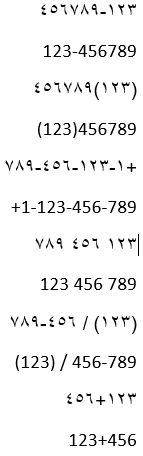
The default Numeral format is ‘Contextual’ for RTL and LTR layouts. In Contextual Numeral format, the formatting of the numeral is determined by the script of the preceding text run. In Western Arabic Indic format, the numerals display as: 123456789. In Arabic-Indic format, the numerals display as: ١٢٣٤٥٦٧٨٩. In Eastern Arabic-Indic format, the numerals display as: ۱۲۳۴۵۶۷۸۹.
If the applied font only supports Latin glyphs and the text language is English but the applied numeral format is Arabic-Indic or Eastern Arabic-Indic, numerals will continue to display in the current font in Western Arabic format. Example: Minion Pro font
If the applied font only supports Latin glyphs and the text language is Arabic, but the applied numeral format is Contextual, Arabic-Indic, or Eastern Arabic-Indic, numerals will continue to display in the current font in Western Arabic format. Example: Minion Pro font.
Numerals will be displayed in Arabic-Indic format if the applied font supports both Latin and Arabic glyphs and the text language is Arabic but the numeral format is Contextual. Example: Arial Regular, Adobe Arabic Regular fonts
Numerals will be displayed in Western Arabic format if the applied font supports both Latin and Arabic glyphs and the text language is English but the numeral format is Contextual. Example: Arial Regular, Adobe Arabic Regular fonts
On opening legacy documents created in version prior to v2024, numerals will display in Western Arabic format. When downsaving to v2023, all numerals, regardless of their format, are displayed in Western Arabic format.
If the numerals contain or are enclosed by punctuation marks, then order of the numerals will vary as per the language.