
Extensibility Interface Use Case Study
Inserting Elements Through EI in Quark XML Author
New elements can be inserted in Quark XML Author in the following ways:
-
Right-click on an insertion point (Empty Style) and select an item from context menu.
-
Select an item from the Styles drop-down list when the selection is at an insertion point (Empty Style).
-
Select a special menu item under the Insert menu or a button on the toolbar. Insert Table is one example.
-
Split the current element (if configured in the schema) into two elements via the Enter key. Another variation of this is to type in the empty below an element which supports splits and Quark XML Author will automatically insert the configured Element and paste the text into the newly added element.
The behavior for each of these operations is exactly the same. When a user chooses a particular element to insert through any of the above means, Quark XML Author looks up the XAS for the definition and builds an XML fragment to be attached to the XOM. In addition, the UI is updated to display this new element if it is defined as visible in the schema. Also any required descendants and attributes are also picked up from the schema and inserted. If the XAS specifies default values to certain elements and attributes, Quark XML Author incorporates them into the fragment that it builds.
Another way of adding new content into Quark XML Author is to paste a valid fragment at a valid insertable position. This option is available when (this is one way, there are other ways) a user performs a Component->Copy operation and copies an XML fragment to the clipboard. The paste operation is slightly different from an insert because the paste does not build the fragment from the schema; it already has the fragment, Quark XML Author validates the fragment against its definition specified in the XAS at the current insertable location and only inserts the fragment if it is valid and insertable at the current spot.
This case study discusses an alternate mechanism of inserting new content into an existing document. In the first three scenarios above, Quark XML Author will support addition of new content externally by exposing an Insert hook. This “hook” can be created by adding the externalMethodId attribute to an insertable ElementDef. The fourth scenario, splitting an element, will work just as before—even if there is an externalMethodId specified in the ElementDef of the element being split, the split will ignore the externalMethodId property and insert a fragment from the schema. The insertable requirement means that if an external ElementDef ends up being a required child of another ElementDef, that ElementDef will also have to be defined as external. Quark XML Author will throw an exception if the above condition is not met. This ensures that only insertable elements can have externalMethodId attributes on them. If a potential insertable element contains externalMethodIds in its descendants, the top most externalMethodId is the only one invoked. Thus, this ‘hook” allows Quark XML Author to essentially perform a paste operation as explained above with an insert operation.
Example 1
Here is a simple ElementDef for an Image element as defined in the XAS defined for DITA:
<ElementDef name="image" friendly="Image" visible="false" style="Heading 8" externalMethodId="getImage">
  <Reference altAttribute="alt">
    <Media xmlname="image" friendly="Image" required="true">
      <Mimetypes>
        <Mimetype type="image/bmp"/>
        <Mimetype type="image/gif"/>
        <Mimetype type="image/jpeg"/>
        <Mimetype type="image/jpg"/>
        <Mimetype type="image/png"/>
        <Mimetype type="image/tif"/>
        <Mimetype type="image/tiff"/>
      </Mimetypes>
    </Media>
  </Reference>
  <Attributes>
    <AttributeType name="href"/>
    <AttributeType name="keyref"/>
    <AttributeType name="alt"/>
    <AttributeType name="longdescref"/>
    <AttributeType name="height"/>
    <AttributeType name="width"/>
    <AttributeType name="align"/>
    <AttributeType name="placement"/>
    &univ-atts;
    <AttributeType name="class"/>
    <AttributeType name="outputclass"/>
  </Attributes>
</ElementDef>
As shown above, the image definition specifies an additional attribute called externalMethodId. This property holds the value of an EI method which will be invoked when an image element is inserted. Specifying an externalMethodId on an ElementDef implies that that element will always be inserted by this externalMethodId. The only exception as noted above is when the element is created by the “split” operation. The externalMethodId has the responsibility to return an XmlNode which will match the structure specified in the schema for the element being inserted.
Since externalMethodId property can only be applied to insertable elements, this means that any ElementDef which references this (external) ElementDef as a required child will also have to be external.
For example,
<ElementDef name="imagemap" friendly="Image Map" visible="true" style="Tag 2" externalMethodId="getImageMap">
  <Section>
   <Sequence minOccurs=”1” maxOccurs=”1”>
    <SectionType name="image"/>
   </Sequence>
   <Sequence maxOccurs="unbounded">
    <SectionType name="area"/>
   </Sequence>
  </Section>
  <Attributes>
  ...
  </Attributes>
 </ElementDef>
In the above definition, the imagemap element has two required child elements (specified by the minOccurs="1" value): image and area. According to the restriction above, the imagemap element will also have to be external since it is a referencing image which is a required child and is defined to be external as above. If the image were optional, then imagemap would not need to be external. If this restriction is not enforced in the schema, Quark XML Author will throw an exception when a document referencing this schema is first opened.
The External Method definition is like any other EI definition. Here is a sample element definition:
<ElementDef name="imagemap" friendly="Image Map" visible="true" style="Tag 2" externalMethodId="getImageMap >
…"</ElementDef>
The externalMethodId references this EI method:
<Method id=" getImageMap " assembly=" InsertEI" class="Invision.Xpress.Extensible.InsertElementManager" method="GetImageMap"/>
The GetImageMap() EI (and all other EIs specified in the externalMethodId attribute) must return an XmlElement. Here is what the GetImageMap() method for DITA image element would look like:
public XmlElement GetImageMap()
{
 string xml = "<imagemap><image href=\"C:\\..\\My Pictures\\4.bmp\" height=\"358\" width=\"286\"/> " +
 "<area> " +
 "<shape>Shape</shape>" +
 "<coords >Coordinates</coords>" +
 "<xref >Cross-reference</xref>" +
 "</area>" +
 "</imagemap>";
 XmlDocument doc = new XmlDocument();
 doc.LoadXml(xml);
 return doc.DocumentElement;
}
The method simply returns a valid imagemap XmlElement. The method above does not use any arguments but it can also use any predefined arguments that Quark XML Author exposes. Here is another example:
<Method id=" getImageMap " assembly=" InsertEI" class="Invision.Xpress.Extensible.InsertElementManager" method="GetImageMap">
  <Argument type="Filename"/>
  <Argument type="Tag"/>
</Method>
Here is how the method looks now:
public XmlElement GetImageMap(string filename, string insertableCaption)
{
 string file = filename; //name of the file that is currently open
 string insertCaption insertableCaption; //Caption that’s shown to user in the insertables context menu.
 string xml = "<imagemap><image href=\"C:\\..\\My Pictures\\4.bmp\" height=\"358\" width=\"286\"/> " +
 "<area> " +
 "<shape>Shape</shape>" +
 "<coords >Coordinates</coords>" +
 "<xref >Cross-reference</xref>" +
 "</area>" +
 "</imagemap>";
 XmlDocument doc = new XmlDocument();
 doc.LoadXml(xml);
 return doc.DocumentElement;
}
In particular, Argument type="Tag" is a special Argument available for any External method specified in the externalMethodId attribute on an ElementDef. This argument specifies the actual caption that Quark XML Author displays in the context menu that was just clicked. So for example, in Figure 21‑1 below, there are two insertable contexts for an image: Image(Child of paragraph) OR Image(Child of Topic Body). Both will call the same EI method, getImage. Tag will contain the actual caption which the user clicked. It might be required by an EI for context.
<Method id=" getImage " assembly=" InsertEI" class="Invision.Xpress.Extensible.InsertElementManager" method="GetImage"/>
Here is how the method looks:
public XmlElement GetImage()
{
 string xml = "<imagemap><image href=\"C:\\..\\My Pictures\\4.bmp\" height=\"358\" width=\"286\"/> " ;
 XmlDocument doc = new XmlDocument();
 doc.LoadXml(xml);
 return doc.DocumentElement;
}
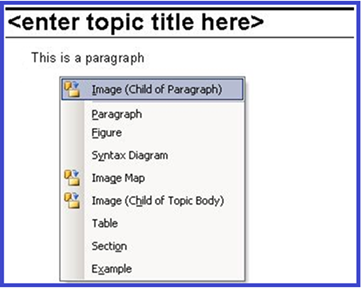
Figure 21‑1: Image Contexts
In the above case, if user chooses the Image (Child of paragraph), the Tag argument type will have the value “Image (Child of paragraph)”. This argument is not required to be used in an EI as seen in the first GetImageMap() example.
After the external method returns, Quark XML Author will react as specified below:
-
If the external method returns null OR a non-XmlElement, Quark XML Author will treat that as a user cancel and simply cancel the Insert operation.
-
If the external method throws back an exception, Quark XML Author will consider that as a critical error and show an error dialog with the error message contained in the thrown exception. The Insert operation is cancelled.
-
If the external method returns an XmlElement but the structure of the returned XML does not match the structure specified in the schema specified for that element, Quark XML Author will throw an error dialog and cancel the Insert operation.
-
If the returned XmlElement has a valid structure it is imported into the document and rendered just like a conventional Insert.
Also as seen in the figure above, to indicate that an element is insertable externally, the context menu puts a small icon (with faceID=2109) in front of it.
Also if an externalMethodId is specified on an ElementDef, and if it has a required Choice Collection, the submenu which is normally shown will not be shown. In Figure 21‑2, the Image Map element uses the following definition, which does not make an external method call:
<ElementDef name="imagemap">
  <Section>
   <Choice maxOccurs="unbounded">
    <SectionType name="image"/>
    <SectionType name="area"/>
   </Choice>
  </Section>
  <Attributes>
   ...
  </Attributes>
 </ElementDef>
In Figure 21‑3, Image Map uses the following definition, which does make an external method call:
<ElementDef name="imagemap" externalMethodId="getImageMap">
  <Section>
   <Choice maxOccurs="unbounded">
    <SectionType name="image"/>
    <SectionType name="area"/>
   </Choice>
  </Section>
  <Attributes>
   ...
  </Attributes>
 </ElementDef>
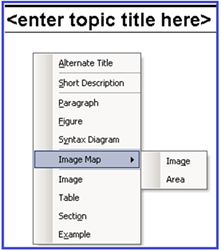
Figure 21‑2: Image Map, no EI
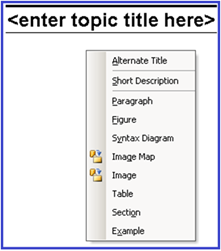
Figure 21‑3: Image Map, with EI
In such cases, the EI has the responsibility to show the dialog prompting the user for the child fragment and construct the fragment with the correct child element in it.
Normally, the fragment that is imported externally will be completely editable within the Quark XML Author UI. If there is a requirement for the fragment to be left alone by Quark XML Author for the current editing session, the external method will have to add the inv:access="read-only"attribute (where the inv prefix refers to the urn:xpressauthor:xpressdocument namespace) to every element in that fragment. Here is a simple EI which does just that:
public XmlElement GetImageMap()
{
  string xml = "<imagemap xmlns:inv="urn:xpressauthor:xpressdocument" inv:access=”read-only”><image inv:access=”read-only” href=\"C:\\..\\My Pictures\\4.bmp\" height=\"358\" width=\"286\"/> " +
 "<area inv:access=”read-only”> " +
 "<shape inv:access=”read-only”>Shape</shape>" +
 "<coords inv:access=”read-only”>Coordinates</coords>" +
 "<xref inv:access=”read-only”>Cross-reference</xref>" +
 "</area>" +
 "</imagemap>";
 XmlDocument doc = new XmlDocument();
 doc.LoadXml(xml);
 return doc.DocumentElement;
}
This attribute is retained by Quark XML Author within the XOM and is stripped off by Quark XML Author when the document is serialized or when accessing the ExportedRoot/ExportedCurrentNode argument in an EI method.
Example 2
In this use case, the cursor is at an Empty and element "p" is valid insertable at this location.
In the first solution, the configuration and code fragment facilitate inserting a paragraph from the Context Menu. In the second solution, the configuration and code fragment facilitate inserting a paragraph from a Ribbon button. Each requires a different solution.
Context Menu
<Method id="InsertParaElementFromContextMenu" assembly="EITest" class="EITest.EITestInsertNode" method="InsertParaElementFromContextMenu">
        <Argument type="XomRoot"/>
</Method>
<ElementDef name="p" externalMethodId="InsertParaElementFromContextMenu">
..
</ElementDef>
public XmlNode InsertParaElementFromContextMenu(XmlNode xomRoot)
{
XmlNode newNode =
xomRoot.OwnerDocument.CreateNode(
XmlNodeType.Element, "p", xomRoot.NamespaceURI);
newNode.InnerText = "Some Text";
return newNode;
}Ribbon Button
<Method id="InsertParaElementFromMenu" assembly="EITest" class="EITest.EITestInsertNode" method="InsertParaElementFromMenu">
        <Argument type="XomPreviousNode"/>
        <Argument type="Delegates">
           <Delegate>InsertNode</Delegate>
        </Argument>
      </Method>
<command idMso="Help" visible="xa">
<!--<ExtensibilityMethod id="About"/>-->
<ExtensibilityMethod id="InsertParaElementFromMenu"/>
</command> public void InsertParaElementFromMenu(XmlNode previousNode, Delegate[] delegates)
{
InsertNode insertNodeDelegate
= (delegates != null && delegates.Length > 0)
? delegates[0] as InsertNode : null;
if(insertNodeDelegate != null && previousNode != null)
{
XmlNode newNode =
previousNode.OwnerDocument.CreateNode
(XmlNodeType.Element, "p", String.Empty);
newNode.InnerText = "Some Text";
insertNodeDelegate(previousNode, newNode, null);
// the last parameter is null assuming there is no muliple contexts // for the fragment being inserted.
}
}