
Application Configuration: Miscellaneous items
There are additional elements that must be set to configure the application. The first set of elements affect the application environment. The last specifies namespaces for your organization's document classes, and is considered separately.
CultureName
Defines the language and language culture. Defaults to en-us, as shown in the example.
<CultureName>en-us</CultureName>
Language and Numerical Content
Quark XML Author saves numerical content, including date and time values, in English format. When opening documents, Quark XML Author expects numerical content to be in English format.
EnableProgressDialogs
Used to enable the display of the various progress bar dialogs in Quark XML Author. For example, opening a document containing a table or splitting table cells.
Defaults to true.
<EnableProgressDialogs>false</EnableProgressDialogs>
ErrorLogging
Determines if an error log should be defined when Quark XML Author is run. The name of the log file is XML Author Log.txt and can be found in Quark XML Author folder with the user's Application Data folder.
<ErrorLogging>true</ErrorLogging>
ExtendedLoggingInfo
If enabled, ExtendedLoggingInfo will log additional details about exceptions being logged in XML Author Log.txt. This flag tries to collect specific information in case of any error or data loss happening in XML Author and logs that information in the log file. This flag should be set to true on the machine where data loss or corruption, if any, is occurring and the logs should be sent to Quark XML Author Customer support team for analysis.
<ExtendedLoggingInfo>false</ExtendedLoggingInfo>
LogFilePath
<LogFilePath>{path}</LogFilePath>
The optional LogFilePath element can be used to specify a file path (drive or UNC) for the file created in conjunction with ErrorLogging. It supports variable placeholders for special folders such as APPDATA and MYDOCUMENTS. If this element is omitted, Quark XML Author continues to use the default location.
Defaults to:
{the path of the current system’s temporary folder}\Quark\XML Author.
UndoHistory
Defines the number of sequential actions that can be reversed when using the Undo command. In the example, up to 50 actions can be reversed.
<UndoHistory>50</UndoHistory>
There is no maximum, but with some features such as table features the number of undo operations can go up exponentially so the best practice is to set the value to 500.
Namespaces
The Namespaces node contains two types of child elements: Namespace and NotSupported.
Namespace
Each supported document class will have its own Namespace element within the Namespaces node.
|
Attribute |
Required |
Definition |
|
config |
yes |
Specifies the location and filename of the document configuration file for the document class. The location must be specified as a relative path. |
|
internalName |
no |
For multiple definitions with the same xmlname property at different levels in the XAS, identifies a single element definition that maps to the root node of the incoming document. |
|
mapperAssembly |
no |
The attribute, along with mapperClass, points to an external method that allows for an external condition to be injected in the evaluation of a particular namespace node. |
|
mapperClass |
no |
This attribute, along with mapperAssembly, points to an external class that implements the Invision.Xpress. Interfaces.IConditionMapper containing the condition to be evaluated. |
|
productLine |
no |
Specifies a name for a document class which can be matched by the productLine processing instruction. can be defined in conjunction with uri and root. |
|
reevaluate |
no |
If set to true, specifies that namespace selection logic is run again after the transform and any associated EI (i.e. BeforeOpen) returns. Reevaluation (and optional transform / BeforeOpen) continues until a namespace is selected without a transform / BeforeOpen or reevaluate equals false. Used in conjunction with transform attribute and BeforeOpen document event. |
|
root |
no |
Specifies the root element for a document class which can be matched by the document root element. can be defined in conjunction with productLine and uri. |
|
schema |
yes |
Specifies the location and filename of the Quark XML Author Structure (.xas file) for the document class. The location must be specified as a relative path. |
|
template |
yes |
Specifies the location and filename of the Word template (.dot file) for the document class. The location must be specified as a relative path. |
|
transform |
no |
Specifies the location and filename of the default stylesheet for the document class. The location must be specified as a relative path. A Namespace node can contain both the BeforeOpen node and the transform attribute. The Open transform and any ExtensibilityMethodhas access to all content in the document. |
|
uri |
no |
Specifies a URI for the document class which can be matched by the uri attribute of the document root element. can be defined in conjunction with productLine and root. can use the * wildcard character. For example, uri="urn:invision:doc*" would match both "urn:invision:doc" and "urn:invision:doc:trm". |
NotSupported
The NotSupported element allows a relevant "not supported" user message when the user attempts to open an XML document that does not match one of the supported document classes.
|
Attribute |
Required |
Definition |
|
message |
yes |
Specifies the message to be displayed when the user attempts to open an unsupported |
|
productLine |
no |
Specifies a name for a document class which can be matched by the productLine processing instruction. It can be defined in conjunction with uri and root. |
|
root |
no |
Specifies the root element for a document class which can be matched by the document root element. It can be defined in conjunction with productLine and uri. |
|
uri |
no |
Specifies a URI for the document class which can be matched by the uri attribute of the document root element. It can be defined in conjunction with productLine and root. It can use the * wildcard character. For example, uri="urn:invision:doc*" would match both "urn:invision:doc" and "urn:invision:doc:trm". |
TempFilePath
The optional TempFilePath element can be used to specify a file path (drive or UNC) for temp file storage. It supports variable placeholders for special folders such as APPDATA and MYDOCUMENTS. If this element is omitted, Quark XML Author continues to use the default location.
Blocking Shortcut Keys
Microsoft Word provides a variety of built-in shortcut keys to invoke dialogs, change text formatting, and perform other actions that can "break" a Quark XML Author document. In addition, some features in Word are not supported and should be blocked. The ShortcutKey section of the DocConfig can be used to block these built-in shortcut keys.
To block a shortcut key, simply create a ShortcutKey node for it in the Shortcuts node of the DocConfig file. For example, to disable the Ctrl + R shortcut (which right-justifies the selected paragraph), you would add the following node to the ShortcutKeys element:
<ShortcutKey key="R" shift="false" ctrl="true"/>
When the keystroke combination is pressed, Quark XML Author intercepts it. Because the node contains no internal class or extensibility interface call, Quark XML Author then discards the keystroke combination and nothing happens.
Note that if you define a keystroke combination, as described in section 3, that is identical to an existing combination, the redefined version will be used by Quark XML Author.
The example below provides some commonly-disabled shortcut keys. Note that this list is not intended to be comprehensive or definitive; your organization can need to disable other keystroke combinations, or can wish to use some of them.
<ShortcutKey key="C" shift="true" ctrl="true"/>
<ShortcutKey key="D" shift="false" ctrl="true"/>
<ShortcutKey key="E" shift="false" ctrl="true"/>
<ShortcutKey key="J" shift="false" ctrl="true"/>
<ShortcutKey key="K" shift="false" ctrl="true"/>
<ShortcutKey key="L" shift="false" ctrl="true"/>
<ShortcutKey key="M" shift="false" ctrl="true"/>
<ShortcutKey key="R" shift="false" ctrl="true"/>
DisableTemplateAddins
Used to disable all third-party template add-ins. See Hiding/Disabling Ribbon Tabs for Third-Party Software for more information. This feature is specified in the AppConfig.
The Quark XML Author add-in can't influence the position or visibility of the ribbon tabs of a third-party add-in. Therefore, disabling the add-in is the only way to remove its ribbon tab when Quark XML Author is in focus/active.
Two types of add-ins are used: Template and COM. For example, Adobe Acrobat is a COM add-in. XML Author can disable template add-ins and some COM add-ins. COM add-ins installed as available "to all users" can't be disabled by Quark XML Author. When the user views a standard Word document, COM add-ins that have a user interface components will be re-displayed. In addition, add-ins that are needed by Quark XML Author can't be disabled.
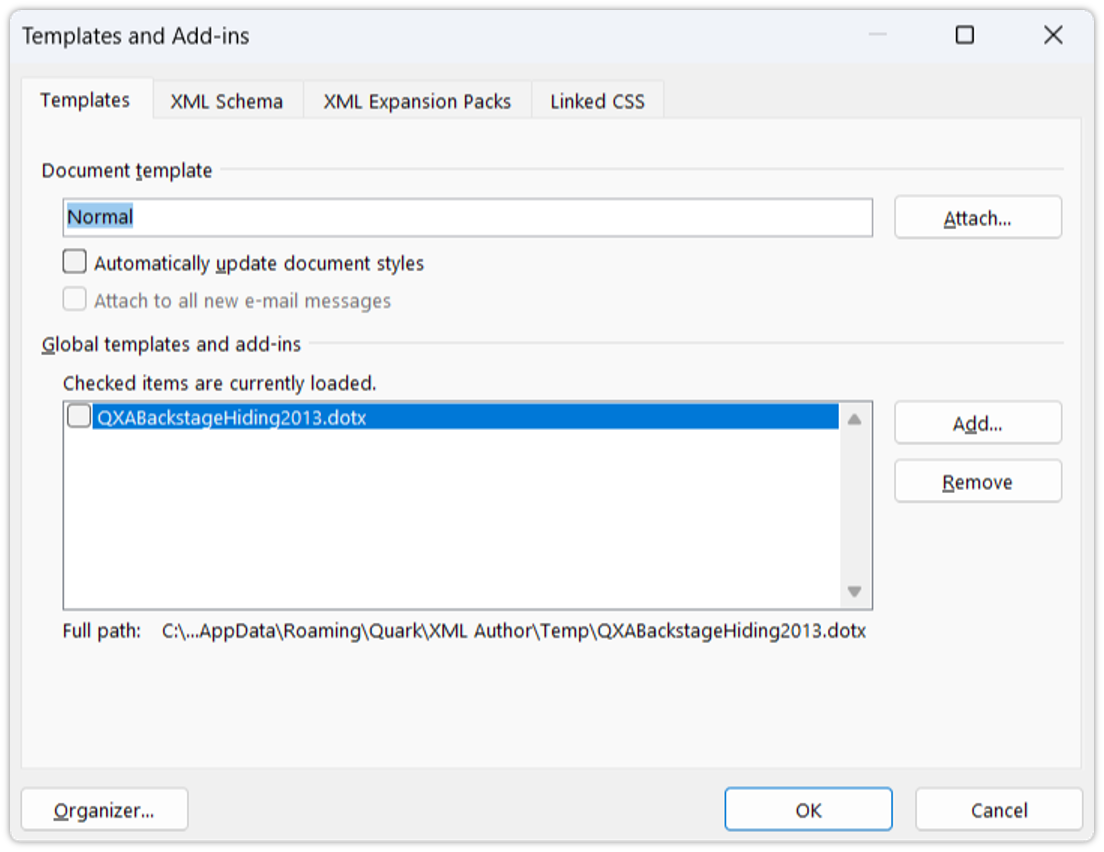
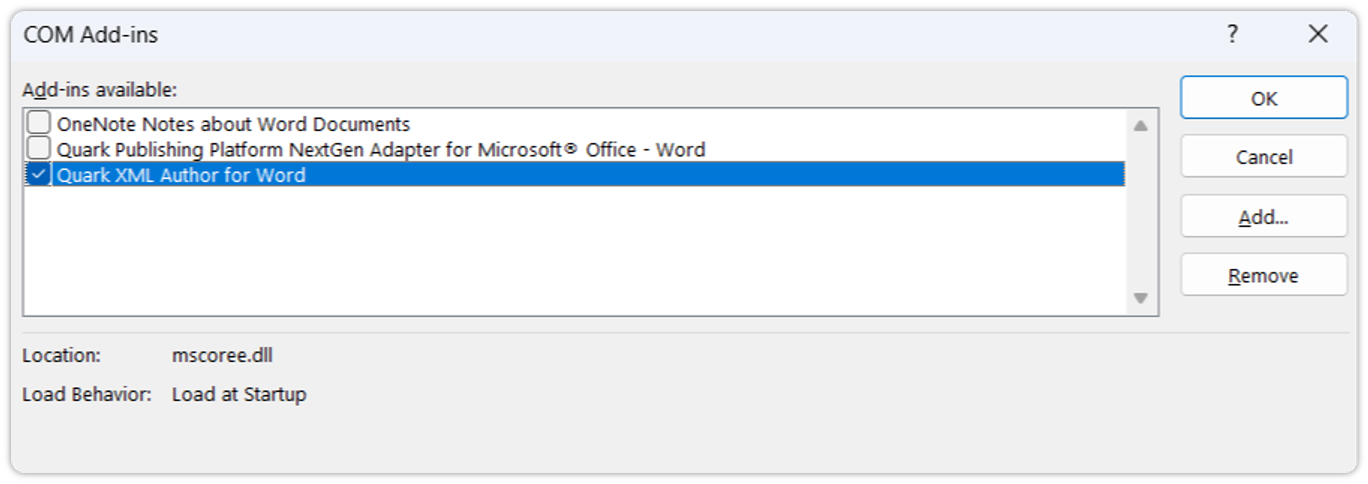
This feature can be used in the following ways:
-
Disable all add-ins
-
Disable all add-ins except the specified list
-
Disable the specified list of add-ins
|
Attribute |
Required |
Definition |
|
AddIn |
no |
Specifies the name of the add-in that should be disabled. This is a case-sensitive wildcard. If the wildcard is contained in any part of an add-in’s name then this is considered to be a match and the system attempts to disable that add-in. |
|
All |
no |
Specifies that the system should attempt to disable all add-ins. The child node <Except> is used to specify add-ins that should be omitted from the disable attempt. |
Disable all add-ins
Disables all add-ins possible.
Example
<DisableTemplateAddIns>
  <All/>
</DisableTemplateAddIns>
Disable all add-ins except the specified list
Disables all add-ins possible except those whose name contains "MathType".
Example
    <DisableTemplateAddins>
        <All>
            <Except>MathType</Except>
        </All>
    </DisableTemplateAddins>
Disable the specified list of add-ins
Disables all add-ins whose name contains "MathType" or "Our Custom Addin".
Example
    <DisableTemplateAddins>
        <AddIn>MathType</AddIn>
        <AddIn>Our Custom Addin</AddIn>
    </DisableTemplateAddins>
ImageFilePath
<ImageFilePath>{path}</ImageFilePath>
The optional ImageFilePath element can be used to specify a file path (drive or UNC) that specifies the 'export' location where images in embedded Word documents will be stored. HREFs in serialized Smart Content will include these paths. See OLE Word Document Integration for more information.
It supports variable placeholders for special folders such as APPDATA and MYDOCUMENTS. If this element is omitted, Quark XML Author continues to use the default location.
Defaults to:
{the path of the current system’s temporary folder}\Quark\XML Author