
Smart Content
This section describes Smart Content serialization formats.
Overview
The Smart Content model is designed to allow the user to author content in a non-constrained authoring experience. The content created by the user is serialized to multiple formats.
  <WordprocessingML>
  <image>
  <smart-content 2.0>
  <smart-content 1.1>
WordprocessingML
WordprocessingML is the primary storage format for the content. This includes content metadata which is stored in a custom XML part within the WordProcessingML.
image
image is the primary storage format for the content. This includes content metadata which is stored in a custom XML part within the WordProcessingML.
smart content 1.0 & 2.0
smart content 1.0 & 2.0 are the storage formats that are more easily converted to HTML and other formats that can be consumed by reader applications and publishing engines. These versions of the content only exist in the serialized file and are not needed or used when the document is opened. They are considered disposable. These formats are not configurable.
The element definitions are fixed. 1.0 tables are similar to CALS. 2.0 tables are Word's native XML. These table structures are fixed for table, row, cell, paragraph and will be whatever is appropriate for CALS or Word's native XML. However, the inline elements are custom and those tagnames come from the EmphasisDef. For example, 'example', 'cite'.
Serialization
The serialization process is a two pass process for both smart content flavors (1.1 and 2.0).
-
First pass: Transform engine exports the basic structure of the content (without metadata). Into that structure, bread crumbs are inserted that specify the locations of content controls. In other words, these specify which content elements were being tracked because they have had metadata applied to them.
-
Second pass: The metadata that was being stored/tracked in the PseudoXOM is applied to the respective elements in the smart content structure (at the bread crumb locations). The bread crumbs are then removed from the smart content.
Metadata on a block element is serialized as attributes on the element in the Smart Content output. Metadata on an inline element is serialized as an actual element around the text.
Word Tables
The following example provides additional details on the serialization of an embedded Word table.
Each OLEWordDocument object found in the XML Author document is serialized using the following format:
<OLEWordDocument  element="">
  <WordprocessingML> Base-64 encoded contents of the word binary representation of the OLE object.</WordprocessingML>
  <image dxaOriginal="width in twips" dyaOriginal="height in twips" defaultStyle="some styling charactertistics ">
      base 64 encoded emf representation of the OLE object.
  </image>
</OLEWordDocument  element>
Given an embedded Word Table in an XML Author document.
<MyOLEWordDocument>
  <WordprocessingML> Base-64 encoded contents of the word binary representation of the OLE object </WordprocessingML>
  <image dxaOriginal="width in twips" dyaOriginal="height in twips" defaultStyle="some styling charactertistics ">
    base 64 encoded emf representation of the OLE object.
  </image>
  <smart-content xmlns="urn:schemas-quark-com:smart-content:2.0">
    <tbl>
      <tblPr/>
      <tblGrid/>
    </tbl>
  </smart-content>
  <smart-content xmlns="urn:schemas-quark-com:smart-content:1.1">
    <table>
      <tgroup/>
    </table>
  </smart-content>
</MyOLEWordDocument>
The two smart-content nodes are the resultant of calls to the TransformEngine. The content returned by the TransformEngine is of the smart content 2.0 format and has to be filtered by XML Author to create the required output.
<topic xsi:schemaLocation="urn:schemas-quark-com:smart-content:2.0 Smart-Content%20(topic).xsd" xmlns="urn:schemas-quark-com:smart-content:2.0" xmlns:xsi="http://www.w3.org/2001/XMLSchema-instance">
  <title/>
  <body>
    <tbl>
      <tblPr/>
      <tblGrid/>
    </tbl>
  </body>
</topic>
The same is true for the smart content 1.0 output format.
<topic xsi:schemaLocation="urn:schemas-quark-com:smart-content:1.1 Smart-Content%20(simple%20topic).xsd" xmlns="urn:schemas-quark-com:smart-content:1.1" xmlns:xsi="http://www.w3.org/2001/XMLSchema-instance">
  <title/>
  <body>
    <table>
      <tgroup cols="">
        <colspec></colspec>
        <tbody>
          <row>
            <entry></entry>
          </row>
        </tbody>
      </tgroup>
    </table>
  </body>
</
topic
>
Why are there empty values in the smart content?
During serialization of regular XML Author content, attributes without values, empty strings, are intentionally not serialized (cleanup). This applies to attributes that XML Author manages, that are in the configuration. Unmanaged attributes are allowed and are serialized. XML Author does not modify them in any way. However, during serialization of that embedded Word documents, this "cleanup" of empty attributes is not performed.
Serializing Metadata
This section discusses the serialization of metadata for various table elements.
The metadata that is serialized is based on the attributes defined for each element type in the OLEWordDocument definition.
For example, the following example configuration shows the definition of table attributes for storing metatdata.
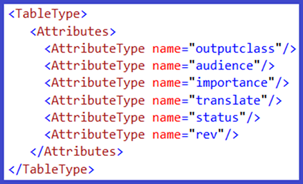
The following shows the serialization of table-level metadata.
