
Enabling Middle Eastern Configuration Settings
To use Right-to-Left languages in QuarkXPress, Middle Eastern Configuration settings need to be enabled in Preferences. QuarkXPress will automatically launch with Middle Eastern Configuration settings if you are using an RTL language OS, such as Arabic or Hebrew.
If you are using a non-RTL language OS like US English, then you need to enable Middle Eastern Configuration in Preferences.
-
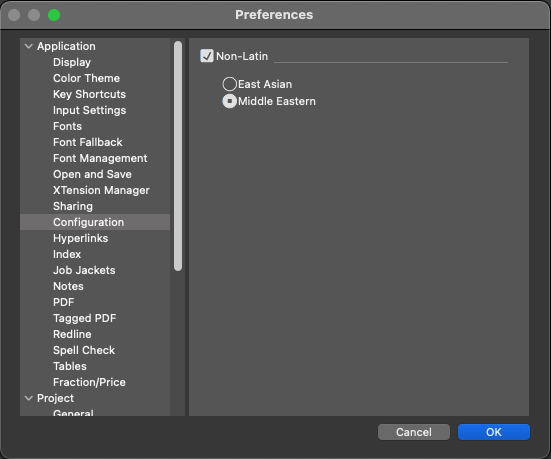
Invoke Preferences > Configuration. In the Configuration pane, check the ‘Non-Latin’ check box.
-
An alert message will be displayed. "Any changes to the configuration settings will require QuarkXPress to quit for the changes to take effect. Do you want to proceed?".
-
Click ‘Yes'.
-
Select the ‘Middle-Eastern’ option
-
Click ‘OK.’ The QuarkXPress application will quit.
-
Relaunch the QuarkXPress application