
General Design Approach
Before you start designing anything, you should know as much as possible about the answers to the questions asked earlier in this document. The features and limitations of the format(s), operating system(s), and device(s) you're targeting may severely limit your choices when it comes to design. If you feel like you already have a good understanding of what you want to create, here are some suggestions on how to approach creating it.
-
Decide upon a general approach. Avoid reinventing the wheel. Try to find an app/reader that looks and works the way you want it to, then think about what it is that you like about it and how you might improve on it.
-
Decide how you want the UI to work. Make sure the UI feels natural. In other words, make sure the design makes affordances for the UI, rather than just imposing an arbitrary UI on every page.
-
Decide what kind of layout you want. A standard way to do an eBook is to simply mimic the experience of reading a physical book, with pages that you can turn. However, this isn't the only way to lay out an eBook. For example, you can present a horizontal line of thumbnails, each of which represents an article, with a scrollable vertical list of page thumbnails underneath each (this is called a "page stack"). In full-page view, a page-stack design lets the user swipe horizontally to browse through articles and vertically to read them.
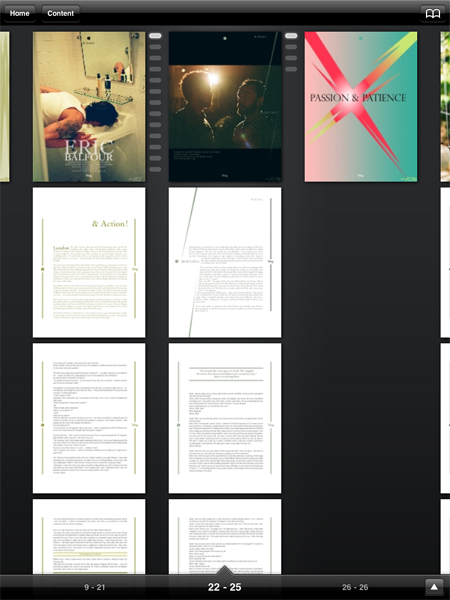
A page stack -
Build and test your templates. If you're templating multiple publications, make sure you think about orientation during the templating phase and do plenty of testing before you start using those templates in production. Test your fonts, colors, styling, and UI on all the devices you plan to publish to. If you're converting content that was designed for another medium, look for problems with very small elements such as narrow and hairline rules, frames, small text, etc.
-
Build your content in an organized way. Decide on naming conventions for styles, colors, objects, and so forth, and stick to them. Consider putting all of your interactive items on their own layer so that you can easily show, hide, and isolate them.
-
Save the reflow view for last. Make sure your visual layout is FINAL before you start working on reflow view.
-
Test, test, test. It's worth a little tedium to avoid embarrassing yourself and having to re-release apps and content. Make sure you test with someone other than the people who designed the content.