
January 25, 2024 — v3.3.0
New features
We are delighted to announce the launch of new features that are designed to elevate your experience with Quark Publishing Platform (QPP) NextGen. These new enhancements are a result of our unwavering commitment to your success and our dedication to continuously improving our platform.
Platform server
-
Introducing OAuth 2.0 for enhanced API security
We are thrilled to announce the integration of OAuth 2.0, a standardized authentication protocol, to our platform. This addition significantly enhances the security and flexibility of API authorization and authentication, providing a robust framework for secure access to our platform's resources.
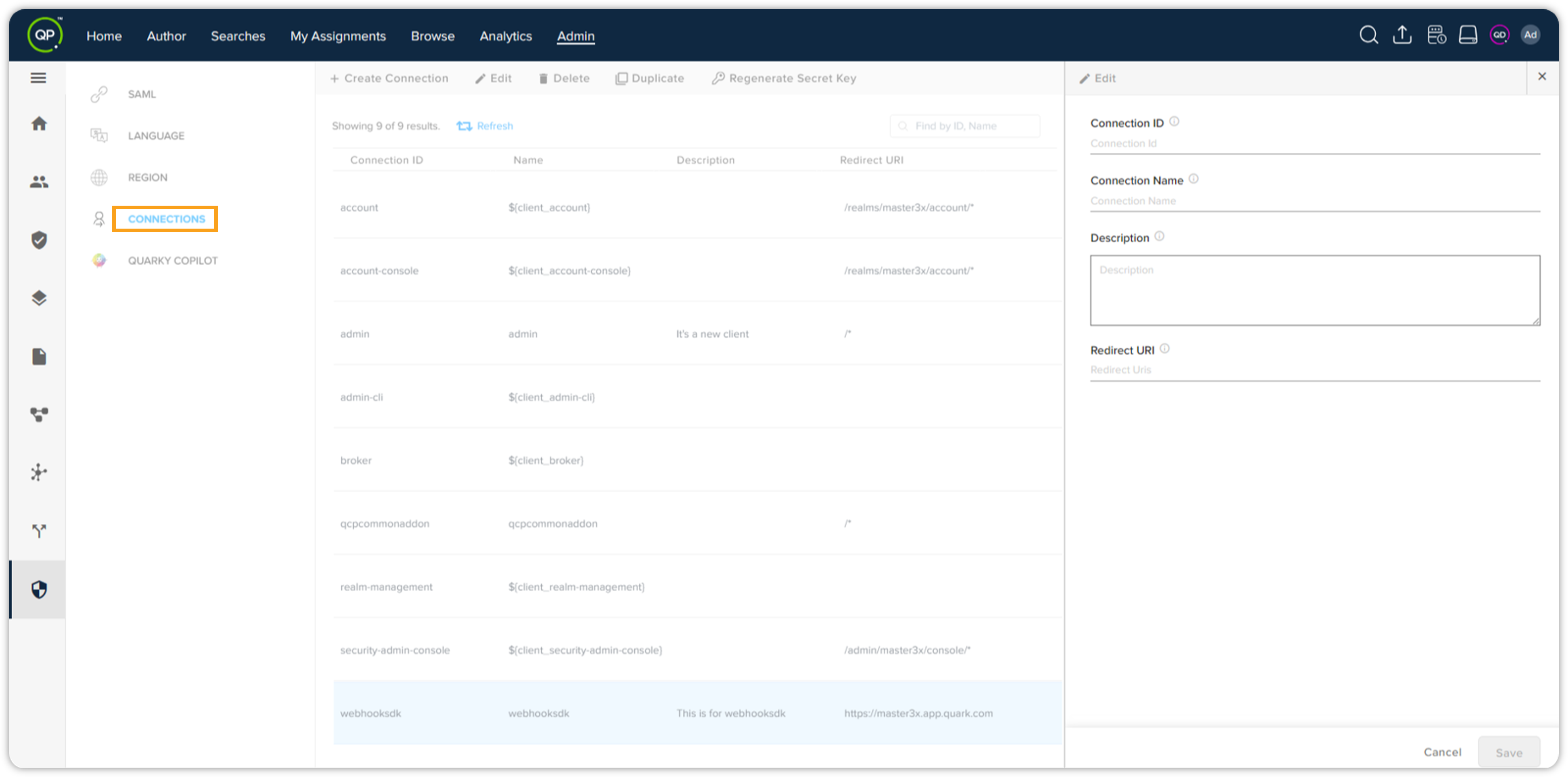
Key aspects of using OAuth 2.0 –
-
Enhanced security: The implementation of OAuth 2.0 reinforces security measures by allowing for delegated access without exposing user credentials, minimizing the risk of unauthorized access.
-
Industry compliance: Compliance with OAuth 2.0 standards ensures compatibility with a wide range of third-party applications and services, facilitating interoperability and enhancing the overall user experience.
Now admin users can easily register a 3rd party application with the QPP-NG system so that the 3rd party application can be integrated with the QPP-NG APIs. No additional implementation will be required anymore. It's a permission-controlled feature, i.e. can only be accessed by the users who have the permission.
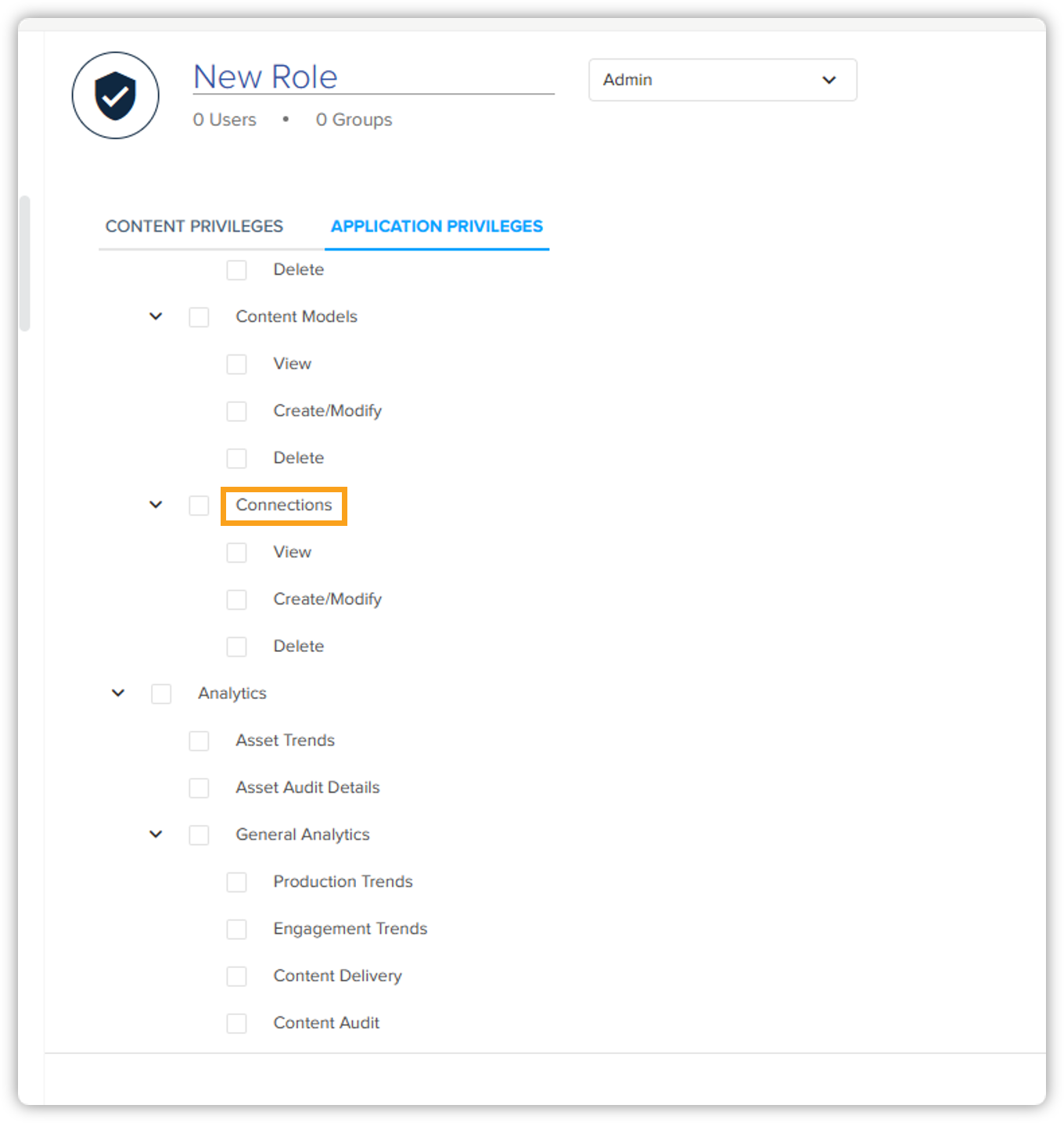
-
-
Introducing password management support
We are introducing password management support in QPP-NG that will help you improve your online privacy and security, reduce the risk of password-related issues, and simplify your login process.
This password security framework includes secure hashing and dynamic password generation, and it enforces password complexity standards. Below are the benefits you get with password management support –
-
Passwords will be securely hashed using approved algorithms to protect sensitive user information
-
Passwords for external systems like LDAP will not be stored in the system, thus keeping the external systems secured
-
Impersonation session logging will be enabled so that audit log entries can clearly indicate an impersonated session and record both the admin user and impersonated user
-
A security measure of minimum password complexity will be enforced so passwords can meet security standards
-
-
Ability to control document visibility
We are excited to announce the rollout of a new privilege, called View Assets, that provides you with the ability to control document visibility based on user role and workflow stage within our platform. This enhancement marks a significant milestone in providing advanced control and security in managing sensitive documents, aligned with specific user roles and workflow progress.
Refer to the scenarios below to have a better understanding –
-
Control your document visibility based on role: Let's say you have a few documents that you don't want to be viewed or accessed by everyone in your organization. To control visibility of your documents, you can assign the visibility permission to any specific role. Upon doing that, users with the appropriate role will only be able to see the documents.
-
Control your document visibility based on workflow stage: Besides role-based visibility, you can also control on which workflow stage you want your documents to be viewed or accessed by which users. This will help you ensure that the right users (part of a role) have access to the right documents at the right time. For example, users associated with Role A can see a document when it is in the Review stage but not users associated with Role B and Role C.
For migrated roles, the View Assets privilege will be enabled by default. For new roles, admin has to define it.
-
-
Contributors and consumers can now view analytics
We are excited to announce the expansion of privileges for contributor and consumer license types, allowing them to access and view analytics within the QPP-NG platform. This development represents a significant advancement in fostering collaborative data-driven decision-making and transparency across our user base. Previously, users with admin and author license types could only view the Analytics tab.
-
Extending consumer privileges
We’ve extended the privileges of the consumer license type. With consumer license type, you can now publish the content and view all the versions of an asset. As a result, you will get more control and visibility over the content you work with.
-
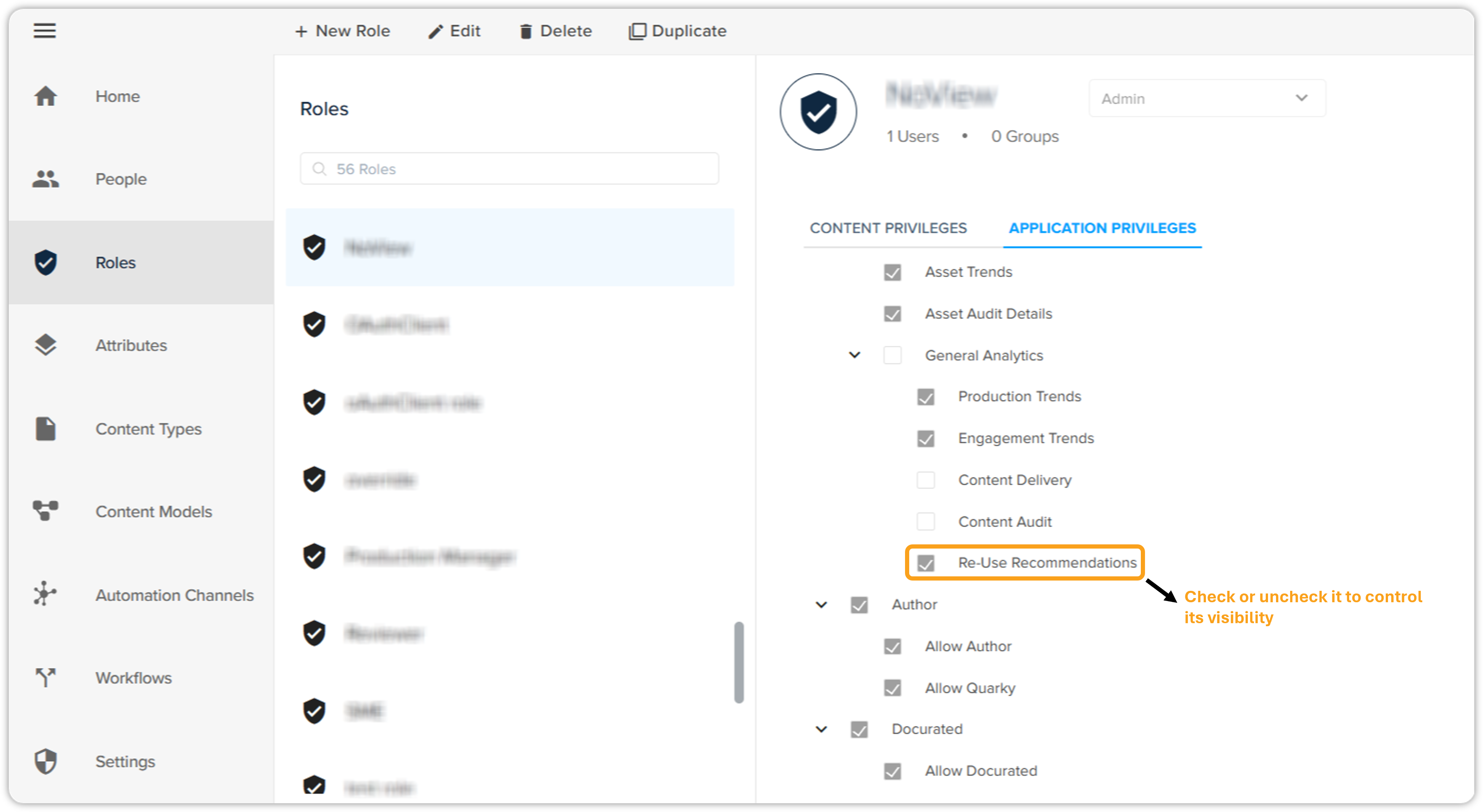
Introducing privilege to control visibility of “Re-Use Recommendations” tab
With the admin license type, you can now manage and control the visibility of the "Re-Use Recommendations" tab. This will allow you to customize the user experience and provide access to analytics data and insights based on the needs of your team or individual users.
Web application
-
Introducing new keyboard shortcuts
We are excited to introduce a set of new keyboard shortcuts, designed to enhance productivity and streamline user interactions with the QPP-NG platform. These new shortcuts are tailored to optimize navigation, improve efficiency, and empower users with additional control over their experience.
The keyboard shortcuts mentioned listed below can be used in Quark Author and Quark XML Author.Below is the list of keyboard shortcuts and their functionalities –
-
Pressing the Tab + Enter keys in the platform will help you focus on an element and its functionality. An element could be anything like a button, tab, or a menu item.
-
Pressing the Shift + Tab keys will help you go back to the previous focusable element.
-
While working on the Quark Author, use these keyboard shortcuts –
-
Pressing the Alt + Shift + E keys will help you get focused on the Quark Author canvas.
-
Pressing the Shift + Alt + Left keys will help you get focused on the Quark Author left pane bar.
-
Pressing the Shift + Alt + Right keys will help you get focused on the Quark Author right pane bar.
-
Pressing the Shift + Alt + Up keys will help you get focused on the Quark Author left tool bar.
-
-
Pressing the Down ↓ arrow key will help you get focus in date picker or time picker.
-
Pressing the Up ↑ and the Down ↓ arrow keys will help you get focus on the dropdown items.
-
Pressing the Space key will help you select items in the multi-select dropdown menu.
-
While on any list, pressing the Tab + Enter keys will remove the selected item(s).
-
While on the dropdown/datepicker/timepicker field, pressing the Tab or Esc key will close that.
-
If there are radio buttons in the dropdown menu or anywhere on the platform, pressing the Space key will select it.
We are committed to providing an intuitive and efficient user interface, and these new keyboard shortcuts represent our dedication to continuously improving your experience.
-
-
Introducing new workflow visualization
We are excited to announce the introduction of a new workflow visualization feature, inspired by BPMN (Business Process Model and Notation), within the QPP-NG platform. This powerful addition empowers users to visually map, analyze, and optimize their business processes with greater clarity and precision.
This new visual representation will make it easier for the key personas like writers, production managers, and content architects, to understand and analyze the flow of activities, decisions, and collaboration points with the content lifecycle.
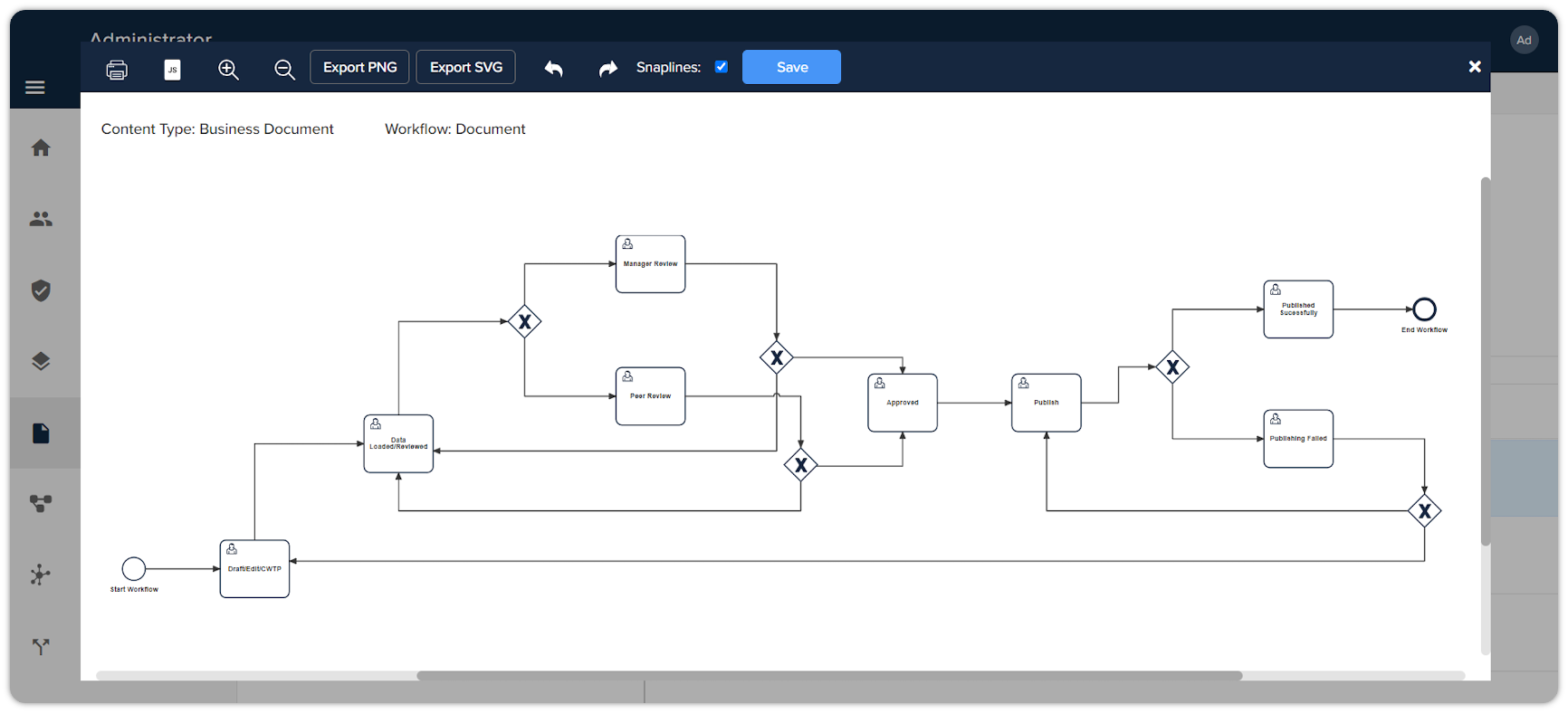
Additionally, content architects will be provided with lightweight visual editing capabilities like editing color, box type, etc. Below are the key benefits of the new workflow visualization –
-
You can view the workflow visualization for the document to understand the content lifecycle.
-
You can see your involvement and contribution to the content workflow.
-
You can see the workflow visualization associated with a content type to understand the content lifecycle.
-
You can edit the appearance of a workflow diagram to enhance its look and feel and make it consumable to end-users.
-
You can view visualize Webhook triggers and events within the diagram.
-
You can perform certain operations on workflow visualization when opened.
It's a permission-controlled feature, i.e. can only be accessed by the users who have the permission.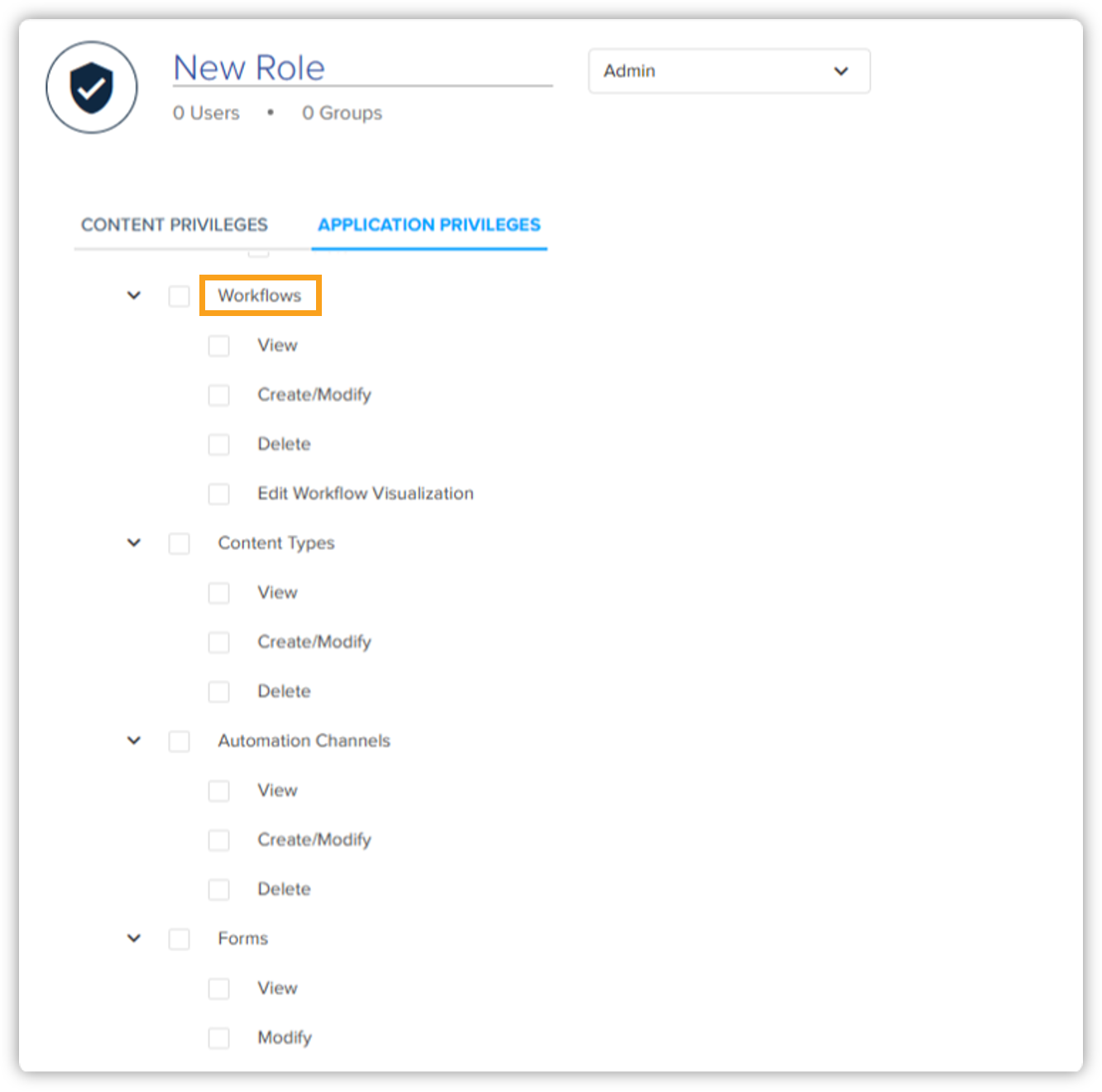
-
-
Introducing self-service data integration from Excel
We are thrilled to unveil our latest update, introducing the much-anticipated self-service data integration feature, which enables users to seamlessly integrate external data sources, such as Excel, directly into the QPP-NG platform. This new functionality represents a significant advancement in data management, providing users with unprecedented flexibility and efficiency in integrating and using Excel data within our platform.
Below are the key features of self-service data integration –
-
Streamlined integration: Users can now effortlessly connect and integrate external data sources, including Excel, into our platform without the need for complex manual processes or third-party tools.
-
Enhanced user empowerment: The self-service data integration feature puts the power in the hands of our users, allowing them to independently manage and integrate external data, freeing up valuable time and resources.
-
Seamless transition: With intuitive and user-friendly interfaces, the integration process is made simple and accessible to all users, regardless of their technical expertise.
-
Enhancements
This feature enhancement reflects our commitment to empowering users with valuable resources and fostering a supportive environment for continuous improvement. The following enhancements have been made to this version of Quark Publishing Platform (QPP) NextGen –
Web application
-
Enhanced error message clarity and comprehensiveness
We have made significant improvements to the error messages within the QPP-NG platform. With our latest update, you can expect error messages to be more clear, comprehensive, and actionable, helping you troubleshoot and resolve issues with greater ease and efficiency. For example, whenever the QPP-NG services will be down, clear and concise information will be provided in the error message so that you can understand the issue and take appropriate actions to resolve it.
-
Ability to create multi string tags
With the author and contributor license types, you can now define and apply the product codes by yourself during document creation, while editing a document, and via workspace. In this way, you can provide more precision and specificity to your content. Previously, only prior created tags from a pre-defined list could be applied.
-
Displaying tips in Quark Copilot loading screen
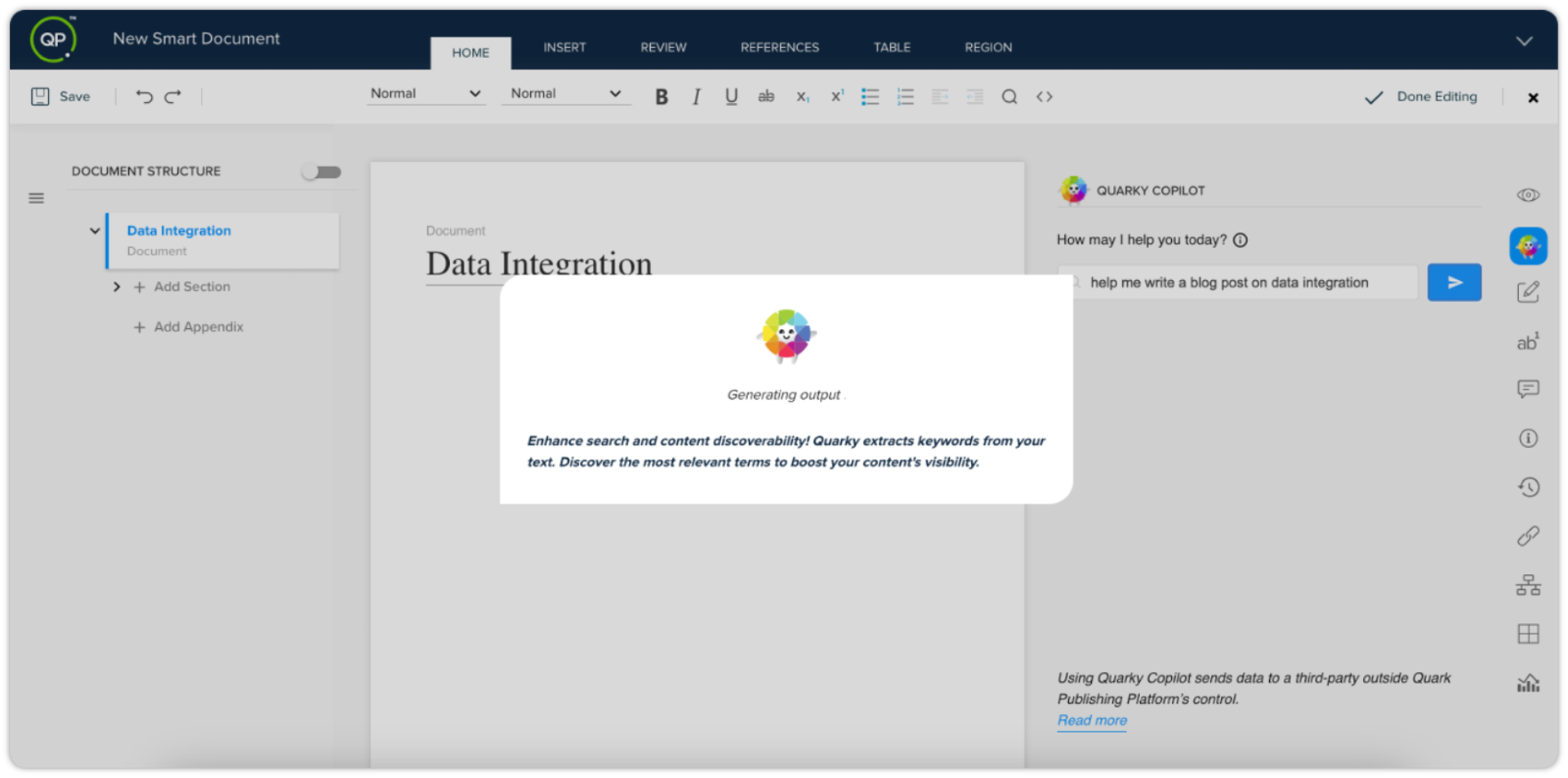
We now display tips in the Quarky Copilot loading screen to increase user engagement and enhance user awareness about Quarky Copilot's various functionalities. The tips on the loading screen will complement the overall user experience by providing useful information or entertainment while you wait for the results to load.
-
Soft return functionality added in Quark Author
We are excited to announce the addition of the soft return (pressing Shift + Enter) functionality in Quark Author. This feature enhancement aims to improve the overall user experience and streamline the content creation process. Previously, we only supported hard return that used to separate paragraphs within a document. With hard return, you had to create a new paragraph every time you wanted to start a new line. But now, as we support soft return, you can easily create a new line without starting a new paragraph.
-
Ability to make marking attributes mandatory
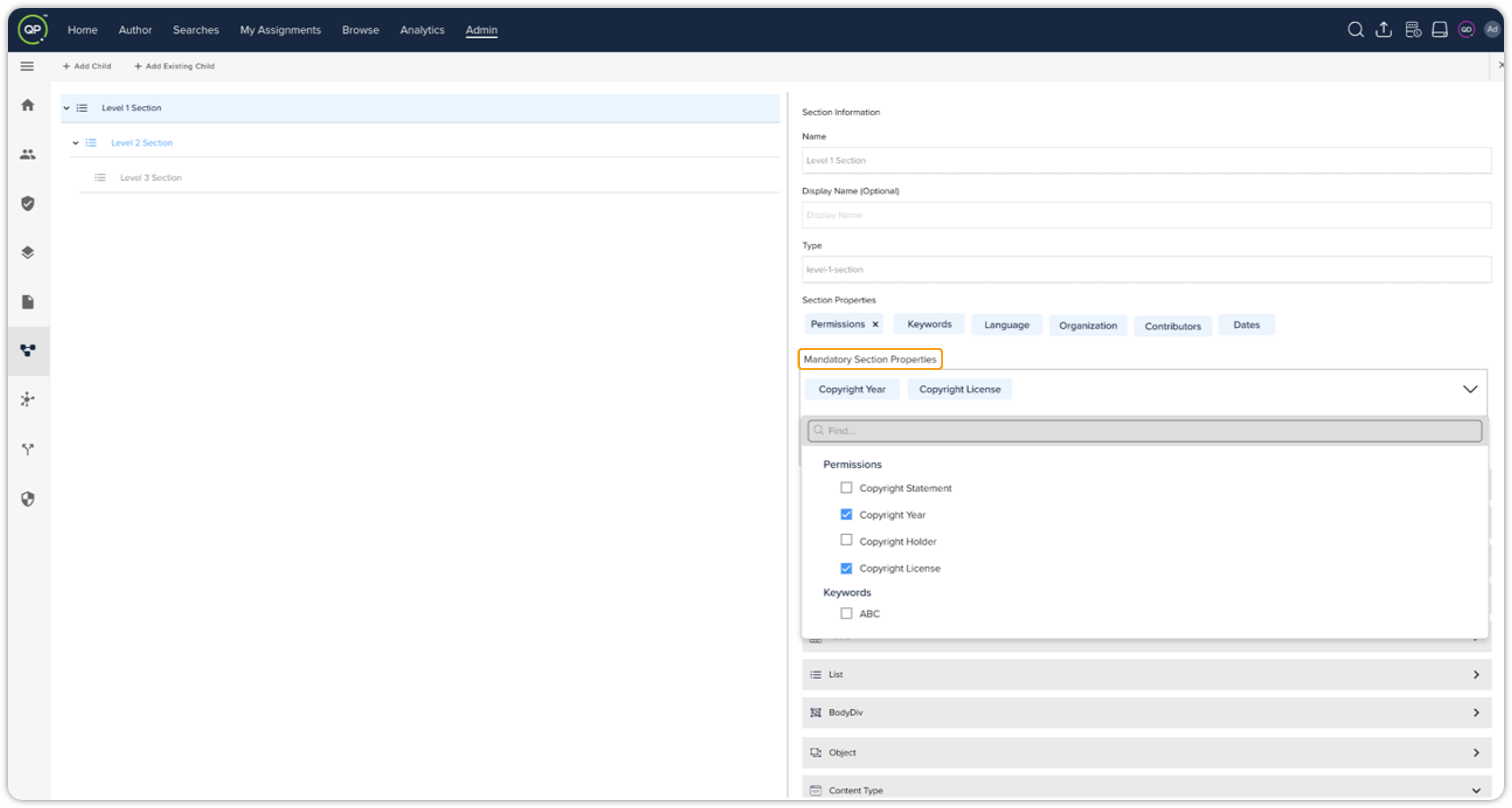
With the admin license type, you can now enforce mandatory attributes in properties of a content model to ensure content creators provide essential information. This will streamline the content creation process and reduce errors and incomplete content submissions, thus ensuring data integrity within the platform.
Platform Server
-
Webhook deactivation will be done automatically
We are excited to introduce the new webhook deactivation feature, designed to provide users with greater control and flexibility over their webhook configurations. With this enhancement, a webhook will be automatically deactivated if it fails three consecutive times. Reactivation can be achieved by submitting an update webhook call for the specific webhook in question.
Only three consecutive failures will be considered for the deactivation process.
Quark XML Author
-
Mandatory attributes validation while creating component & saving document
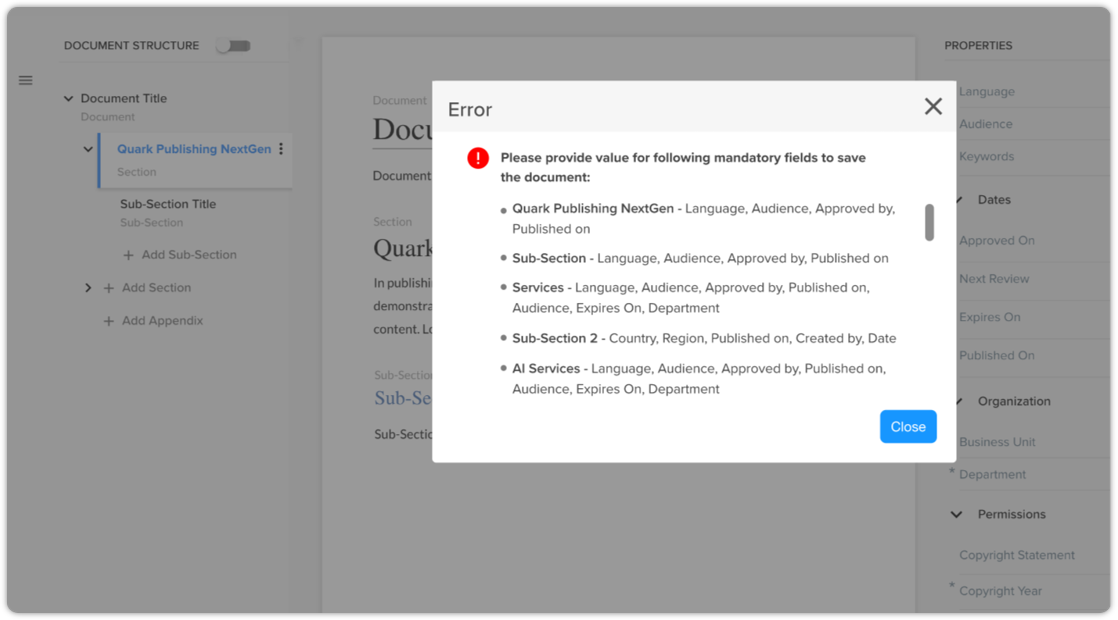
While creating a new component from the inline sections and creating/saving documents in Quark XML Author, we will now perform validation against mandatory attributes outlined in the section content model. Besides validation, we will also provide users with clear and actionable feedback, thus eliminating data inaccuracies, enhancing the user experience, and streamlining the workflow.
The same functionality is also supported by Quark Author while creating and saving a new document.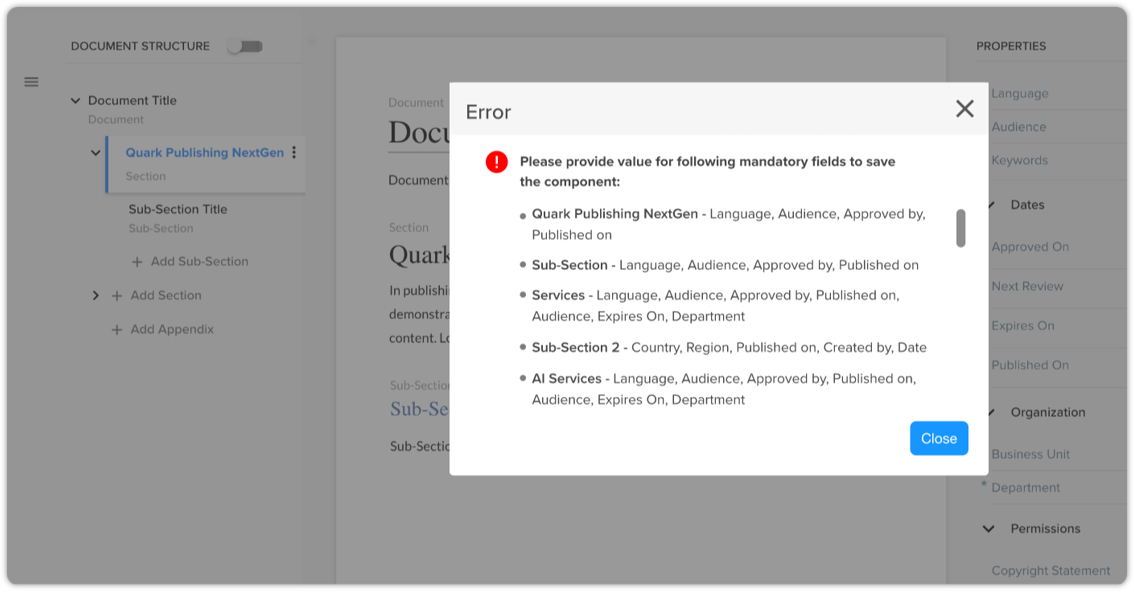
-
Control visibility of sections in navigation pane
In Quark XML Author, you can now control the visibility of sections in the navigation pane. In the config file, you need to define the section name that you want to show in the navigation pane. Only those sections/elements will be visible in the navigation pane defined in the config file, and the rest will be hidden. Below points are well noted –
-
By default, the document Title will always be shown in the navigation pane, irrespective of whether it's defined in the config file or not.
-
If the element configured for the display title is not available in the document, then the section's element name will be shown in the navigation pane.
-
DOCX Converter
We are excited to announce the release of version 3.0.0 of our DOCX Converter tool. This upgrade includes the following enhancements and improvements –
-
Validation of XML after conversion
We have added support for validating XML files during conversion. The DOCX Converter tool will now validate the XMLs against the selected content-type schema after the conversion process.
-
In case of check-in preference QPP-NG, only valid documents will be checked-in on the server. If the schema of converted XML file is not valid, the check-in process will fail for that document.
-
In case of check-in preference local, invalid documents will be saved in a separate folder, named Invalid Documents.
-
In both the check-in preferences, a Validation Summary will be logged on console and log file.
-
Once the conversion process is completed, a validation summary will display the count of valid and invalid documents along with their names.
-
-
The log will show whether the converted content is valid or not as per the selected content model schema.
-
In case of invalid content, an exception message will be logged in the UI and the detailed message will be logged in the log file.
-
-
-
Enhanced logging details
The logging mechanism has been upgraded to provide more comprehensive and detailed information during the conversion process. You can now access detailed logs that include timestamps, file-specific information, and conversion statuses.
-
Some known data loss fixes during conversion
We have fixed some reported data loss issues that were identified during conversion. This improvement represents our steadfast commitment to data integrity and user satisfaction. Currently, only unsupported content like shapes, citations, math equations, OLE (Object Linking & Embedding), embedded images, and clip arts will not be converted.
-
Automatic log file rolling
The DOCX Converter tool will now monitor the size of the migration log file and initiate a rolling process when it reaches 1 MB, ensuring that historical logs are preserved while maintaining an optimal file size for easier management and analysis. This enhancement will streamline the migration process and provide users with a more reliable and efficient logging mechanism.
Resolved issues
The following issue has been resolved in this version of QPP-NextGen –
Web application
-
Previously, while performing a search based on the Status field with asset details tab, the QPP-NG platform used to overlap the workflow name and the available value. This was happening due to an internal issue that has been successfully fixed. Now, the text displayed anywhere on the platform will not be overlapped.
-
In Quark Author, the order of meta selected for multiselect meta will now be retained in the order you will be selecting the values.
-
The search parameters will now remain the same as saved while adding the conditional parameters.
Quark XML Author
-
Now, in Quark XML Author for Microsoft Word, the emphasis cannot be removed from a read-only paragraph within a document.
-
In QPP-NG, the Smart Document pane will now display the same comprehensive information for version 0.2 as it is played for version 0.1. This ensures a seamless transition for users and maintains consistency in accessing and utilizing document information across different versions.
-
Previously, we were having an issue due to which Quark XML Author was unexpectedly launching Save As dialog to save XML files on system whilst user was performing the "save to server" action. We have successfully fixed that issue.