
Color Groups
Keeping a brand's colors together just got easy. QuarkXPress 2027 introduces Color Groups: organize your swatches into named groups right in the Colors palette, and find the color you need in seconds.
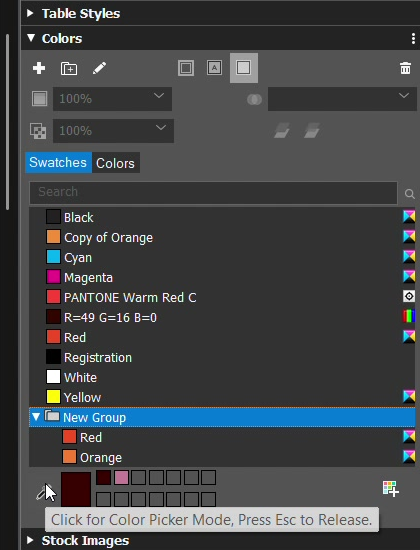
Use the new New group button in the Colors palette, then create colors inside it or drag existing colors in. Rename, edit and duplicate groups and colors, and undo any change. Process colors only need unique names within their group, so "Red" can live in more than one group. Spot colors keep unique names across the document, so separations stay correct. Empty groups are kept with your project, ready for later.
Your groups appear everywhere you choose a color: style sheets, footnotes, Find/Change, Item Styles and the Colors dialog. When you Append colors from another project, you can bring in a single color or a whole group, and appended colors keep their group. Groups come in from InDesign through IDML import and go back out through IDML export. When you import a Photoshop file with spot channels, its spot colors arrive in a group named after the file.
Tip: select a group, then Option-click (Mac) or Alt-click (Windows) with the color picker to add a sampled color straight into that group.