
Design Document: Smart Elements API (Regions and Tables)
Asset Creation from Asset JSON
Create Smart Content API
This API endpoint generates a Smart XML from the provided Smart JSON object. Depending on the specified type, it creates a document of that type (region, table or document). Additionally, based on a provided flag, the endpoint either:
-
Returns the generated XML directly, or
-
Checks in the document to the server and returns the asset ID.
HTTP Method
POST
Endpoint
/document/api/v5/createSmartContent
Description
The endpoint processes the input Smart JSON payload and converts it into a valid Smart XML document.
This XML can represent different types of assets depending on the type parameter.
If the checkIn flag is true, the generated XML will be automatically checked into the repository, and the corresponding asset ID will be returned.
Request Parameters
|
Name |
Type |
Required |
Default |
Description |
|
type |
String |
Yes |
— |
Specifies the type of asset to generate (e.g., region, table, document |
|
checkIn |
Boolean |
No |
true |
If true, the generated XML will be checked into the document server and the asset ID will be returned. If false, the XML string will be returned. |
Request Body: form-data
smartJson (application/json) — asset json

General JSON Structure
It's recommended to initially use the UI to create sample assets for any content type (based on any content model). After that, you can leverage the Asset JSON Retrieval APIs to fetch and analyze the JSON structure for better understanding. In addition, you can refer to the following documentation for further guidance. (Example based on Smart Document Content Type and Model).
Specifying server attributes

Under the attributes, server attributes can be specified. For example,
-
Collection and Content Type are mandatory
-
Name is not required. If Name is not specified, then title string is picked as asset name.
Auto Bursting/ Componentization of Section
skipAutoburstingWhenNotMatched value as false will create components of section inside document. For true value, it'll create inline section.
This setting is only applicable for sections and not tables or regions when specified in the JSON.

Specifying Document Meta
Meta Types: attributes, groups, collections

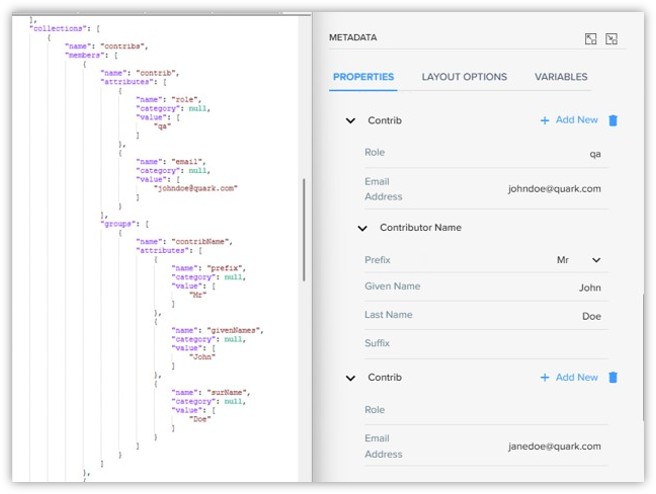
More Examples
Specifying Document and nested section name
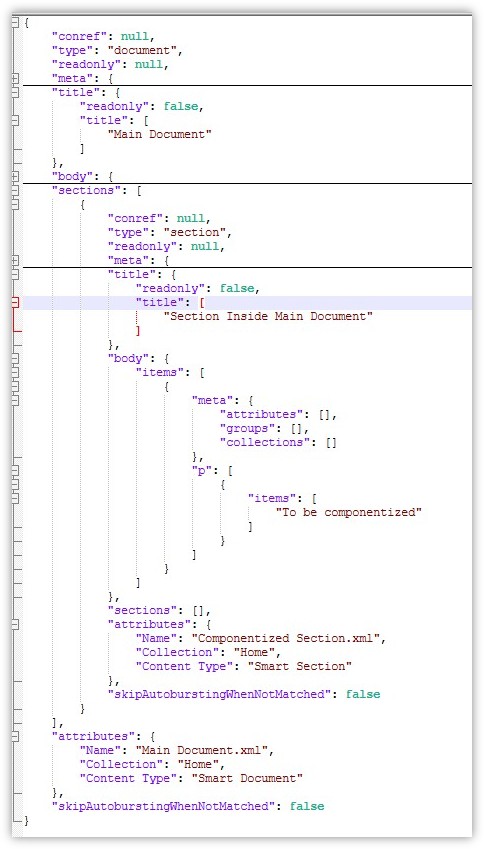
Smart Table JSON

Asset JSON Retrieval APIs
The Asset JSON Retrieval API provides endpoints to fetch asset JSON templates from the document service. The JSON template for the asset is fetched without the server attributes of the document.
Assets can be retrieved either by their unique ID or by their path, along with optional versioning and branch parameters.
The API supports returning different template types (e.g. Document, Region, Table) based on the provided asset type.
Endpoints Summary
|
Endpoint |
Method |
Description |
|
/assetJsonByIdAndType |
GET |
Retrieve asset JSON template by asset ID and type |
|
/assetJsonByPathAndType |
GET |
Retrieve asset JSON template by path and type |
GET /assetJsonByIdAndType
Fetches an asset JSON template using its unique asset ID and type, with optional version and branch identifiers.
HTTP Method
GET
Endpoint
/document/api/v5/assetJsonByIdAndType
Query Parameters
|
Name |
Type |
Required |
Default |
Description |
|
assetId |
Long |
Yes |
— |
Unique identifier of the asset |
|
branchId |
Long |
No |
0 |
The ID of the branch where the asset resides |
|
majorVersion |
Long |
No |
0 |
The major version of the asset (0 means latest version of an asset) |
|
minorVersion |
Long |
No |
0 |
The minor version of the asset (0 means latest version of an asset) |
|
type |
String |
Yes |
— |
The type of asset (document, region, table) |
GET /assetJsonByPathAndType
Fetches an asset JSON template using its path and type, with optional branch and version parameters.
HTTP Method
GET
Endpoint
/document/api/v5/assetJsonByIdAndType
Query Parameters
|
Name |
Type |
Required |
Default |
Description |
|
assetPath |
String |
Yes |
— |
Path of the asset within the repository |
|
branchId |
Long |
No |
0 |
The ID of the branch where the asset resides |
|
majorVersion |
Long |
No |
0 |
The major version of the asset (0 means the latest version of an asset) |
|
minorVersion |
Long |
No |
0 |
The minor version of the asset (0 means the latest version of an asset) |
|
type |
String |
Yes |
— |
The type of asset (document, region, table) |